
ESP8266 WiFi-Controlled Robot with L298N Motor Driver and LED/Buzzer Indicators
View and Edit Project In Cirkit Designer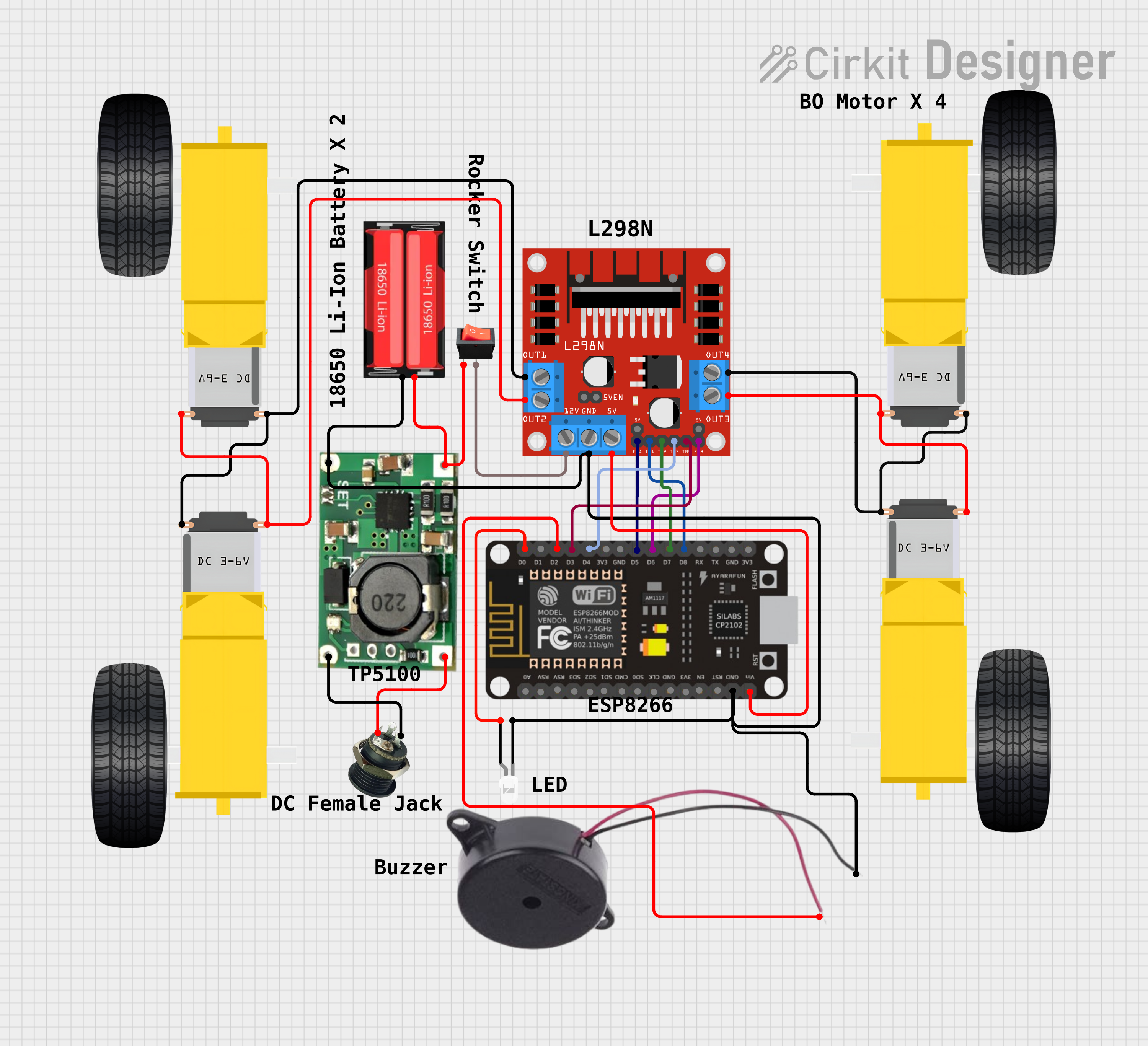
Circuit Documentation
Summary
This circuit is designed to control a four-wheeled robot with two DC gearmotors for each side (left and right), an ESP8266 NodeMCU microcontroller for logic control, an L298N DC motor driver for motor control, a buzzer for audio signaling, an LED for visual signaling, a TP5100 module for battery charging, and a rocker switch for power control. The ESP8266 NodeMCU is programmed to receive commands via a WiFi connection to drive the motors, control the LED, and activate the buzzer.
Component List
Gearmotor DC Wheels (Right and Left)
- Description: DC gearmotors used to drive the wheels of the robot.
- Pins: PIN1, PIN2
L298N DC Motor Driver
- Description: A motor driver module that controls the direction and speed of the DC motors.
- Pins: OUT1, OUT2, 12V, GND, 5V, OUT3, OUT4, 5V-ENA-JMP-I, 5V-ENA-JMP-O, +5V-J1, +5V-J2, ENA, IN1, IN2, IN3, IN4, ENB
18650 Li-Ion Battery
- Description: A rechargeable lithium-ion battery that provides power to the circuit.
- Pins: Positive, Negative
DC Female Jack
- Description: A connector for supplying power to the circuit from an external source.
- Pins: Positive, Negative
Rocker Switch
- Description: A switch used to control the power supply to the circuit.
- Pins: Output, Input
LED: Two Pin (White)
- Description: A white LED used for visual signaling.
- Pins: Cathode, Anode
ESP8266 NodeMCU
- Description: A microcontroller with WiFi capability used for controlling the robot.
- Pins: D0, D1, D2, D3, D4, 3V3, GND, D5, D6, D7, D8, RX, TX, A0, RSV, SD3, SD2, SD1, CMD, SD0, CLK, EN, RST, VIN
Buzzer
- Description: An audio signaling device.
- Pins: POSITIVE, NEGATIVE
TP5100
- Description: A battery charging module for the 18650 Li-Ion battery.
- Pins: B-, B+, IN-, IN+
Wiring Details
Gearmotor DC Wheels (Right and Left)
- PIN1: Connected to L298N motor driver OUT2 or OUT3
- PIN2: Connected to L298N motor driver OUT1 or OUT4
L298N DC Motor Driver
- OUT1, OUT2, OUT3, OUT4: Connected to Gearmotor DC Wheels
- 12V: Connected to the rocker switch output
- GND: Common ground with TP5100 B-, ESP8266 NodeMCU GND, Buzzer NEGATIVE, LED cathode, and 18650 Li-Ion Negative
- 5V: Connected to ESP8266 NodeMCU VIN
- ENA, ENB: Controlled by ESP8266 NodeMCU pins D5 and D6
- IN1, IN2, IN3, IN4: Controlled by ESP8266 NodeMCU pins D8, D7, D4, and D3
18650 Li-Ion Battery
- Positive: Connected to TP5100 B+ and rocker switch input
- Negative: Common ground
DC Female Jack
- Positive: Connected to TP5100 IN+
- Negative: Connected to TP5100 IN-
Rocker Switch
- Output: Connected to L298N motor driver 12V
- Input: Connected to 18650 Li-Ion Positive
LED: Two Pin (White)
- Anode: Controlled by ESP8266 NodeMCU pin D0
- Cathode: Common ground
ESP8266 NodeMCU
- D0, D1, D2, D3, D4, D5, D6, D7, D8: Control signals for LED, Buzzer, and L298N motor driver
- GND: Common ground
- VIN: Powered by L298N motor driver 5V
Buzzer
- POSITIVE: Controlled by ESP8266 NodeMCU pin D2
- NEGATIVE: Common ground
TP5100
- B-: Common ground
- B+: Connected to 18650 Li-Ion Positive
- IN-: Connected to DC Female Jack Negative
- IN+: Connected to DC Female Jack Positive
Documented Code
#define ENA   14          // Enable/speed motors Right        GPIO14(D5)
#define ENB   12          // Enable/speed motors Left         GPIO12(D6)
#define IN_1  15          // L298N in1 motors Right           GPIO15(D8)
#define IN_2  13          // L298N in2 motors Right           GPIO13(D7)
#define IN_3  2           // L298N in3 motors Left            GPIO2(D4)
#define IN_4  0           // L298N in4 motors Left            GPIO0(D3)

#include <ESP8266WiFi.h>
#include <WiFiClient.h>
#include <ESP8266WebServer.h>

String command;             // String to store app command state.
int speedCar = 800;         // Speed range between 400 - 1023.
int speed_Coeff = 3;        // Speed coefficient for turning.

const int beepHornPin = D1; // Buzzer pin.
const int ledPin = D2;      // LED pin.

const char* ssid = "ESP8266_Wifi_Car"; // WiFi SSID.
const char* pwd = "test@123";          // WiFi Password.
ESP8266WebServer server(80);           // Web server on port 80.

void setup() {
  // Motor control pins setup
  pinMode(ENA, OUTPUT);
  pinMode(ENB, OUTPUT);
  pinMode(IN_1, OUTPUT);
  pinMode(IN_2, OUTPUT);
  pinMode(IN_3, OUTPUT);
  pinMode(IN_4, OUTPUT);

  // Buzzer and LED pins setup
  pinMode(beepHornPin, OUTPUT);
  pinMode(ledPin, OUTPUT);

  Serial.begin(115200); // Start serial communication at 115200 baud rate.

  // Connecting to WiFi
  WiFi.mode(WIFI_AP); // Set WiFi to AP mode.
  WiFi.softAP(ssid);  // Start WiFi access point with SSID and password.

  IPAddress myIP = WiFi.softAPIP(); // Get IP address of the ESP8266.
  Serial.print("192.168.4.1 ");     // Print the IP address to the serial monitor.
  Serial.println(myIP);

  // Starting the web server
  server.on("/", HTTP_handleRoot); // Define root URL handling.
  server.onNotFound(HTTP_handleRoot); // Handle not found URLs.
  server.begin(); // Start the server.
}

// Function definitions for robot movement, horn, and LED control omitted for brevity.

void loop() {
  server.handleClient(); // Handle incoming client requests.

  // Process command from the web server.
  command = server.arg("State");
  // Movement commands
  if (command == "F") goAhead();
  else if (command == "B") goBack();
  else if (command == "L") goLeft();
  else if (command == "R") goRight();
  else if (command == "I") goAheadRight();
  else if (command == "G") goAheadLeft();
  else if (command == "J") goBackRight();
  else if (command == "H") goBackLeft();
  // Horn and LED commands
  else if (command == "V") beepHorn();
  else if (command == "W") ledOn();
  else if (command == "w") ledOff();
  // Speed adjustment commands
  else if (command == "0") speedCar = 400;
  // ... other speed settings omitted for brevity.
  else if (command == "9") speedCar = 1023;
  else if (command == "S") stopRobot(); // Stop the robot.
}

void HTTP_handleRoot(void) {
  if(server.hasArg("State")){
    Serial.println(server.arg("State")); // Print the command to the serial monitor.
  }
  server.send(200, "text/html", ""); // Send response to the client.
  delay(1); // Short delay.
}
Note: The full implementation of the movement functions (goAhead, goBack, goLeft, goRight, etc.), horn (beepHorn), and LED control (ledOn, ledOff) are not included in this document for brevity. These functions are responsible for controlling the GPIO pins according to the commands received from the web server, thus driving the motors, activating the buzzer, and toggling the LED.