
Circuit Documentation
Summary
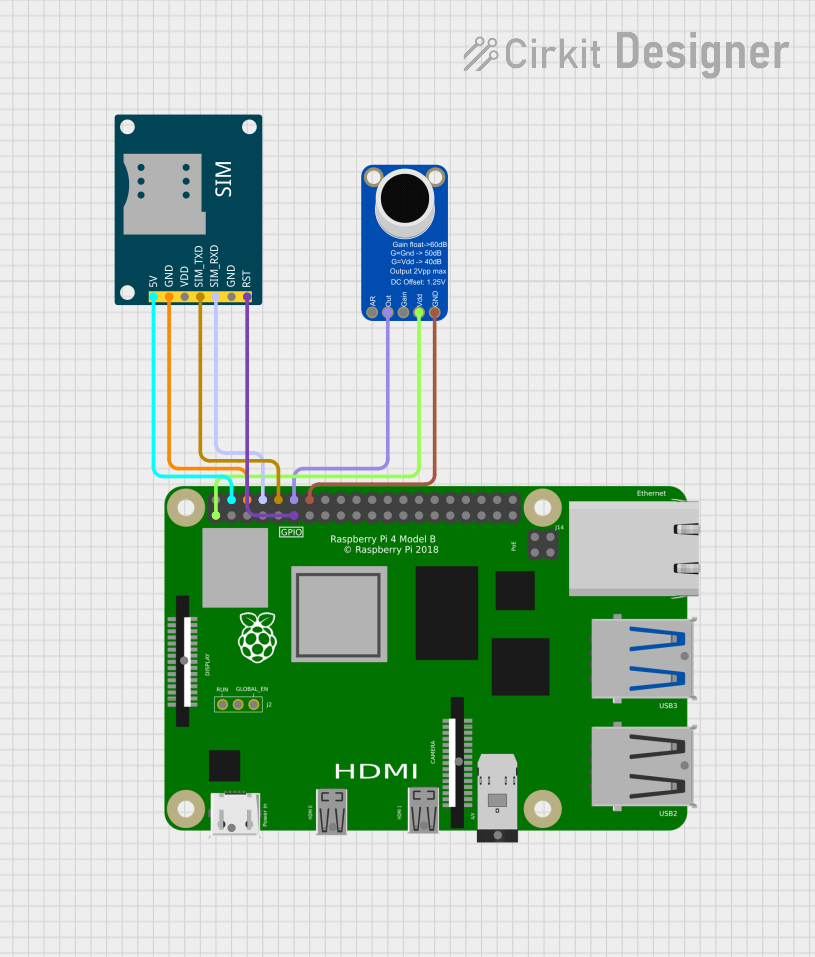
This circuit integrates a Raspberry Pi 4B with a SIM800L GSM Module and an Adafruit MAX9814 Electret Microphone Amplifier. The Raspberry Pi 4B serves as the central processing unit, managing communication with the SIM800L GSM Module for cellular connectivity and processing audio signals from the Adafruit MAX9814 Microphone Amplifier. The SIM800L GSM Module enables the circuit to perform telecommunication tasks such as making calls, while the Adafruit MAX9814 Amplifier is used to capture and amplify audio signals, potentially for voice recognition or audio recording purposes.
Component List
Raspberry Pi 4B
- Description: A powerful microcomputer with multiple GPIO pins for interfacing with various peripherals and modules.
- Purpose: Acts as the central controller for the circuit, running the embedded code and interfacing with the GSM module and microphone amplifier.
SIM800L GSM Module
- Description: A compact GSM/GPRS module that allows for cellular communication, including SMS and voice calls.
- Purpose: Provides cellular connectivity to the circuit, enabling it to send/receive messages and make calls.
Adafruit MAX9814 Electret Microphone Amplifier
- Description: An automatic gain control (AGC) microphone amplifier designed for use with electret microphones.
- Purpose: Captures and amplifies audio signals for processing by the Raspberry Pi.
Wiring Details
Raspberry Pi 4B
- 3V3: Powers the Adafruit MAX9814 Electret Microphone Amplifier.
- 5V: Powers the SIM800L GSM Module.
- GND: Common ground for the circuit.
- GPIO14: Receives serial data from the SIM800L GSM Module (SIM_RXD).
- GPIO15: Transmits serial data to the SIM800L GSM Module (SIM_TXD).
- GPIO17: Connected to the reset pin (RST) of the SIM800L GSM Module.
- GPIO18: Receives the amplified audio output from the Adafruit MAX9814 Electret Microphone Amplifier.
SIM800L GSM Module
- 5V: Powered by the Raspberry Pi 4B.
- GND: Common ground with the Raspberry Pi 4B.
- SIM_TXD: Transmits serial data to the Raspberry Pi 4B (GPIO15).
- SIM_RXD: Receives serial data from the Raspberry Pi 4B (GPIO14).
- RST: Connected to the Raspberry Pi 4B for reset functionality (GPIO17).
Adafruit MAX9814 Electret Microphone Amplifier
- VDD: Powered by the 3V3 pin of the Raspberry Pi 4B.
- GND: Common ground with the Raspberry Pi 4B.
- OUTPUT: Sends the amplified audio signal to the Raspberry Pi 4B (GPIO18).
Documented Code
The embedded code is written for the Raspberry Pi 4B and is responsible for initializing serial communication with the SIM800L GSM Module, making a call, and simulating the detection of a "help" command, which could be replaced with actual speech recognition functionality.
#include <iostream>
#include <wiringPi.h>
#include <wiringSerial.h>
#include <unistd.h>   // For sleep function
#include <string.h>

#define SERIAL_PORT "/dev/serial0"  // Set the correct serial port for SIM800L
#define BAUD_RATE 9600

int sim800l;

// Function to initialize serial communication with SIM800L
void initializeSIM800L() {
    sim800l = serialOpen(SERIAL_PORT, BAUD_RATE);
    if (sim800l == -1) {
        std::cerr << "Failed to open serial port." << std::endl;
        exit(1);
    }
    std::cout << "Serial communication with SIM800L initialized." << std::endl;
}

// Function to make a call using SIM800L
void makeCall(const char* phoneNumber) {
    std::string command = "ATD" + std::string(phoneNumber) + ";\r\n";
    serialPuts(sim800l, command.c_str());
    serialFlush(sim800l); // Ensure command is sent immediately
    std::cout << "Calling: " << phoneNumber << std::endl;
    sleep(2);  // Wait a bit for call to go through
}

// Function to simulate listening for "help" command
bool listenForHelp() {
    // Placeholder for actual speech recognition function
    // You would replace this with a call to a speech recognition API or library
    // Here, we are simulating detection by manually returning true
    std::string input;
    std::cout << "Type 'help' to simulate the keyword detection (or anything else to skip): ";
    std::getline(std::cin, input);

    if (input == "help") {
        return true;
    }
    return false;
}

// Main function
int main() {
    if (wiringPiSetup() == -1) {
        std::cerr << "Failed to initialize WiringPi." << std::endl;
        return 1;
    }

    initializeSIM800L();

    while (true) {
        std::cout << "Listening for 'help'..." << std::endl;
        if (listenForHelp()) {
            std::cout << "Keyword 'help' detected!" << std::endl;
            makeCall("8979300633");  // Replace with the phone number to call
        }
        sleep(1);  // Wait before listening again
    }

    serialClose(sim800l);  // Close serial connection before exiting
    return 0;
}
This code is designed to be compiled and run on the Raspberry Pi 4B. It uses the WiringPi library for GPIO pin control and serial communication. The initializeSIM800L function sets up the serial connection with the SIM800L GSM Module, makeCall sends AT commands to the module to initiate a phone call, and listenForHelp is a placeholder for a function that would listen for a specific audio command. The main function contains an infinite loop that continuously checks for the "help" command and initiates a call if detected.