
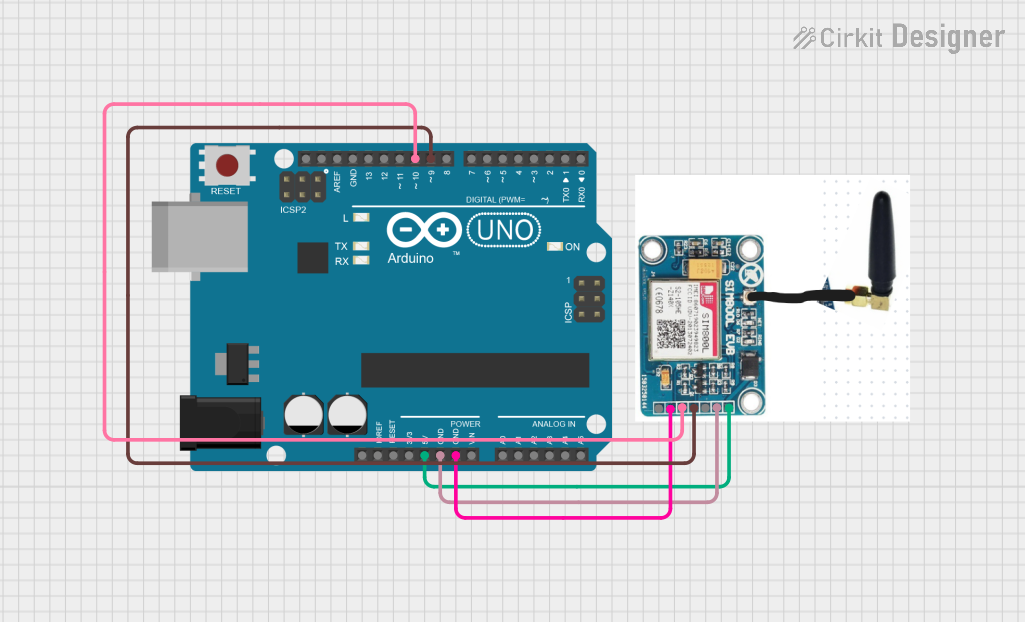
Circuit Documentation
Summary
This circuit involves an Arduino UNO microcontroller interfacing with a SIM 800L V2 GSM module. The Arduino UNO is used to send and receive SMS messages through the SIM 800L module. The communication between the Arduino and the SIM module is handled via software serial communication.
Component List
Arduino UNO
- Description: A microcontroller board based on the ATmega328P.
- Pins: UNUSED, IOREF, Reset, 3.3V, 5V, GND, Vin, A0, A1, A2, A3, A4, A5, SCL, SDA, AREF, D13, D12, D11, D10, D9, D8, D7, D6, D5, D4, D3, D2, D1, D0
SIM 800L V2
- Description: A GSM module used for sending and receiving SMS messages.
- Pins: RST, SIM_RXD, GND, SIM_TXD, VDD, 5V
Wiring Details
Arduino UNO
- 5V: Connected to SIM 800L V2 5V
- GND: Connected to SIM 800L V2 GND
- D10: Connected to SIM 800L V2 SIM_RXD
- D9: Connected to SIM 800L V2 SIM_TXD
SIM 800L V2
- 5V: Connected to Arduino UNO 5V
- GND: Connected to Arduino UNO GND
- SIM_RXD: Connected to Arduino UNO D10
- SIM_TXD: Connected to Arduino UNO D9
Code Documentation
Arduino UNO Code
sketch.ino
#include <SoftwareSerial.h>

SoftwareSerial Sim(9, 10);

void setup()
{
  Sim.begin(9600);                            // Setting the baud rate of Sim Module
  Serial.begin(9600);                         // Setting the baud rate of Serial Monitor (Arduino)
  delay(100);
}

void loop()
{
  if (Serial.available()>0)
    switch(Serial.read())                      // Read data given in Serial Monitor
    {
      case 's':                                 // If data is 's', goto SendMessage() function
        SendMessage();
        break;
      case 'r':                                 // If data is 'r', goto ReceiveMessage() function
        ReceiveMessage();
        break;
    }

  if (Sim.available()>0)
    Serial.write(Sim.read());                  // If SIM module sends messages, print it to Serial monitor
}

void SendMessage()
{
  Sim.println("AT+CMGF=1");                    // Sets the Sim Module in send SMS mode
  delay(1000);                                 // Delay of 1 second
  Sim.println("AT+CMGS=\"+639989316031\"\r");  // Replace x with mobile number
  delay(1000);                                 // Delay of 1 second
  Sim.println("I am SMS from Sim Module");     // Type in the SMS text you want to send
  delay(100);                                  // Delay of 0.1 second
  Sim.println((char)26);                       // ASCII code of CTRL+Z (to exit out)
  delay(1000);                                 // Delay of 1 second
}

void ReceiveMessage()
{
  Sim.println("AT+CNMI=2,2,0,0,0");            // AT Command to receive a live SMS
  delay(1000);                                 // Delay of 1 second
}
documentation.txt
#include <SoftwareSerial.h>

SoftwareSerial Sim(9, 10);

void setup()
{
  Sim.begin(9600);                            // Setting the baud rate of Sim Module
  Serial.begin(9600);                         // Setting the baud rate of Serial Monitor (Arduino)
  delay(100);
}

void loop()
{
  if (Serial.available()>0)
    switch(Serial.read())                      // Read data given in Serial Monitor
    {
      case 's':                                 // If data is 's', goto SendMessage() function
        SendMessage();
        break;
      case 'r':                                 // If data is 'r', goto ReceiveMessage() function
        ReceiveMessage();
        break;
    }

  if (Sim.available()>0)
    Serial.write(Sim.read());                  // If SIM module sends messages, print it to Serial monitor
}

void SendMessage()
{
  Sim.println("AT+CMGF=1");                    // Sets the Sim Module in send SMS mode
  delay(1000);                                 // Delay of 1 second
  Sim.println("AT+CMGS=\"+639989316031\"\r");  // Replace x with mobile number
  delay(1000);                                 // Delay of 1 second
  Sim.println("I am SMS from Sim Module");     // Type in the SMS text you want to send
  delay(100);                                  // Delay of 0.1 second
  Sim.println((char)26);                       // ASCII code of CTRL+Z (to exit out)
  delay(1000);                                 // Delay of 1 second
}

void ReceiveMessage()
{
  Sim.println("AT+CNMI=2,2,0,0,0");            // AT Command to receive a live SMS
  delay(1000);                                 // Delay of 1 second
}