
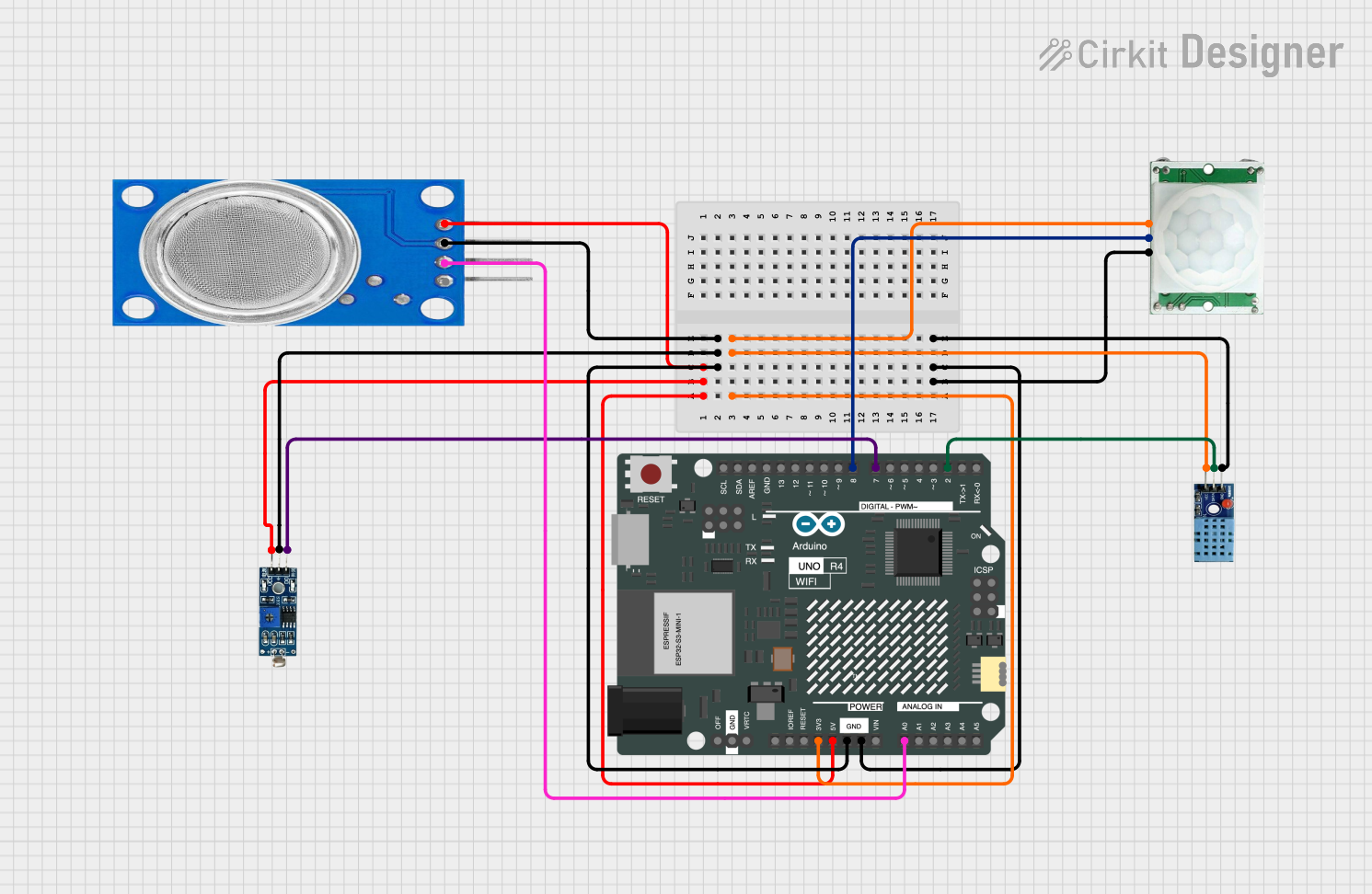
Circuit Documentation
Summary
This circuit is designed to read data from several sensors and send the data to a Firebase Realtime Database using an Arduino UNO R4 WiFi. The sensors included in this circuit are a DHT11 (temperature and humidity), MQ135 (air quality), LDR (light intensity), and a PIR (motion detection) sensor. The Arduino also connects to a Wi-Fi network and synchronizes time using NTP (Network Time Protocol).
Component List
Arduino UNO R4 WiFi
- Description: Microcontroller board with Wi-Fi capabilities.
- Pins: OFF, GND, VRTC, IIC0_SCL, IIC0_SDA, 3V3, GPIO 41, GPIO 0, GPIO 42, GPIO 43, GPIO 44, BOOT, IOREF, RESET, 5V, VIN, A0, A1, A2, A3, A4, A5, RSPCKA, CIPO, COPI, D0/RX, D1/TX, D2, D3, D4, D5, D6, D7, D8, D9, D10, D11, D12, D13, AREF, SDA, SCL
DHT11
- Description: Temperature and humidity sensor.
- Pins: VCC, GND, DATA
PIR/Motion Sensor
- Description: Motion detection sensor.
- Pins: GND, OUTPUT, VCC
MQ135
- Description: Air quality sensor.
- Pins: VCC, GND, A0, D0
LDR Module 3 pin
- Description: Light intensity sensor.
- Pins: VCC, GND, DO
Wiring Details
Arduino UNO R4 WiFi
- 3V3: Connected to VCC of PIR/Motion Sensor and DHT11.
- 5V: Connected to VCC of LDR Module and MQ135.
- GND: Connected to GND of PIR/Motion Sensor, DHT11, LDR Module, and MQ135.
- A0: Connected to A0 of MQ135.
- D2: Connected to DATA of DHT11.
- D7: Connected to DO of LDR Module.
- D8: Connected to OUTPUT of PIR/Motion Sensor.
DHT11
- VCC: Connected to 3V3 of Arduino UNO R4 WiFi.
- GND: Connected to GND of Arduino UNO R4 WiFi.
- DATA: Connected to D2 of Arduino UNO R4 WiFi.
PIR/Motion Sensor
- VCC: Connected to 3V3 of Arduino UNO R4 WiFi.
- GND: Connected to GND of Arduino UNO R4 WiFi.
- OUTPUT: Connected to D8 of Arduino UNO R4 WiFi.
MQ135
- VCC: Connected to 5V of Arduino UNO R4 WiFi.
- GND: Connected to GND of Arduino UNO R4 WiFi.
- A0: Connected to A0 of Arduino UNO R4 WiFi.
LDR Module 3 pin
- VCC: Connected to 5V of Arduino UNO R4 WiFi.
- GND: Connected to GND of Arduino UNO R4 WiFi.
- DO: Connected to D7 of Arduino UNO R4 WiFi.
Code Documentation
/*
 * This Arduino Sketch connects to a Wi-Fi network and Firebase Realtime
 * Database using the FirebaseESP32 library. It reads data from several
 * sensors: DHT11 (temperature and humidity), MQ135 (air quality), LDR
 * (light intensity), and PIR (motion detection). The time is synced using
 * NTP (Network Time Protocol), and the system time is updated regularly.
 */

#include <WiFi.h>
#include <FirebaseESP32.h>
#include <NTPClient.h>
#include <WiFiUdp.h>
#include <DHT.h>

#define DHTPIN 2
#define DHTTYPE DHT11
#define MQ135PIN 34
#define LDRPIN 35
#define PIRPIN 33

const char* ssid = "your_SSID";
const char* password = "your_PASSWORD";
const char* firebaseHost = "your_firebase_host";
const char* firebaseAuth = "your_firebase_auth";

WiFiUDP ntpUDP;
NTPClient timeClient(ntpUDP, "pool.ntp.org", 0, 60000);
FirebaseData firebaseData;
DHT dht(DHTPIN, DHTTYPE);

void setup() {
  Serial.begin(115200);
  WiFi.begin(ssid, password);
  while (WiFi.status() != WL_CONNECTED) {
    delay(1000);
    Serial.println("Connecting to WiFi...");
  }
  Serial.println("Connected to WiFi");
  Firebase.begin(firebaseHost, firebaseAuth);
  Firebase.reconnectWiFi(true);
  timeClient.begin();
  dht.begin();
  pinMode(MQ135PIN, INPUT);
  pinMode(LDRPIN, INPUT);
  pinMode(PIRPIN, INPUT);
}

void loop() {
  timeClient.update();
  float temperature = dht.readTemperature();
  float humidity = dht.readHumidity();
  int airQuality = analogRead(MQ135PIN);
  int lightIntensity = analogRead(LDRPIN);
  int motionDetected = digitalRead(PIRPIN);
  if (isnan(temperature) || isnan(humidity)) {
    Serial.println("Failed to read from DHT sensor!");
    return;
  }
  String path = "/sensorData/" + String(timeClient.getEpochTime());
  Firebase.setFloat(firebaseData, path + "/temperature", temperature);
  Firebase.setFloat(firebaseData, path + "/humidity", humidity);
  Firebase.setInt(firebaseData, path + "/airQuality", airQuality);
  Firebase.setInt(firebaseData, path + "/lightIntensity", lightIntensity);
  Firebase.setInt(firebaseData, path + "/motionDetected", motionDetected);
  delay(2000);
}
This code initializes the Wi-Fi connection, connects to the Firebase Realtime Database, and reads data from the DHT11, MQ135, LDR, and PIR sensors. The data is then sent to the Firebase database every 2 seconds.