
Arduino UNO-Based Automated Gate with Ultrasonic Sensor and Servo Motor
View and Edit Project In Cirkit Designer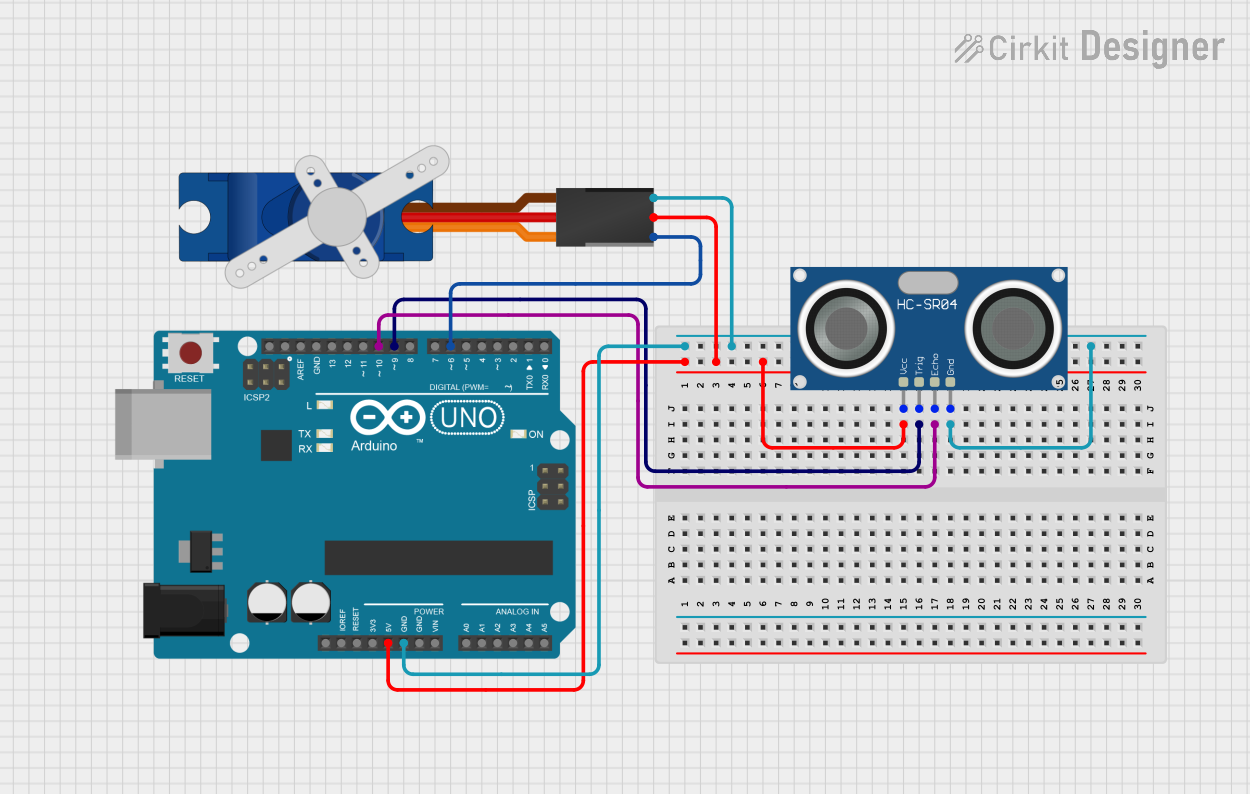
Circuit Documentation
Summary
This circuit utilizes an Arduino UNO microcontroller to control a Tower Pro SG90 servo motor and an HC-SR04 ultrasonic sensor. The ultrasonic sensor measures the distance to an object, and based on this distance, the servo motor is used to open or close a gate. The Arduino UNO reads the distance from the ultrasonic sensor and controls the servo motor accordingly.
Component List
Arduino UNO
- Description: A microcontroller board based on the ATmega328P.
- Pins: UNUSED, IOREF, Reset, 3.3V, 5V, GND, Vin, A0, A1, A2, A3, A4, A5, SCL, SDA, AREF, D13, D12, D11, D10, D9, D8, D7, D6, D5, D4, D3, D2, D1, D0
HC-SR04 Ultrasonic Sensor
- Description: A sensor used to measure distance by using ultrasonic waves.
- Pins: VCC, TRIG, ECHO, GND
Tower Pro SG90 Servo
- Description: A small servo motor used for precise control of angular position.
- Pins: Signal, +5V, GND
Wiring Details
Arduino UNO
- 5V: Connected to the +5V pin of the Tower Pro SG90 servo and the VCC pin of the HC-SR04 Ultrasonic Sensor.
- GND: Connected to the GND pin of the Tower Pro SG90 servo and the GND pin of the HC-SR04 Ultrasonic Sensor.
- D10: Connected to the ECHO pin of the HC-SR04 Ultrasonic Sensor.
- D9: Connected to the TRIG pin of the HC-SR04 Ultrasonic Sensor.
- D6: Connected to the Signal pin of the Tower Pro SG90 servo.
HC-SR04 Ultrasonic Sensor
- VCC: Connected to the 5V pin of the Arduino UNO.
- GND: Connected to the GND pin of the Arduino UNO.
- ECHO: Connected to the D10 pin of the Arduino UNO.
- TRIG: Connected to the D9 pin of the Arduino UNO.
Tower Pro SG90 Servo
- +5V: Connected to the 5V pin of the Arduino UNO.
- GND: Connected to the GND pin of the Arduino UNO.
- Signal: Connected to the D6 pin of the Arduino UNO.
Code Documentation
#include <Servo.h>  // Include Servo library

Servo gateServo;  // Create a servo object
int trigPin = 9;  // Pin for Trig of ultrasonic sensor
int echoPin = 10;  // Pin for Echo of ultrasonic sensor
long duration;  // Store the duration of the pulse (long)
float distance;  // Store the calculated distance (float)

void setup() {
  gateServo.attach(6);  // Attach servo to pin 6
  pinMode(trigPin, OUTPUT);  // Set Trig pin as output
  pinMode(echoPin, INPUT);  // Set Echo pin as input
  Serial.begin(9600);  // Start the serial communication
}

void loop() {
  digitalWrite(trigPin, LOW);  // Clear the Trig pin
  delayMicroseconds(2);
  digitalWrite(trigPin, HIGH);  // Send pulse to trigger
  delayMicroseconds(10);
  digitalWrite(trigPin, LOW);  // Stop sending pulse

  duration = pulseIn(echoPin, HIGH);  // Measure the duration of the pulse
  distance = duration * 0.034 / 2;  // Calculate the distance (float)

  Serial.print("Distance: ");
  Serial.println(distance);  // Print the distance to serial monitor

  if (distance < 20.0) {  // If an object is detected within 20cm
    gateServo.write(90);  // Open the gate (servo at 90 degrees)
  } else {
    gateServo.write(0);  // Close the gate (servo at 0 degrees)
  }

  delay(500);  // Wait for half a second before checking again
}
This code controls the servo motor based on the distance measured by the ultrasonic sensor. The servo motor opens the gate when an object is detected within 20 cm and closes it otherwise. The distance is also printed to the serial monitor for debugging purposes.