
Arduino and ESP32-CAM Motion Detection and Email Alert System
View and Edit Project In Cirkit Designer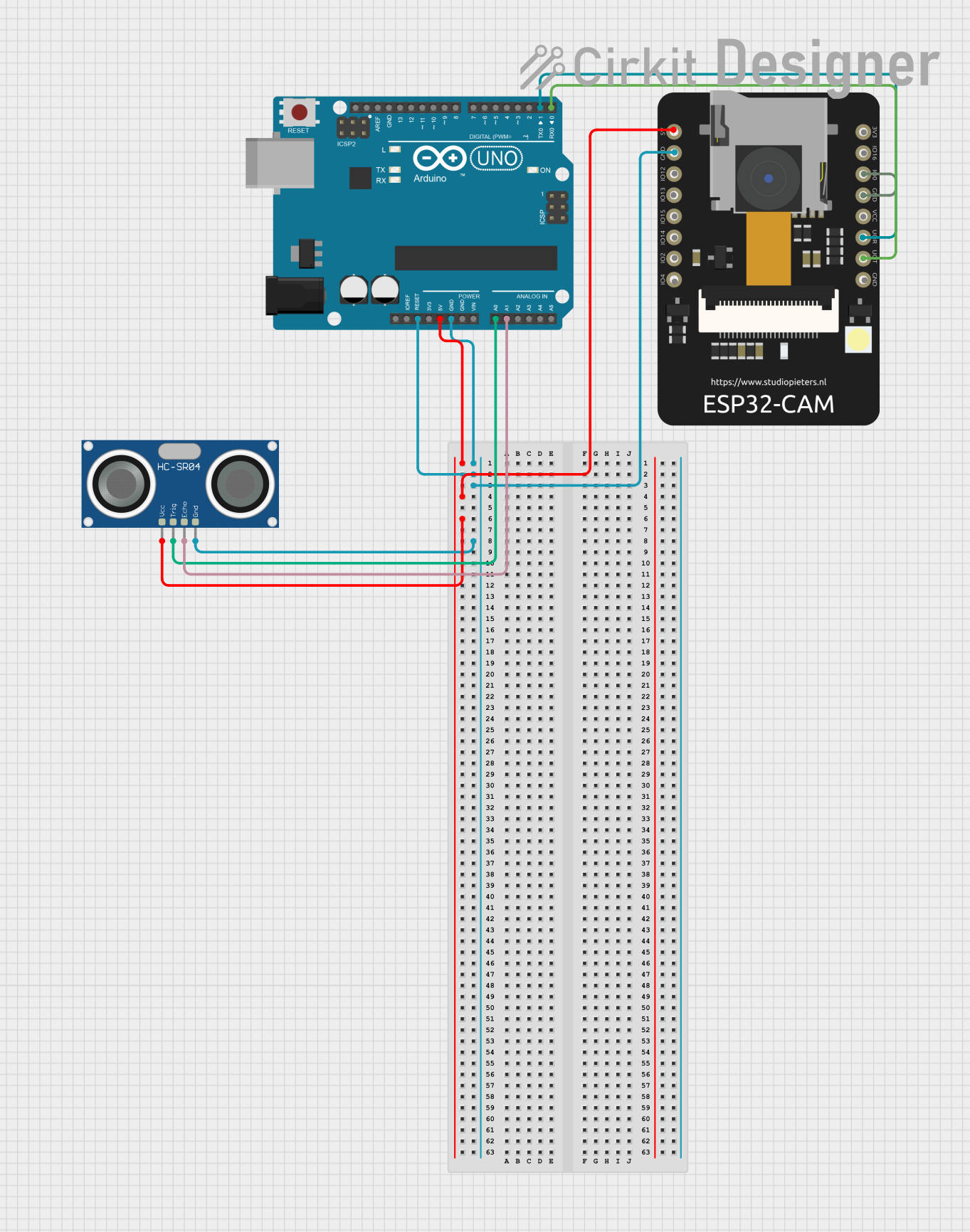
Circuit Documentation
Summary
This circuit integrates an Arduino UNO, an ESP32 CAM, and an HC-SR04 Ultrasonic Sensor. The Arduino UNO is used to control the ultrasonic sensor and communicate with the ESP32 CAM. The ESP32 CAM captures images when motion is detected by the ultrasonic sensor and sends the images via email.
Component List
Arduino UNO
- Description: A microcontroller board based on the ATmega328P.
- Pins: UNUSED, IOREF, Reset, 3.3V, 5V, GND, Vin, A0, A1, A2, A3, A4, A5, SCL, SDA, AREF, D13, D12, D11, D10, D9, D8, D7, D6, D5, D4, D3, D2, D1, D0
ESP32 CAM
- Description: A low-cost development board with a camera module.
- Pins: 5V, GND, GPIO12, GPIO13, GPIO15, GPIO14, GPIO2, GPIO4, 3.3V, GPIO16, GPIO0, 3.3V / 5V / P_OUT, GPIO3 / RX, GPIO1 / TX
HC-SR04 Ultrasonic Sensor
- Description: A sensor used for measuring distance using ultrasonic waves.
- Pins: VCC, TRIG, ECHO, GND
Wiring Details
Arduino UNO
- 5V: Connected to ESP32 CAM (5V) and HC-SR04 Ultrasonic Sensor (VCC)
- GND: Connected to ESP32 CAM (GND) and HC-SR04 Ultrasonic Sensor (GND)
- A0: Connected to HC-SR04 Ultrasonic Sensor (TRIG)
- A1: Connected to HC-SR04 Ultrasonic Sensor (ECHO)
- D1: Connected to ESP32 CAM (GPIO3 / RX)
- D0: Connected to ESP32 CAM (GPIO1 / TX)
ESP32 CAM
- 5V: Connected to Arduino UNO (5V)
- GND: Connected to Arduino UNO (GND) and ESP32 CAM (GPIO0)
- GPIO3 / RX: Connected to Arduino UNO (D1)
- GPIO1 / TX: Connected to Arduino UNO (D0)
HC-SR04 Ultrasonic Sensor
- VCC: Connected to Arduino UNO (5V)
- GND: Connected to Arduino UNO (GND)
- TRIG: Connected to Arduino UNO (A0)
- ECHO: Connected to Arduino UNO (A1)
Documented Code
Arduino UNO Code
#define trigPin A0
#define echoPin A1

void setup() {
  pinMode(trigPin, OUTPUT);
  pinMode(echoPin, INPUT);
  Serial.begin(115200); // Communication with ESP32-CAM
}

void loop() {
  long duration, distance;

  digitalWrite(trigPin, LOW);
  delayMicroseconds(2);
  digitalWrite(trigPin, HIGH);
  delayMicroseconds(10);
  digitalWrite(trigPin, LOW);

  // Read the echo
  duration = pulseIn(echoPin, HIGH);
  distance = duration * 0.034 / 2; // Convert to cm

  if (distance > 0 && distance < 100) { // Adjust range as needed
    Serial.println("Motion detected");
    Serial.println("capture"); // Notify ESP32-CAM
    delay(5000); // Prevent multiple triggers
  }

  delay(100);
}
ESP32 CAM Code
#include <WiFi.h>
#include "esp_camera.h"
#include "SD_MMC.h"
#include <WiFiClientSecure.h>

// ESP32-CAM Pin Configuration
#define PWDN_GPIO_NUM -1
#define RESET_GPIO_NUM -1
#define XCLK_GPIO_NUM 0
#define SIOD_GPIO_NUM 26
#define SIOC_GPIO_NUM 27
#define Y9_GPIO_NUM 35
#define Y8_GPIO_NUM 34
#define Y7_GPIO_NUM 39
#define Y6_GPIO_NUM 36
#define Y5_GPIO_NUM 21
#define Y4_GPIO_NUM 19
#define Y3_GPIO_NUM 18
#define Y2_GPIO_NUM 5
#define VSYNC_GPIO_NUM 25
#define HREF_GPIO_NUM 23
#define PCLK_GPIO_NUM 22

#define RXD2 3 // RX for ESP32-CAM (connected to Arduino TX)
#define TXD2 1 // TX for ESP32-CAM (connected to Arduino RX)

// WiFi credentials
const char* ssid = "KYOU MO KAWAII";
const char* password = "987654321";

// Email credentials
const char* smtp_server = "smtp.gmail.com";
const int smtp_port = 465;
const char* smtp_user = "fuzareu@gmail.com";
const char* smtp_password = "zssaflwfpuzpngcq";
const char* recipient_email = "fuzarxu@gmail.com";

WiFiClientSecure client;

void setup() {
  Serial.begin(115200);
  Serial2.begin(115200, SERIAL_8N1, RXD2, TXD2);

  // Start WiFi
  WiFi.begin(ssid, password);
  while (WiFi.status() != WL_CONNECTED) {
    delay(1000);
    Serial.println("Connecting to WiFi...");
  }
  Serial.println("WiFi connected");

  // Initialize SD card
  if (!SD_MMC.begin()) {
    Serial.println("SD Card Mount Failed");
    return;
  }
  Serial.println("SD Card initialized");

  // Initialize Camera
  camera_config_t config;
  config.ledc_channel = LEDC_CHANNEL_0;
  config.ledc_timer = LEDC_TIMER_0;
  config.pin_d0 = Y2_GPIO_NUM;
  config.pin_d1 = Y3_GPIO_NUM;
  config.pin_d2 = Y4_GPIO_NUM;
  config.pin_d3 = Y5_GPIO_NUM;
  config.pin_d4 = Y6_GPIO_NUM;
  config.pin_d5 = Y7_GPIO_NUM;
  config.pin_d6 = Y8_GPIO_NUM;
  config.pin_d7 = Y9_GPIO_NUM;
  config.pin_xclk = XCLK_GPIO_NUM;
  config.pin_pclk = PCLK_GPIO_NUM;
  config.pin_vsync = VSYNC_GPIO_NUM;
  config.pin_href = HREF_GPIO_NUM;
  config.pin_sscb_sda = SIOD_GPIO_NUM;
  config.pin_sscb_scl = SIOC_GPIO_NUM;
  config.pin_pwdn = PWDN_GPIO_NUM;
  config.pin_reset = RESET_GPIO_NUM;
  config.xclk_freq_hz = 20000000;
  config.pixel_format = PIXFORMAT_JPEG;

  if (psramFound()) {
    config.frame_size = FRAMESIZE_UXGA;
    config.jpeg_quality = 10;
    config.fb_count = 2;
  } else {
    config.frame_size = FRAMESIZE_SVGA;
    config.jpeg_quality = 12;
    config.fb_count = 1;
  }

  esp_err_t err = esp_camera_init(&config);
  if (err != ESP_OK) {
    Serial.printf("Camera init failed with error 0x%x\n", err);
    return;
  }
  Serial.println("Camera initialized");
}

void loop() {
  if (Serial2.available()) {
    String command = Serial2.readStringUntil('\n');
    command.trim();
    if (command == "capture") {
      Serial.println("Capturing photo...");

      camera_fb_t* fb = esp_camera_fb_get();
      if (!fb) {
        Serial.println("Camera capture failed");
        return;
      }

      File file = SD_MMC.open("/photo.jpg", FILE_WRITE);
      if (!file) {
        Serial.println("Failed to open file in writing mode");
        esp_camera_fb_return(fb);
        return;
      }
      file.write(fb->buf, fb->len);
      file.close();
      esp_camera_fb_return(fb);
      Serial.println("Photo saved");

      sendPhoto();
    }
  }
}

void sendPhoto() {
  if (!client.connect(smtp_server, smtp_port)) {
    Serial.println("Failed to connect to SMTP server");
    return;
  }

  client.println("EHLO " + String(smtp_server));
  waitForResponse();
  client.println("AUTH LOGIN");
  waitForResponse();
  client.println(encodeBase64(smtp_user, strlen(smtp_user)));
  waitForResponse();
  client.println(encodeBase64(smtp_password, strlen(smtp_password)));
  waitForResponse();

  client.println("MAIL FROM:<" + String(smtp_user) + ">");
  waitForResponse();
  client.println("RCPT TO:<" + String(recipient_email) + ">");
  waitForResponse();
  client.println("DATA");
  waitForResponse();

  client.println("From: ESP32-CAM <" + String(smtp_user) + ">");
  client.println("To: <" + String(recipient_email) + ">");
  client.println("Subject: Security Alert: Motion Detected");
  client.println("MIME-Version: 1.0");
  client.println("Content-Type: multipart/mixed; boundary=boundary");
  client.println();
  client.println("--boundary