
Arduino UNO WiFi Smart Irrigation System with Soil Moisture Sensing and Temperature Control
View and Edit Project In Cirkit Designer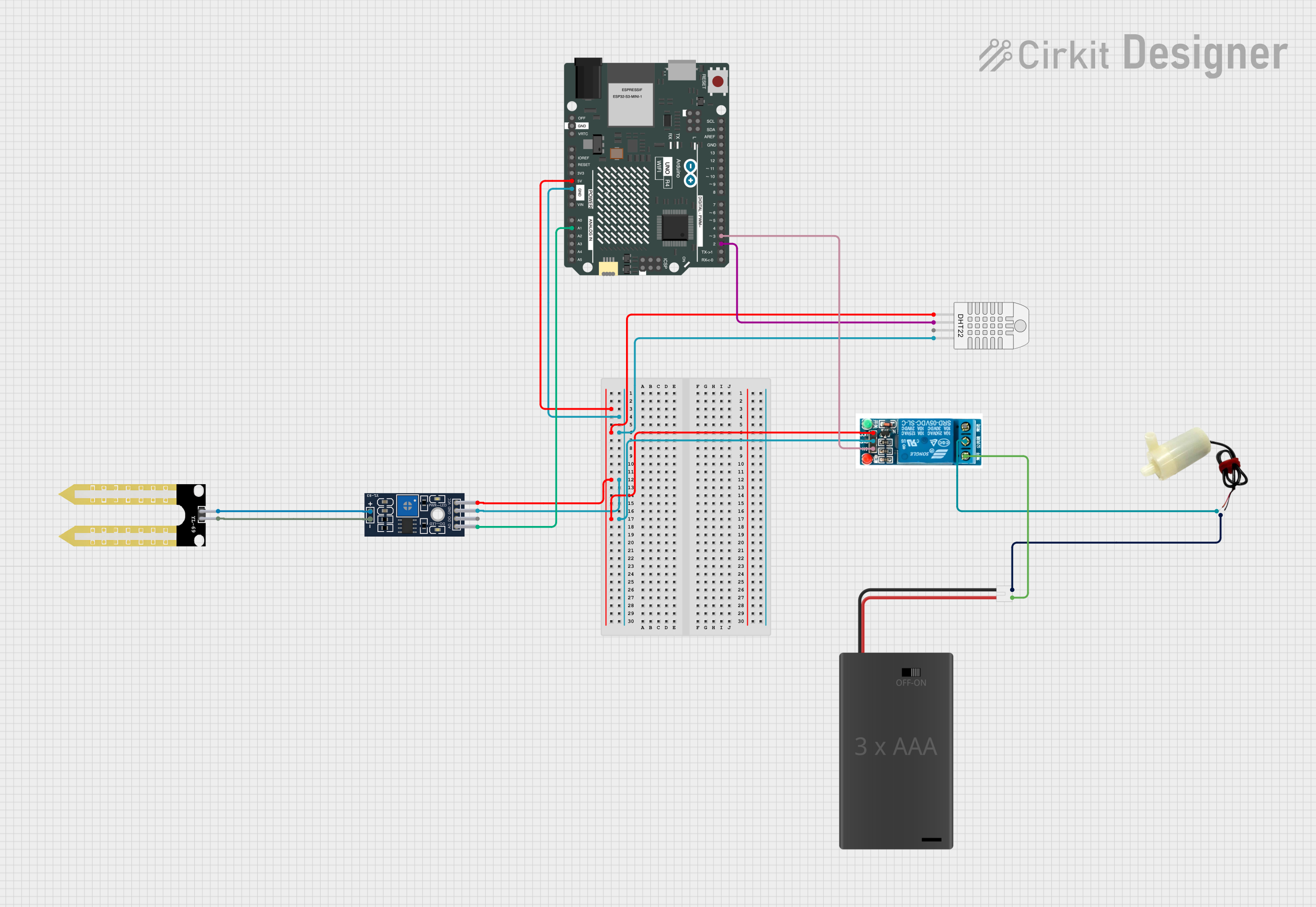
Smart Irrigation System Circuit Documentation
Summary
The Smart Irrigation System is designed to automate the watering process of a plant based on soil moisture and temperature readings. The system utilizes an Arduino UNO R4 WiFi as the main controller, interfaced with a DHT22 sensor for humidity and temperature measurements, and a YL-83 Module LM393 for soil moisture detection. A 5V relay is used to control a 5V mini water pump, which is powered by a 3xAAA Battery Pack. The system activates the water pump when the soil moisture is below a certain threshold and the temperature is within a specified range.
Component List
DHT22 (Wokwi Compatible)
- Description: A digital temperature and humidity sensor.
- Pins: VCC, SDA, NC, GND
3xAAA Battery Pack with Switch and JST
- Description: A battery pack providing power to the circuit.
- Pins: POS, NEG
5v Mini Water Pump
- Description: A pump used for watering the plant.
- Pins: Positive pin, Negative pin
Arduino UNO R4 WiFi
- Description: A microcontroller board with WiFi capability.
- Pins: Multiple GPIOs, Power, and Analog pins
YL-69 Sonda
- Description: A probe used with the YL-83 Module for soil moisture detection.
- Pins: +, -
YL-83 Module LM393
- Description: A soil moisture sensor module.
- Pins: A0, D0, GND, VCC, -, +
5v Relay
- Description: An electromechanical switch used to control the water pump.
- Pins: Normally Open, Common terminal, Normally Closed, In, GND, VCC
Wiring Details
DHT22 (Wokwi Compatible)
- VCC: Connected to 5V from Arduino UNO R4 WiFi
- SDA: Connected to Digital Pin 2 (D2) on Arduino UNO R4 WiFi
- GND: Connected to GND on Arduino UNO R4 WiFi
3xAAA Battery Pack with Switch and JST
- POS: Connected to Normally Open on 5v Relay
- NEG: Connected to Negative pin on 5v Mini Water Pump
5v Mini Water Pump
- Positive pin: Connected to Common terminal on 5v Relay
- Negative pin: Connected to NEG on 3xAAA Battery Pack
Arduino UNO R4 WiFi
- 5V: Connected to VCC on DHT22, YL-83 Module LM393, and 5v Relay
- GND: Connected to GND on DHT22, YL-83 Module LM393, and 5v Relay
- A1: Connected to A0 on YL-83 Module LM393
- D2: Connected to SDA on DHT22
- D3: Connected to In on 5v Relay
YL-69 Sonda
- +: Connected to + on YL-83 Module LM393
- -: Connected to - on YL-83 Module LM393
YL-83 Module LM393
- A0: Connected to Analog Pin 1 (A1) on Arduino UNO R4 WiFi
- VCC: Connected to 5V on Arduino UNO R4 WiFi
- GND: Connected to GND on Arduino UNO R4 WiFi
- +: Connected to + on YL-69 Sonda
- -: Connected to - on YL-69 Sonda
5v Relay
- VCC: Connected to 5V on Arduino UNO R4 WiFi
- GND: Connected to GND on Arduino UNO R4 WiFi
- In: Connected to Digital Pin 3 (D3) on Arduino UNO R4 WiFi
- Common terminal: Connected to Positive pin on 5v Mini Water Pump
- Normally Open: Connected to POS on 3xAAA Battery Pack
Documented Code
/*
 * Smart Irrigation System
 * This Arduino sketch reads data from a DHT22 sensor (humidity and temperature)
 * and a soil moisture sensor. If the soil moisture is below a certain threshold
 * and the temperature is within an ideal range, it activates a relay to water
 * the plant by turning on a water pump.
 */

#include <DHT.h>

#define DHTPIN 2     // Pin connected to DHT22 data pin
#define DHTTYPE DHT22   // DHT 22 (AM2302)
#define RELAY_PIN 3  // Pin connected to Relay trigger
#define SOIL_PIN A1  // Pin connected to Soil Moisture Sensor

DHT dht(DHTPIN, DHTTYPE);

void setup() {
  Serial.begin(9600);
  dht.begin();
  pinMode(RELAY_PIN, OUTPUT);
  digitalWrite(RELAY_PIN, LOW); // Ensure relay is off initially
}

void loop() {
  delay(2000);  // Wait a few seconds between measurements

  float humidity = dht.readHumidity();
  float temperature = dht.readTemperature();
  int soilMoisture = analogRead(SOIL_PIN);

  if (isnan(humidity) || isnan(temperature)) {
    Serial.println("Failed to read from DHT sensor!");
    return;
  }

  Serial.print("Humidity: ");
  Serial.print(humidity);
  Serial.print(" %\t");
  Serial.print("Temperature: ");
  Serial.print(temperature);
  Serial.println(" *C");

  Serial.print("Soil Moisture: ");
  Serial.println(soilMoisture);

  // Control relay based on soil moisture and temperature
  if (soilMoisture < 300 && temperature > 15 && temperature < 35) {
    digitalWrite(RELAY_PIN, HIGH); // Turn on relay
  } else {
    digitalWrite(RELAY_PIN, LOW); // Turn off relay
  }
}
This code is designed to be uploaded to the Arduino UNO R4 WiFi microcontroller. It initializes the DHT22 sensor and the relay pin, reads the sensor data, and controls the relay based on the soil moisture and temperature readings.