
Arduino-Controlled Water Pressure Monitoring and Solenoid Valve System
View and Edit Project In Cirkit Designer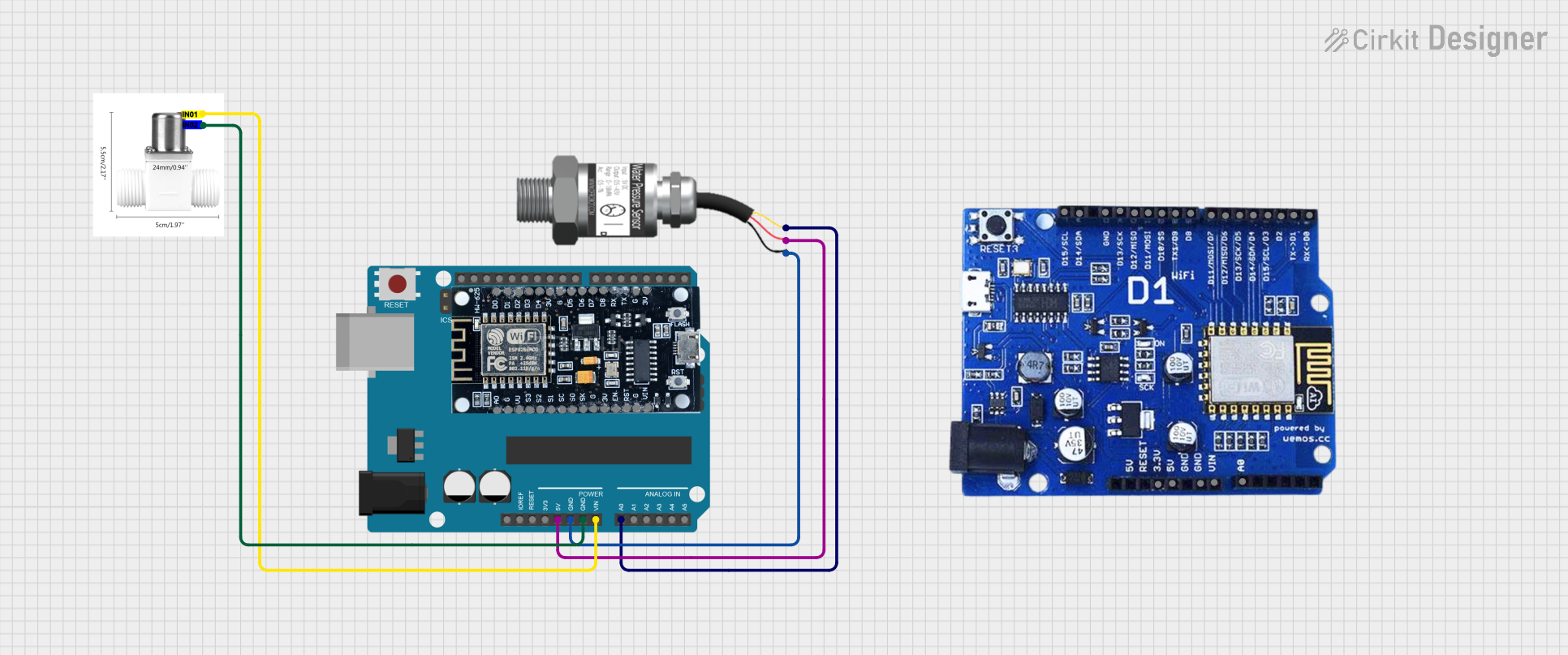
Circuit Documentation
Summary of the Circuit
The circuit in question appears to be designed for monitoring water pressure and controlling a water solenoid valve using an Arduino UNO microcontroller. The Gravity: Analog Water Pressure Sensor is used to measure the water pressure and provide a signal to the Arduino UNO. The Arduino UNO then likely processes this signal and controls the valve solenoid water to regulate the flow of water based on the pressure readings. The circuit also includes an ESP8266 module, which could be intended for wireless communication, although it is not connected in the provided net list.
Component List
Gravity: Analog Water Pressure Sensor
- Pins: Signal, VCC, GND
- Description: This sensor is used to measure the water pressure in the system. It outputs an analog signal proportional to the pressure.
Arduino UNO
- Pins: UNUSED, IOREF, Reset, 3.3V, 5V, GND, Vin, A0-A5, SCL, SDA, AREF, D0-D13
- Description: The Arduino UNO is a microcontroller board based on the ATmega328P. It is used here to process the signal from the water pressure sensor and control the solenoid valve.
Valve Solenoid Water
- Pins: IN01, IN02
- Description: This is an electrically-controlled valve used for controlling the flow of water. It is operated by signals from the Arduino UNO.
ESP8266
- Pins: 3V, G, D0-D8, A0, S0-SC, EN, VIN, RST, VU
- Description: The ESP8266 is a Wi-Fi microchip with full TCP/IP stack and microcontroller capability. It is not connected in the current circuit configuration.
WeMOS ESP8266
- Pins: A0, VIN, GND, 5V, 3.3V, D0-D15, 19
- Description: The WeMOS ESP8266 is a Wi-Fi-enabled microcontroller board compatible with the Arduino platform. It is also not connected in the current circuit configuration.
Wiring Details
Gravity: Analog Water Pressure Sensor
- Signal connected to Arduino UNO A0
- VCC connected to Arduino UNO 5V
- GND connected to Arduino UNO GND
Arduino UNO
- A0 connected to Gravity: Analog Water Pressure Sensor Signal
- 5V connected to Gravity: Analog Water Pressure Sensor VCC
- GND connected to Gravity: Analog Water Pressure Sensor GND and Valve Solenoid Water IN02
- Vin connected to Valve Solenoid Water IN01
Valve Solenoid Water
- IN01 connected to Arduino UNO Vin
- IN02 connected to Arduino UNO GND
Documented Code
Arduino UNO Code (sketch.ino)
void setup() {
  // put your setup code here, to run once:

}

void loop() {
  // put your main code here, to run repeatedly:

}
The provided code for the Arduino UNO is a template with empty setup() and loop() functions. The setup() function is intended to contain initialization code that runs once when the microcontroller is powered on or reset. The loop() function is intended to contain the main logic of the program, which runs repeatedly as long as the microcontroller is powered.
Additional Notes
There is an additional file named "documentation.txt" mentioned for the Arduino UNO, but it contains no code or text. It is likely intended for further documentation or notes related to the Arduino's program or circuit operation.