
Arduino UNO Based Home Automation System with Multi-Sensor Integration and I2C LCD Display
View and Edit Project In Cirkit Designer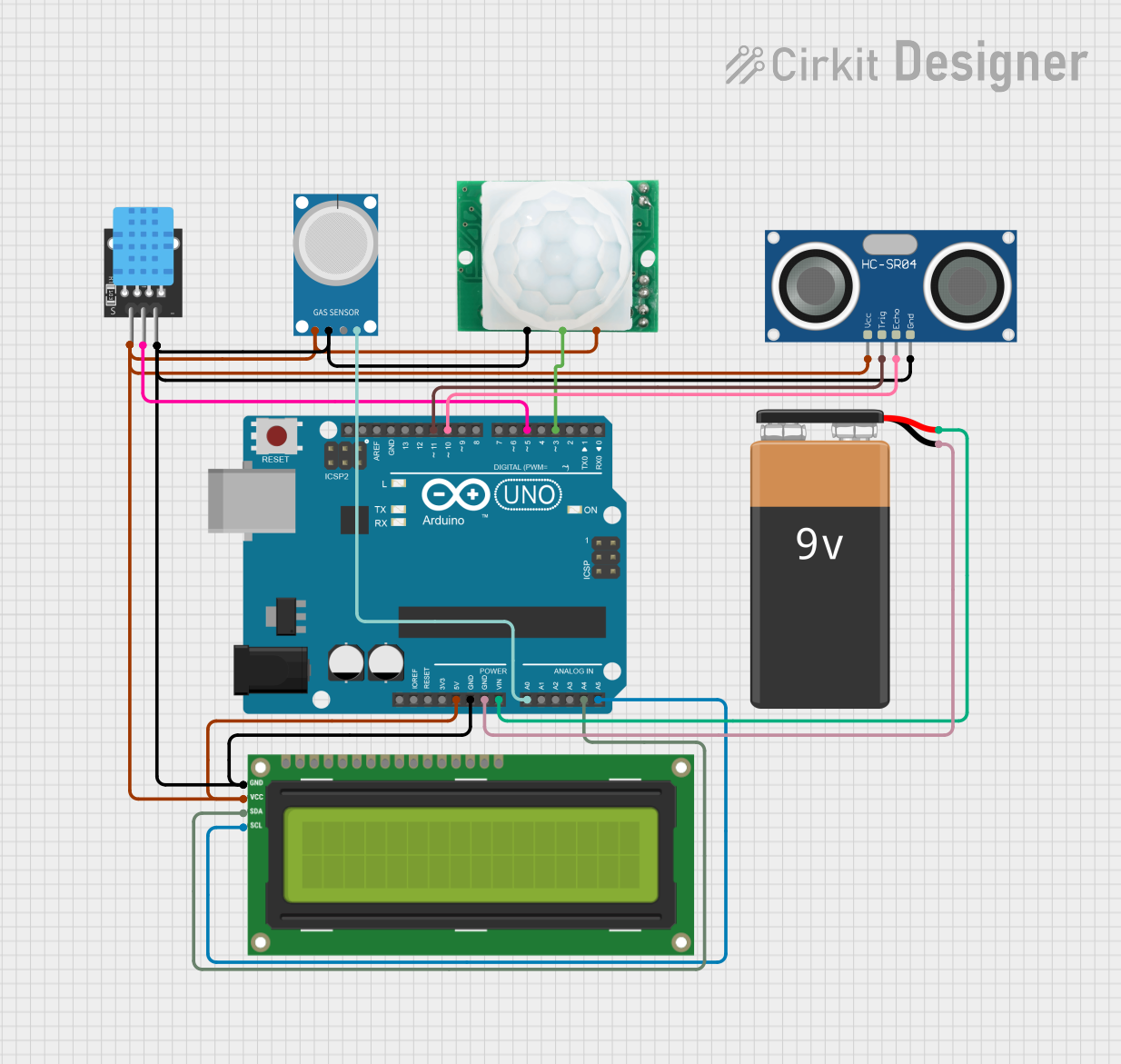
Circuit Documentation
Summary
This circuit is designed for a home automation system that integrates various sensors and an I2C LCD display to monitor environmental conditions and detect motion. The core of the system is an Arduino UNO microcontroller, which processes data from a DHT11 temperature and humidity sensor, an MQ-4 gas sensor, an HC-SR04 ultrasonic sensor, and an HC-SR501 motion sensor. The system is powered by a 9V battery and displays sensor readings on an I2C LCD 16x2 screen. The Arduino UNO also manages the communication with the I2C LCD and reads the sensor data to perform actions based on the sensor inputs.
Component List
I2C LCD 16x2 Screen
- Description: A 16x2 character LCD display with an I2C interface for displaying text.
- Pins: SCL, SDA, VCC (5V), GND, VDD, VO, RS, RW, E, D0-D7, BLA, BLK
MQ-4 Gas Sensor
- Description: A gas sensor used for detecting methane and natural gas in the air.
- Pins: A0, D0, GND, VCC
HC-SR04 Ultrasonic Sensor
- Description: An ultrasonic sensor used for measuring distance via ultrasonic waves.
- Pins: VCC, TRIG, ECHO, GND
DHT11 Temperature and Humidity Sensor
- Description: A sensor used for measuring ambient temperature and humidity.
- Pins: 5V, S, GND
HC-SR501 Motion Sensor
- Description: A passive infrared sensor used for detecting motion.
- Pins: GND, OUT, VCC
Arduino UNO Microcontroller
- Description: A microcontroller board based on the ATmega328P, used for controlling the sensors and LCD.
- Pins: UNUSED, IOREF, Reset, 3.3V, 5V, GND, Vin, A0-A5, SCL, SDA, AREF, D0-D13
9V Battery
- Description: A power source for the circuit.
- Pins: -, +
Wiring Details
I2C LCD 16x2 Screen
- SCL: Connected to Arduino UNO A5
- SDA: Connected to Arduino UNO A4
- VCC (5V): Connected to Arduino UNO 5V
- GND: Connected to Arduino UNO GND
MQ-4 Gas Sensor
- A0: Connected to Arduino UNO A0
- VCC: Connected to Arduino UNO 5V
- GND: Connected to Arduino UNO GND
HC-SR04 Ultrasonic Sensor
- VCC: Connected to Arduino UNO 5V
- TRIG: Connected to Arduino UNO D11
- ECHO: Connected to Arduino UNO D10
- GND: Connected to Arduino UNO GND
DHT11 Temperature and Humidity Sensor
- 5V: Connected to Arduino UNO 5V
- S: Connected to Arduino UNO D5
- GND: Connected to Arduino UNO GND
HC-SR501 Motion Sensor
- VCC: Connected to Arduino UNO 5V
- OUT: Connected to Arduino UNO D3
- GND: Connected to Arduino UNO GND
Arduino UNO Microcontroller
- 5V: Provides power to sensors and LCD
- GND: Common ground for all components
- Vin: Connected to 9V Battery +
- GND (for power): Connected to 9V Battery -
Documented Code
#include <Wire.h>
#include <LiquidCrystal_I2C.h>
#include <DHT.h>

// Pin Definitions
#define DHTPIN 2
#define DHTTYPE DHT11
#define PIRPIN 7
#define MQ4PIN A0
#define TRIGPIN 8
#define ECHOPIN 9

// Initialize DHT11
DHT dht(DHTPIN, DHTTYPE);

// Initialize LCD (Assuming I2C address 0x27)
LiquidCrystal_I2C lcd(0x27, 16, 2);

void setup() {
  Serial.begin(9600);

  // Initialize sensors
  dht.begin();
  pinMode(PIRPIN, INPUT);
  pinMode(MQ4PIN, INPUT);
  pinMode(TRIGPIN, OUTPUT);
  pinMode(ECHOPIN, INPUT);

  // Initialize LCD
  lcd.init();
  lcd.backlight();

  // Display welcome message
  lcd.setCursor(0, 0);
  lcd.print("Home Automation");
  lcd.setCursor(0, 1);
  lcd.print("System Starting...");
  delay(2000);
  lcd.clear();
}

void loop() {
  // Read DHT11 sensor
  float h = dht.readHumidity();
  float t = dht.readTemperature();

  // Read PIR sensor
  int pirState = digitalRead(PIRPIN);

  // Read MQ4 Gas Sensor
  int gasValue = analogRead(MQ4PIN);

  // Read HC-SR04 Ultrasonic Sensor
  long duration, distance;
  digitalWrite(TRIGPIN, LOW);
  delayMicroseconds(2);
  digitalWrite(TRIGPIN, HIGH);
  delayMicroseconds(10);
  digitalWrite(TRIGPIN, LOW);
  duration = pulseIn(ECHOPIN, HIGH);
  distance = (duration / 2) / 29.1; // Convert to cm

  // Display sensor data on LCD
  lcd.setCursor(0, 0);
  lcd.print("Temp: ");
  lcd.print(t);
  lcd.print("C Hum: ");
  lcd.print(h);
  lcd.print("%");

  lcd.setCursor(0, 1);
  lcd.print("Gas: ");
  lcd.print(gasValue);
  lcd.print(" PIR: ");
  lcd.print(pirState ? "Motion" : "No Motion");

  delay(2000);
  lcd.clear();

  lcd.setCursor(0, 0);
  lcd.print("Distance: ");
  lcd.print(distance);
  lcd.print(" cm");

  delay(2000);
  lcd.clear();

  // Add any other logic for handling detected events
  // such as sending alerts or triggering alarms
}
This code initializes and reads from the connected sensors, displaying their data on the I2C LCD screen. It includes setup for the DHT11 sensor, the PIR motion sensor, the MQ-4 gas sensor, and the HC-SR04 ultrasonic sensor. The LCD displays temperature, humidity, gas levels, motion detection, and distance measurements in a rotating fashion.