
Circuit Documentation
Summary
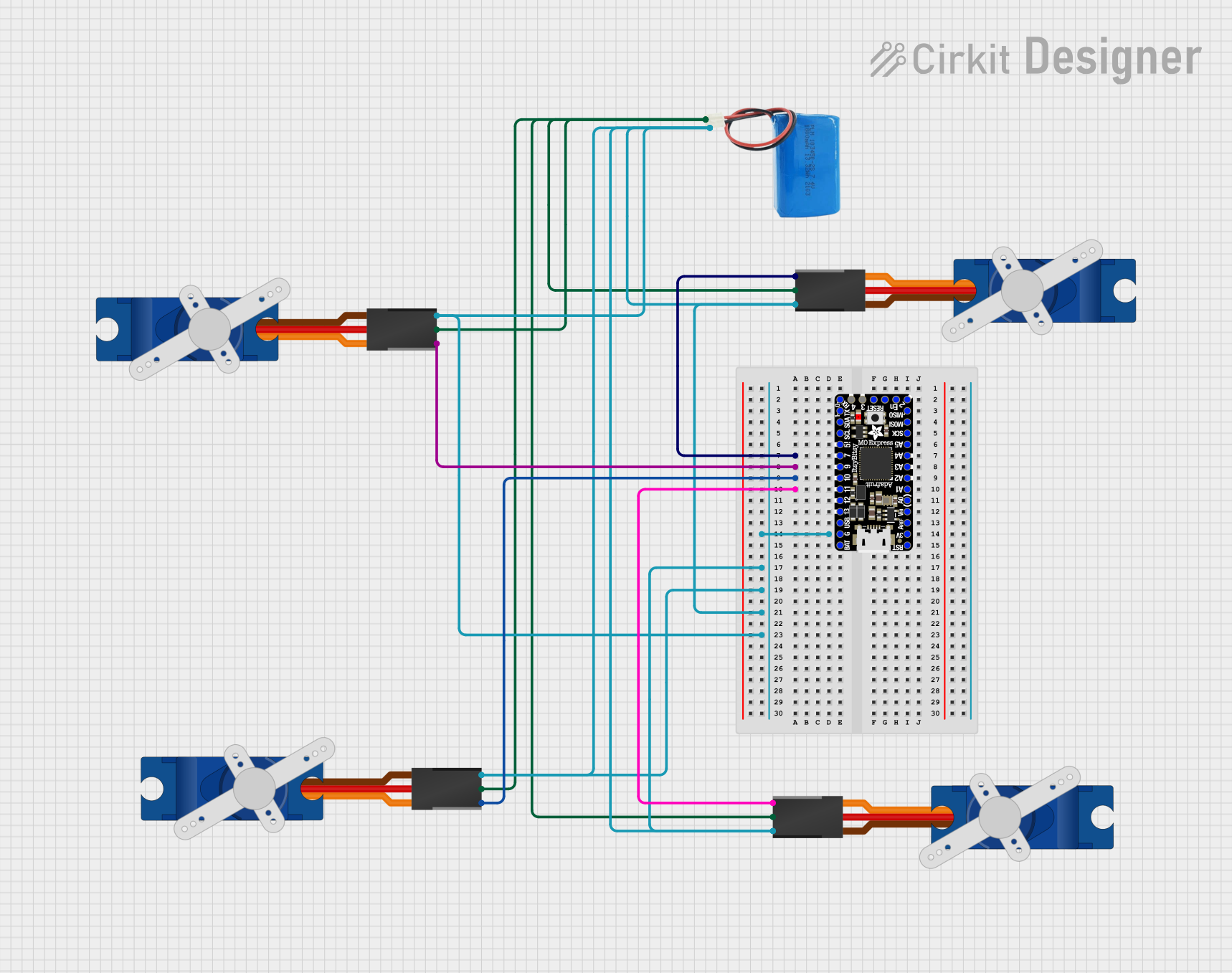
This circuit is designed to control multiple Tower Pro SG90 servos using an Itsy Bitsy M0 Express microcontroller. The servos are powered by a 5V battery and are controlled by individual digital pins on the microcontroller. The ground connections are shared among all components, creating a common ground for the circuit.
Component List
Itsy Bitsy M0 Express
- Description: A powerful, general-purpose microcontroller board with a SAMD21G18 ARM Cortex M0 processor.
- Pins: EN, SWDIO, SWCLK, D3, D4, VBAT, GND, VBUS, D13, D12, D11, D10, D9, D7, D5_5V, SCL, SDA, D1, D0, D2, MISO, MOSI, SCK, A5, A4, A3, A2, A1, A0, VHI, AREF, +3V3, !RESET
Tower Pro SG90 Servo
- Description: A small and lightweight servo motor suitable for a variety of applications.
- Pins: Signal, +5V, GND
5V Battery
- Description: A power source for the circuit providing a stable 5V output.
- Pins: Positive, Negative
Wiring Details
Itsy Bitsy M0 Express
- D7: Connected to the signal pin of the first Tower Pro SG90 servo.
- D9: Connected to the signal pin of the second Tower Pro SG90 servo.
- D10: Connected to the signal pin of the third Tower Pro SG90 servo.
- D11: Connected to the signal pin of the fourth Tower Pro SG90 servo.
- GND: Connected to the ground pins of all Tower Pro SG90 servos and the negative pin of the 5V battery.
- EN, SWDIO, SWCLK, D2: These pins are not connected to other components in the circuit.
Tower Pro SG90 Servo (All Servos)
- Signal: Each servo's signal pin is connected to a unique digital pin on the Itsy Bitsy M0 Express as detailed above.
- +5V: All servos' +5V pins are connected to the positive pin of the 5V battery.
- GND: All servos' ground pins are connected to the ground (GND) pin of the Itsy Bitsy M0 Express and the negative pin of the 5V battery.
5V Battery
- Positive: Connected to the +5V pins of all Tower Pro SG90 servos.
- Negative: Connected to the ground pins of all Tower Pro SG90 servos and the GND pin of the Itsy Bitsy M0 Express.
Documented Code
There is no code provided for the microcontroller. To control the Tower Pro SG90 servos, code must be written and uploaded to the Itsy Bitsy M0 Express. The code should initialize the servos on the corresponding digital pins and provide a control mechanism to set the servo angles as desired.