
Solar-Powered Arduino UNO with Li-ion Battery Management and Voltage Step-Up
View and Edit Project In Cirkit Designer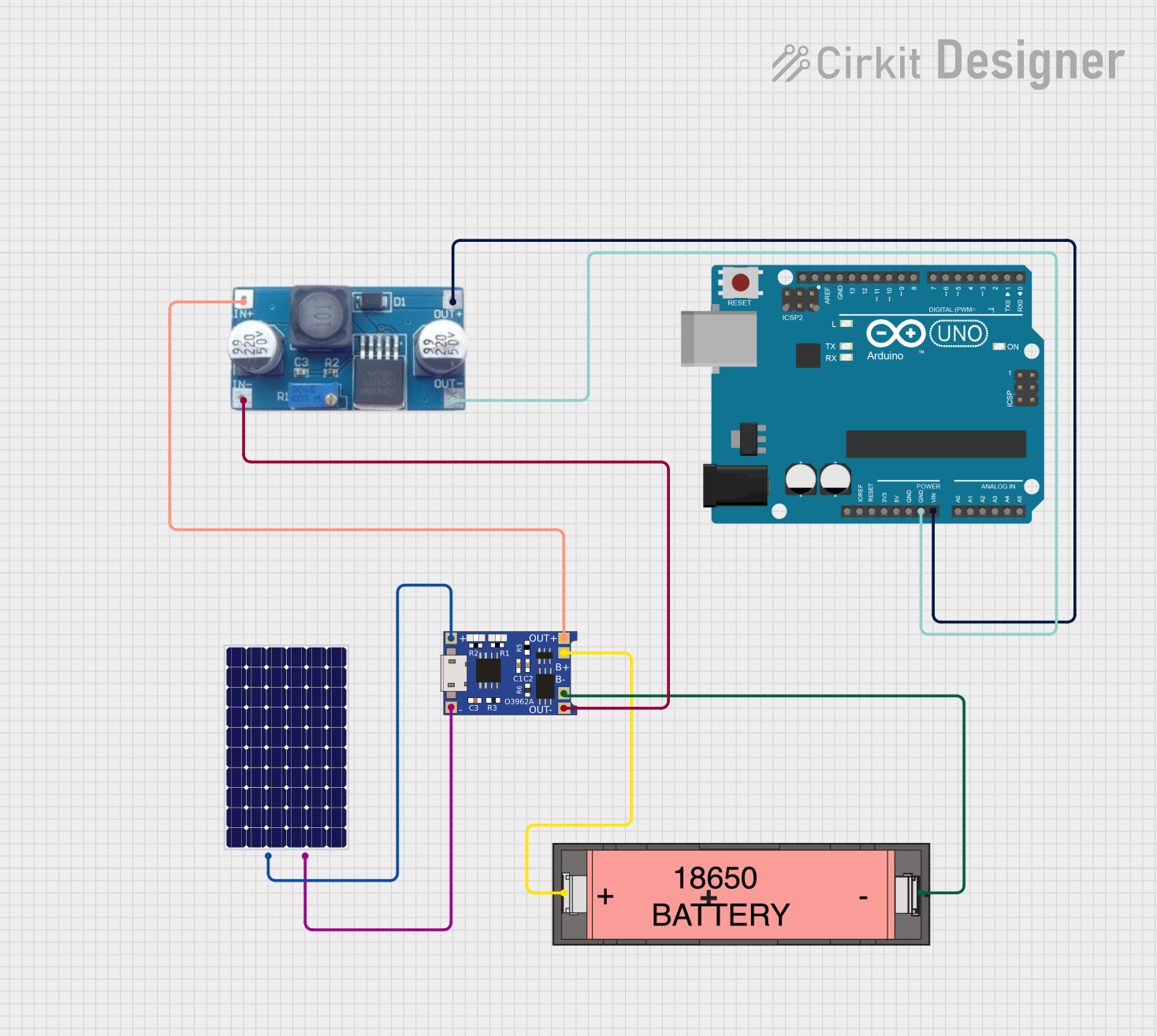
Solar-Powered Arduino Circuit Documentation
Summary
This document provides a detailed overview of a solar-powered circuit designed to charge a Li-ion 18650 battery and power an Arduino UNO microcontroller. The circuit utilizes a solar panel to generate electrical power, which is then managed by a TP4056 charging module to safely charge the battery. A XL6009 step-up buck converter is used to boost the voltage to a suitable level for powering the Arduino UNO. The Arduino UNO is programmed to perform user-defined tasks, which are not specified in the provided code.
Component List
Solar Panel
- Description: A photovoltaic panel that converts sunlight into electrical energy.
- Pins:
+(Positive),-(Negative)
TP4056
- Description: A lithium battery charger module with overcharge protection and LED indicators.
- Pins:
OUT-(Output Negative),B-(Battery Negative),B+(Battery Positive),OUT+(Output Positive),IN-(Input Negative),IN+(Input Positive)
XL6009 Step-Up Buck Converter
- Description: A DC-DC converter that steps up the voltage from a lower voltage source.
- Pins:
OUT +(Output Positive),OUT-(Output Negative),IN+(Input Positive),IN-(Input Negative)
Li-ion 18650 Battery
- Description: A rechargeable battery commonly used in portable electronics.
- Pins:
-(Negative),+(Positive)
Arduino UNO
- Description: A microcontroller board based on the ATmega328P, widely used for building digital devices and interactive objects.
- Pins:
UNUSED,IOREF,Reset,3.3V,5V,GND,Vin,A0toA5,SCL,SDA,AREF,D13toD0
Wiring Details
Solar Panel
+connected to TP4056IN+-connected to TP4056IN-
TP4056
IN+connected to Solar Panel+IN-connected to Solar Panel-OUT-connected to XL6009IN-B-connected to Li-ion 18650 Battery-B+connected to Li-ion 18650 Battery+OUT+connected to XL6009IN+
XL6009 Step-Up Buck Converter
IN+connected to TP4056OUT+IN-connected to TP4056OUT-OUT +connected to Arduino UNOVinOUT-connected to Arduino UNOGND
Li-ion 18650 Battery
+connected to TP4056B+-connected to TP4056B-
Arduino UNO
Vinconnected to XL6009OUT +GNDconnected to XL6009OUT-
Documented Code
Arduino UNO Code (sketch.ino)
void setup() {
  // put your setup code here, to run once:

}

void loop() {
  // put your main code here, to run repeatedly:

}
Note: The provided code is a template and does not contain any functional code. Users are expected to fill in the setup() and loop() functions with their specific application code.