
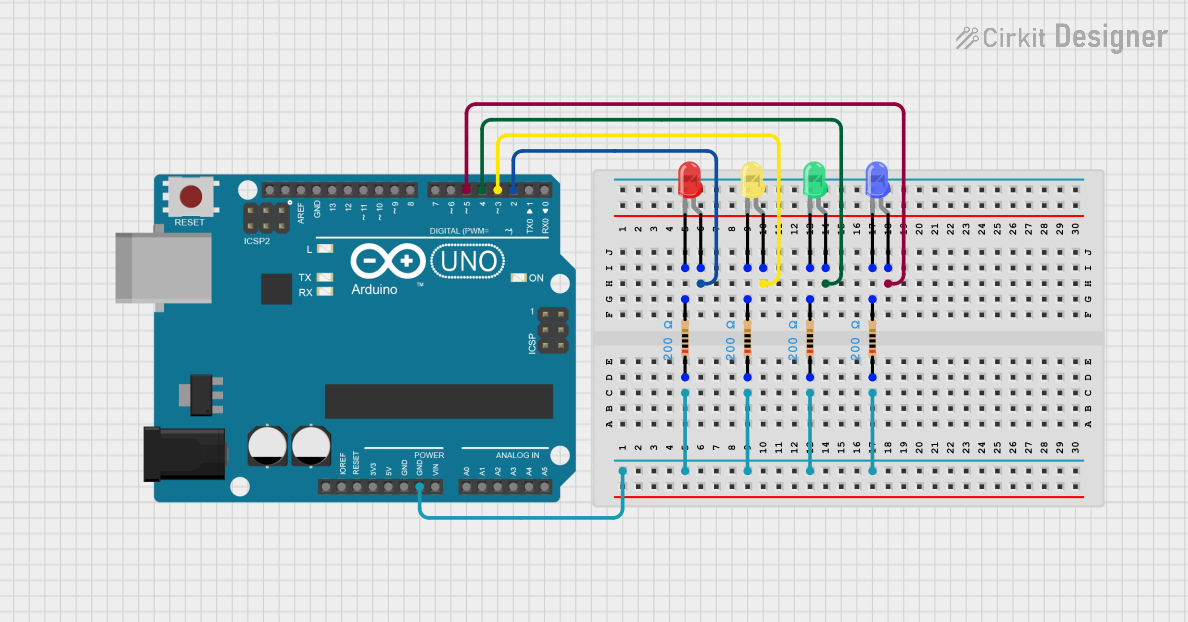
Circuit Documentation
Summary
This circuit consists of an Arduino UNO microcontroller connected to four LEDs (red, green, yellow, and blue) through resistors. The LEDs are controlled by the Arduino, which is programmed to manage their behavior.
Component List
LED: Two Pin (red)
- Description: A red LED with two pins: anode and cathode.
- Pins:
- Anode
- Cathode
Resistor
- Description: A resistor with a resistance of 200 Ohms.
- Pins:
- Pin1
- Pin2
- Properties:
- Resistance: 200 Ohms
Arduino UNO
- Description: A microcontroller board based on the ATmega328P.
- Pins:
- UNUSED
- IOREF
- Reset
- 3.3V
- 5V
- GND
- Vin
- A0
- A1
- A2
- A3
- A4
- A5
- SCL
- SDA
- AREF
- D13
- D12
- D11
- D10
- D9
- D8
- D7
- D6
- D5
- D4
- D3
- D2
- D1
- D0
LED: Two Pin (green)
- Description: A green LED with two pins: anode and cathode.
- Pins:
- Anode
- Cathode
LED: Two Pin (yellow)
- Description: A yellow LED with two pins: anode and cathode.
- Pins:
- Anode
- Cathode
LED: Two Pin (blue)
- Description: A blue LED with two pins: anode and cathode.
- Pins:
- Anode
- Cathode
Resistor
- Description: A resistor with a resistance of 200 Ohms.
- Pins:
- Pin1
- Pin2
- Properties:
- Resistance: 200 Ohms
Resistor
- Description: A resistor with a resistance of 200 Ohms.
- Pins:
- Pin1
- Pin2
- Properties:
- Resistance: 200 Ohms
Resistor
- Description: A resistor with a resistance of 200 Ohms.
- Pins:
- Pin1
- Pin2
- Properties:
- Resistance: 200 Ohms
Wiring Details
LED: Two Pin (red)
- Anode: Connected to Arduino UNO pin D2
- Cathode: Connected to Resistor pin2
Resistor
- Pin1: Connected to Arduino UNO GND
- Pin2: Connected to LED: Two Pin (red) cathode
LED: Two Pin (green)
- Anode: Connected to Arduino UNO pin D4
- Cathode: Connected to Resistor pin2
Resistor
- Pin1: Connected to Arduino UNO GND
- Pin2: Connected to LED: Two Pin (green) cathode
LED: Two Pin (yellow)
- Anode: Connected to Arduino UNO pin D3
- Cathode: Connected to Resistor pin2
Resistor
- Pin1: Connected to Arduino UNO GND
- Pin2: Connected to LED: Two Pin (yellow) cathode
LED: Two Pin (blue)
- Anode: Connected to Arduino UNO pin D5
- Cathode: Connected to Resistor pin2
Resistor
- Pin1: Connected to Arduino UNO GND
- Pin2: Connected to LED: Two Pin (blue) cathode
Code Documentation
Arduino UNO Code
sketch.ino
void setup() {
  // put your setup code here, to run once:

}

void loop() {
  // put your main code here, to run repeatedly:

}
documentation.txt