
Raspberry Pi 4B Powered Projector System with HDMI to VGA Conversion
View and Edit Project In Cirkit Designer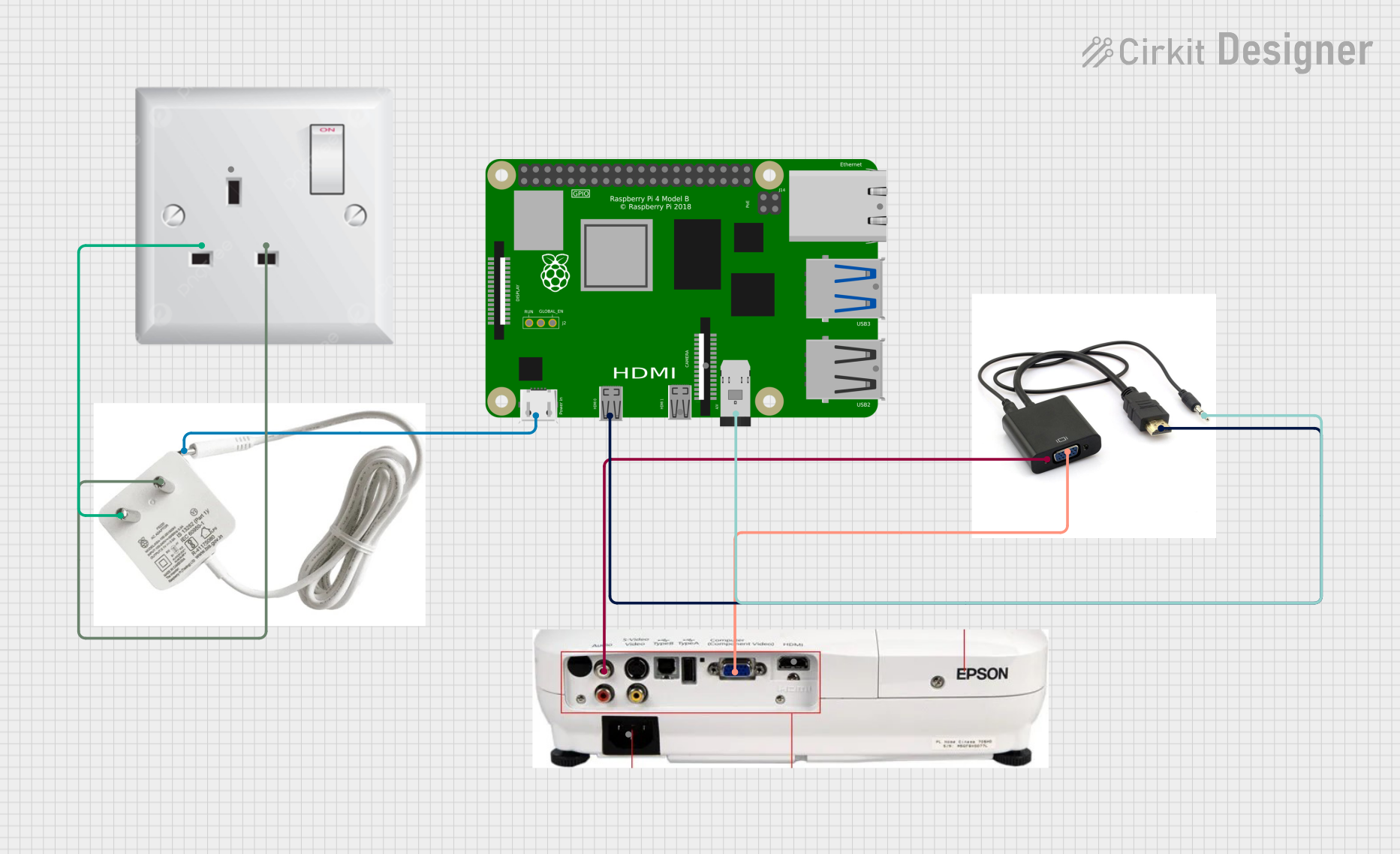
Circuit Documentation
Summary
This circuit involves a Raspberry Pi 4B connected to a projector through an HDMI to VGA adapter. The Raspberry Pi is powered by a 5V power adapter, which is connected to an AC wall plug point. The HDMI to VGA adapter also routes audio to the projector.
Component List
Raspberry Pi 4B
- Description: A single-board computer used for various applications.
- Pins: 3V3, 5V, GPIO2, GPIO3, GND, GPIO4, GPIO14, GPIO15, GPIO17, GPIO18, GPIO27, GPIO22, GPIO23, GPIO24, GPIO10, GPIO9, GPIO25, GPIO11, GPIO8, GPIO7, ID_SD, GPIO5, GPIO6, GPIO12, GPIO13, GPIO19, GPIO16, GPIO26, GPIO20, GPIO21, ID_SC, TR01_TAP, TR00_TAP, TR03_TAP, TR02_TAP, RUN, GLOBAL_EN, ETH, HDMI 0, HDMI 1, CAMERA, AV
Projector
- Description: A device used to project visual content onto a screen.
- Pins: HDMI/OUT, VGA/OUT, POWER, AUD/OUT
HDMI to VGA Adapter
- Description: An adapter used to convert HDMI signals to VGA signals.
- Pins: AUD/IN, HDMI/IN, VGA, AUD/OUT
5V Power Adapter
- Description: A power adapter that converts 240V AC to 5V DC.
- Pins: 5V, 240V/AC
AC Wall Plug Point
- Description: A standard AC wall plug point.
- Pins: E, N, L
Wiring Details
Raspberry Pi 4B
- 5V pin is connected to the 5V pin of the 5V Power Adapter.
- HDMI 0 pin is connected to the HDMI/IN pin of the HDMI to VGA Adapter.
- AV pin is connected to the AUD/IN pin of the HDMI to VGA Adapter.
Projector
- VGA/OUT pin is connected to the VGA pin of the HDMI to VGA Adapter.
- AUD/OUT pin is connected to the AUD/OUT pin of the HDMI to VGA Adapter.
HDMI to VGA Adapter
- HDMI/IN pin is connected to the HDMI 0 pin of the Raspberry Pi 4B.
- AUD/IN pin is connected to the AV pin of the Raspberry Pi 4B.
- VGA pin is connected to the VGA/OUT pin of the Projector.
- AUD/OUT pin is connected to the AUD/OUT pin of the Projector.
5V Power Adapter
- 5V pin is connected to the 5V pin of the Raspberry Pi 4B.
- 240V/AC pin is connected to the N pin of the AC Wall Plug Point.
- 240V/AC pin is also connected to the L pin of the AC Wall Plug Point.
AC Wall Plug Point
- N pin is connected to the 240V/AC pin of the 5V Power Adapter.
- L pin is connected to the 240V/AC pin of the 5V Power Adapter.
Code
There is no code provided for this circuit.