
ESP8266 NodeMCU OLED Display: Wi-Fi Enabled Hello World Project
View and Edit Project In Cirkit Designer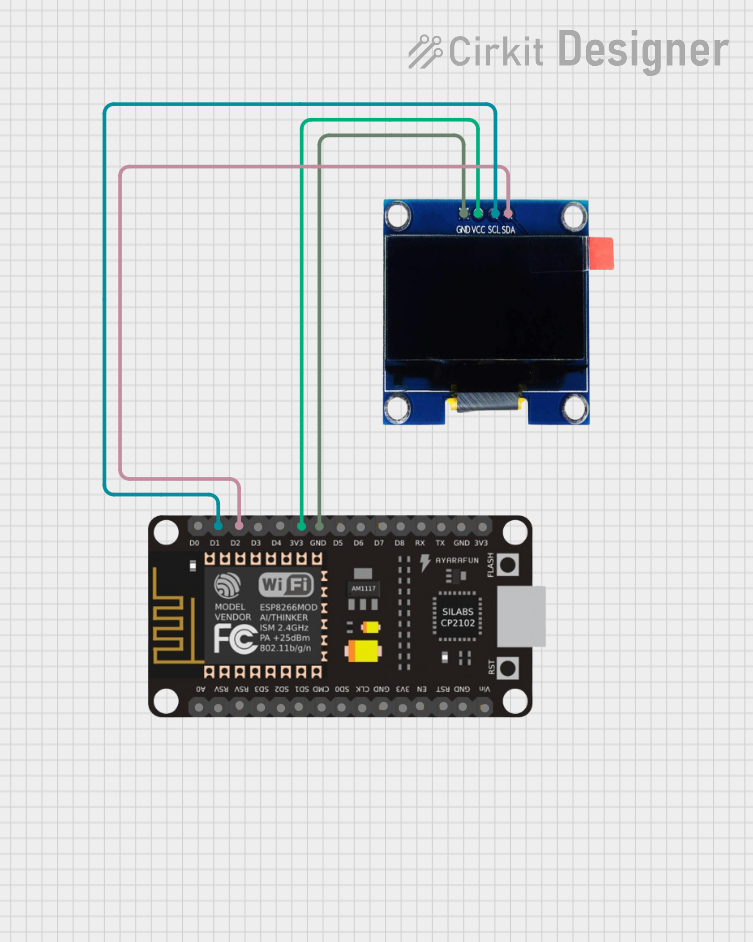
Circuit Documentation
Summary
This circuit involves an ESP8266 NodeMCU microcontroller connected to a 1.3" OLED display. The microcontroller communicates with the OLED display using the I2C protocol. The circuit is designed to initialize the OLED display and display a simple "Hello, World!" message.
Component List
ESP8266 NodeMCU
- Description: A low-cost Wi-Fi microcontroller with GPIO, PWM, ADC, I2C, and 1-Wire capabilities.
- Pins: D0, D1, D2, D3, D4, 3V3, GND, D5, D6, D7, D8, RX, TX, A0, RSV, SD3, SD2, SD1, CMD, SD0, CLK, EN, RST, VIN
OLED 1.3"
- Description: A 1.3-inch OLED display module with I2C interface.
- Pins: GND, VCC, SCL, SDA
Wiring Details
ESP8266 NodeMCU to OLED 1.3"
- D1 (ESP8266 NodeMCU) to SCL (OLED 1.3")
- D2 (ESP8266 NodeMCU) to SDA (OLED 1.3")
- 3V3 (ESP8266 NodeMCU) to VCC (OLED 1.3")
- GND (ESP8266 NodeMCU) to GND (OLED 1.3")
Code Documentation
Code for ESP8266 NodeMCU
#include <Wire.h>
#include <Adafruit_GFX.h>
#include <Adafruit_SSD1306.h>

#define SCREEN_WIDTH 128
#define SCREEN_HEIGHT 64
#define OLED_RESET    -1
Adafruit_SSD1306 display(SCREEN_WIDTH, SCREEN_HEIGHT, &Wire, OLED_RESET);

void setup() {
  Serial.begin(9600);  // Ensure the correct baud rate

  // Initialize I2C with specific pins for NodeMCU 12E
  Wire.begin(4, 5);  // SDA to GPIO4, SCL to GPIO5

  Serial.println("Initializing OLED...");
  if (!display.begin(SSD1306_SWITCHCAPVCC, 0x3C)) {
    Serial.println(F("SSD1306 initialization failed!"));
    while (1);  // Stay here if initialization fails
  }
  Serial.println(F("OLED initialized successfully"));

  display.clearDisplay();

  // Draw a line as a basic test
  display.drawLine(0, 0, SCREEN_WIDTH, SCREEN_HEIGHT, SSD1306_WHITE);
  display.display();
  delay(2000);  // Pause for 2 seconds to see the line

  // Now print text again
  display.setTextSize(1);
  display.setTextColor(SSD1306_WHITE);
  display.setCursor(0, 0);
  display.println(F("Hello, World!"));
  display.display();
}

void loop() {
  // Nothing to do in loop
}
This code initializes the OLED display and prints "Hello, World!" on it. The I2C communication is set up with the SDA pin connected to GPIO4 and the SCL pin connected to GPIO5 on the ESP8266 NodeMCU. The display is cleared, a line is drawn for testing, and then the text is displayed.