
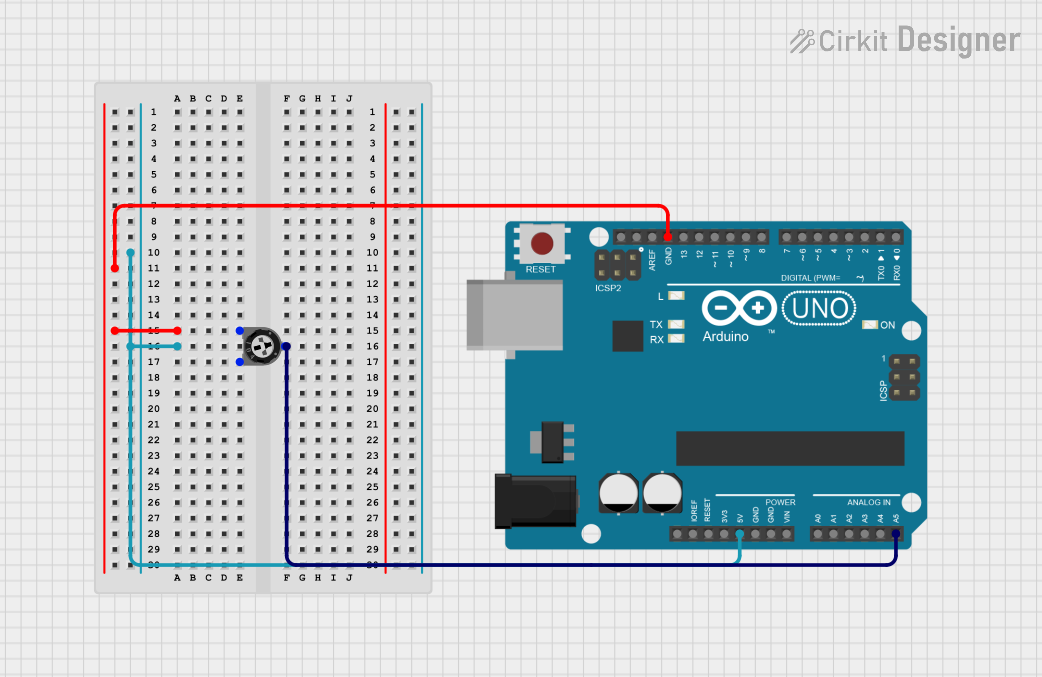
Circuit Documentation
Summary of the Circuit
This circuit consists of an Arduino UNO microcontroller board and a trimmer potentiometer. The potentiometer is used as a variable resistor to provide an analog input to the Arduino UNO. The Arduino UNO reads the analog voltage from the wiper of the potentiometer and outputs the reading through its serial communication interface. This setup can be used for applications requiring user input to adjust a parameter, such as volume control or brightness adjustment.
Component List
Arduino UNO
- Description: A microcontroller board based on the ATmega328P.
- Purpose: Acts as the central processing unit of the circuit, reads analog input, and communicates data.
- Pins: UNUSED, IOREF, Reset, 3.3V, 5V, GND, Vin, A0-A5, SCL, SDA, AREF, D0-D13.
Trimmer Potentiometer
- Description: A three-legged variable resistor with a 10k Ohm resistance.
- Purpose: Provides a variable voltage input to the Arduino UNO.
- Pins: leg1, wiper, leg2.
Wiring Details
Arduino UNO
- 5V: Not connected in this circuit.
- GND: Connected to leg1 of the Trimmer Potentiometer.
- A5: Connected to the wiper of the Trimmer Potentiometer.
Trimmer Potentiometer
- leg1: Connected to GND on the Arduino UNO.
- wiper: Connected to A5 on the Arduino UNO.
- leg2: Not connected in this circuit.
Documented Code
The following code is written for the Arduino UNO microcontroller to read the analog value from the potentiometer and send it over the serial interface.
int odczytanaWartosc = 0;

void setup() {
  Serial.begin(9600); // Initialize serial communication
}

void loop() {
  odczytanaWartosc = analogRead(A5); // Read the voltage at the wiper of the potentiometer
  Serial.println(odczytanaWartosc); // Send the reading to the serial monitor
  delay(200); // Wait to make the readings more readable
}
The code initializes the serial communication at a baud rate of 9600. In the main loop, it reads the analog value from pin A5, where the potentiometer's wiper is connected, and prints this value to the serial monitor. The delay(200) function call adds a 200-millisecond pause between readings to make the output easier to read.