
Arduino UNO Gas Detection System with MQ-2 Sensor and LCD Display
View and Edit Project In Cirkit Designer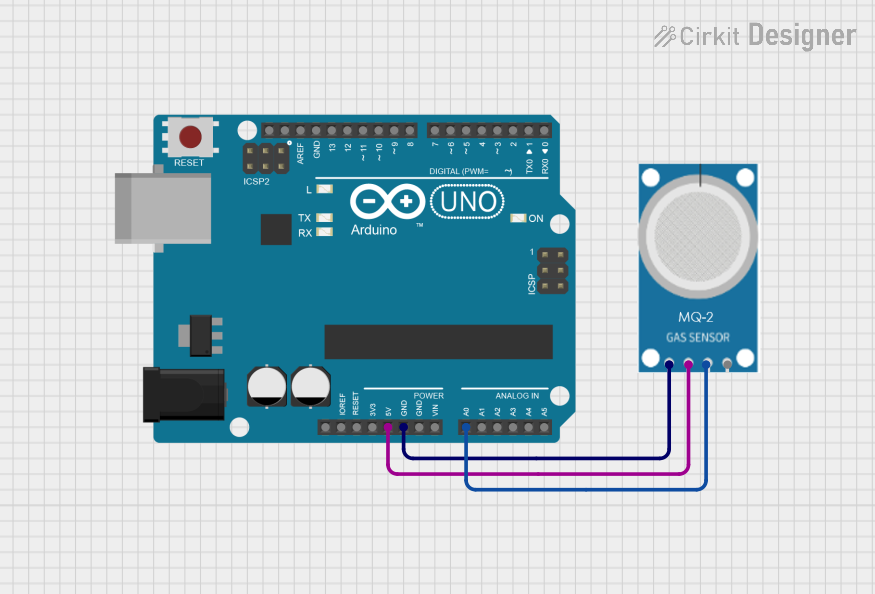
Circuit Documentation
Summary
This circuit involves an Arduino UNO microcontroller interfaced with an MQ-2 gas sensor. The MQ-2 sensor detects various gases and sends analog signals to the Arduino, which processes the data and displays it on an LCD. Additionally, the circuit includes a red LED and a buzzer that are activated when gas concentration exceeds a predefined threshold.
Component List
Arduino UNO
- Description: A microcontroller board based on the ATmega328P.
- Pins: UNUSED, IOREF, Reset, 3.3V, 5V, GND, Vin, A0, A1, A2, A3, A4, A5, SCL, SDA, AREF, D13, D12, D11, D10, D9, D8, D7, D6, D5, D4, D3, D2, D1, D0
MQ-2 Gas Sensor
- Description: A gas sensor capable of detecting LPG, CO, and smoke.
- Pins: GND, VCC, ANALOG, Digital
Wiring Details
Arduino UNO
- 5V: Connected to VCC of the MQ-2 Gas Sensor
- GND: Connected to GND of the MQ-2 Gas Sensor
- A0: Connected to ANALOG of the MQ-2 Gas Sensor
MQ-2 Gas Sensor
- VCC: Connected to 5V of the Arduino UNO
- GND: Connected to GND of the Arduino UNO
- ANALOG: Connected to A0 of the Arduino UNO
Code Documentation
const int mqxPin = A0; // pin A0 MQ2 connected to pin analog A0 Arduino
int redLed = D5; // LED connected to pin 12 Arduino
int buzzer = D6; // Buzzer connected to pin 10 Arduino
int sensorThres = 400; // Threshold value of pin A0 that we desired which indicate concentration of gas detected by Sensor

#include <Wire.h>
#include <LiquidCrystal_I2C.h>
LiquidCrystal_I2C lcd(0x27, 20, 4);
#include <MQ2.h>
int lpg_gas, co_gas, smoke_gas;
int pinAout = A0;
MQ2 mq2(pinAout);

void setLCD()
{
    lcd.init();
    lcd.clear();
    lcd.backlight();
    lcd.setCursor(3, 0);
    lcd.print("Hallo guyss");
    lcd.setCursor(0, 1);
    lcd.print("Kelompok 9 TF-46-02");
    lcd.setCursor(0, 2);
    lcd.print("https://ciwaruga.com");
    lcd.setCursor(0, 3);
    lcd.print("Jl.Abah Muhalim 8B");

    delay(5000);
}

void setup()
{
    pinMode(mqxPin, INPUT);
    pinMode(redLed, OUTPUT);
    pinMode(buzzer, OUTPUT);
    Serial.begin(9600); // Initialization Serial Monitor at Baudrate = 9600
    setLCD();
}

void loop()
{
    int analogSensor = analogRead(mqxPin);
    Serial.print("Output MQ-2 : ");
    Serial.println(analogSensor);
    float* values = mq2.read(true); // jika diset "false" tidak akan dimunculkan di serial monitor

    lpg_gas = mq2.readLPG();
    co_gas = mq2.readCO();
    smoke_gas = mq2.readSmoke();
    lcd.clear();
    lcd.setCursor(0, 0);
    lcd.print("PENGUKURAN GAS/ASAP");
    lcd.setCursor(0, 1);
    lcd.print("LPG :");
    lcd.println(lpg_gas);
    lcd.print(" PPM");
    lcd.setCursor(0, 2);
    lcd.print("CO :");
    lcd.println(co_gas);
    lcd.print(" PPM");
    lcd.setCursor(0, 3);
    lcd.print("SMOKE:");
    lcd.print(smoke_gas);
    lcd.print(" PPM");
    delay(1000);

    // Check whether it is greater than the threshold value
    if (analogSensor > sensorThres)
    {
        digitalWrite(redLed, HIGH);
        tone(buzzer, 1000, 200);
    }
    else
    {
        digitalWrite(redLed, LOW);
        noTone(buzzer);
    }
    delay(1000); // Delay 1 second for next reading
}
This code initializes the MQ-2 sensor and reads the gas concentration values. It displays the values on an LCD and activates a red LED and buzzer if the gas concentration exceeds the threshold.