
Arduino UNO-Based Smart Clothesline with Rain, Temperature, and Object Detection
View and Edit Project In Cirkit Designer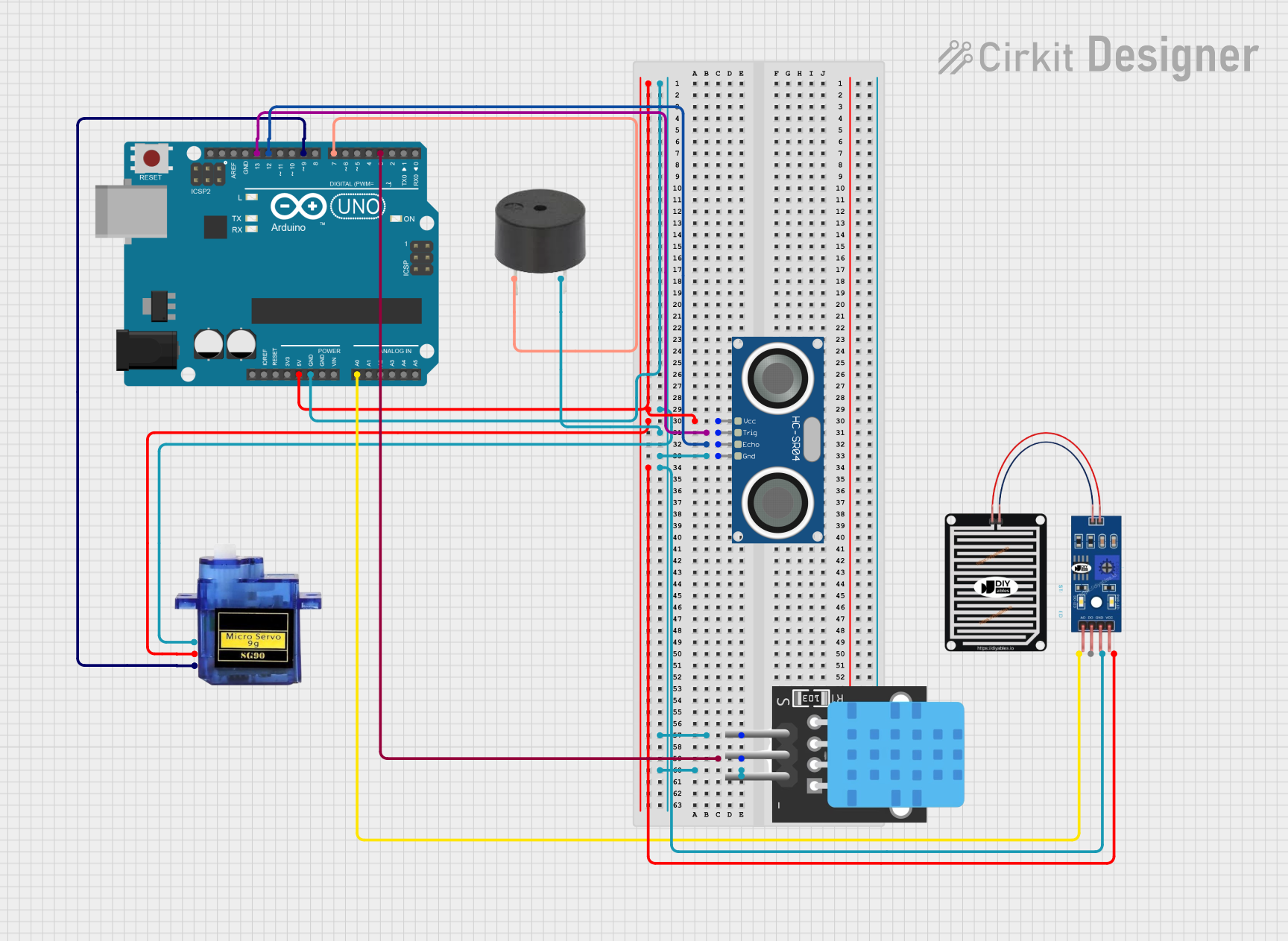
Circuit Documentation
Summary
This circuit is designed to control a clothesline system using an Arduino UNO. The system includes a rain sensor, a temperature sensor, an ultrasonic sensor, a micro servo motor, and a buzzer. The Arduino UNO reads data from the sensors and controls the servo motor and buzzer based on the sensor inputs.
Component List
Arduino UNO
- Description: A microcontroller board based on the ATmega328P.
- Pins: UNUSED, IOREF, Reset, 3.3V, 5V, GND, Vin, A0, A1, A2, A3, A4, A5, SCL, SDA, AREF, D13, D12, D11, D10, D9, D8, D7, D6, D5, D4, D3, D2, D1, D0
RAIN SENSOR
- Description: A sensor to detect rain.
- Pins: AO, DO, GRD, VCC
Micro servo 9G
- Description: A small servo motor for precise control.
- Pins: GND, +5V, PWM
HC-SR04 Ultrasonic Sensor
- Description: An ultrasonic sensor for distance measurement.
- Pins: VCC, TRIG, ECHO, GND
TEMP
- Description: A temperature sensor.
- Pins: 5V, D3, GND
Buzzer
- Description: A simple buzzer for sound output.
- Pins: PIN, GND
Wiring Details
Arduino UNO
5V connected to:
- HC-SR04 Ultrasonic Sensor (VCC)
- Micro servo 9G (+5V)
- RAIN SENSOR (VCC)
GND connected to:
- HC-SR04 Ultrasonic Sensor (GND)
- TEMP (GND)
- Micro servo 9G (GND)
- Buzzer (GND)
- RAIN SENSOR (GRD)
D13 connected to:
- HC-SR04 Ultrasonic Sensor (TRIG)
D12 connected to:
- HC-SR04 Ultrasonic Sensor (ECHO)
D3 connected to:
- TEMP (D3)
A0 connected to:
- RAIN SENSOR (AO)
D9 connected to:
- Micro servo 9G (PWM)
D7 connected to:
- Buzzer (PIN)
RAIN SENSOR
VCC connected to:
- Arduino UNO (5V)
GRD connected to:
- Arduino UNO (GND)
AO connected to:
- Arduino UNO (A0)
Micro servo 9G
+5V connected to:
- Arduino UNO (5V)
GND connected to:
- Arduino UNO (GND)
PWM connected to:
- Arduino UNO (D9)
HC-SR04 Ultrasonic Sensor
VCC connected to:
- Arduino UNO (5V)
TRIG connected to:
- Arduino UNO (D13)
ECHO connected to:
- Arduino UNO (D12)
GND connected to:
- Arduino UNO (GND)
TEMP
5V connected to:
- Arduino UNO (5V)
D3 connected to:
- Arduino UNO (D3)
GND connected to:
- Arduino UNO (GND)
Buzzer
PIN connected to:
- Arduino UNO (D7)
GND connected to:
- Arduino UNO (GND)
Code Documentation
#include <Servo.h>
#include <DHT.h>

// Pin definitions
const int servoPin = 9;
const int buzzerPin = 8;
const int trigPin = 13;
const int echoPin = 12;
const int rainSensorPin = A0;
const int tempSensorPin = 3;

// Create Servo object
Servo servo;

// DHT11 setup
#define DHTTYPE DHT11
DHT dht(tempSensorPin, DHTTYPE);

void setup() {
  servo.attach(servoPin); // Attach servo to the pin
  pinMode(buzzerPin, OUTPUT);
  pinMode(trigPin, OUTPUT);
  pinMode(echoPin, INPUT);
  pinMode(rainSensorPin, INPUT);
  dht.begin();
  servo.write(0); // Start with clothesline closed
  delay(1000); // Wait for 1 second
}

void loop() {
  // Read rain sensor
  int rainValue = analogRead(rainSensorPin);
  bool isRaining = rainValue < 500; // Adjust threshold as needed

  // Read temperature sensor
  float temp = dht.readTemperature();
  bool isHot = temp > 10.0;

  // Read ultrasonic sensor
  long duration, distance;
  digitalWrite(trigPin, LOW);
  delayMicroseconds(2);
  digitalWrite(trigPin, HIGH);
  delayMicroseconds(10);
  digitalWrite(trigPin, LOW);
  duration = pulseIn(echoPin, HIGH);
  distance = (duration / 2) / 29.1;
  bool objectDetected = distance < 50; // Adjust threshold as needed

  // Determine servo and buzzer state
  if (isRaining || isHot || !objectDetected) {
    servo.write(0); // Close clothesline
    digitalWrite(buzzerPin, HIGH); // Turn on buzzer
  } else {
    servo.write(180); // Open clothesline
    digitalWrite(buzzerPin, LOW); // Turn off buzzer
  }

  delay(1000); // Wait for 1 second before next loop
}
This code controls the clothesline system by reading data from the rain sensor, temperature sensor, and ultrasonic sensor. Based on the sensor inputs, it decides whether to open or close the clothesline and whether to turn the buzzer on or off.