
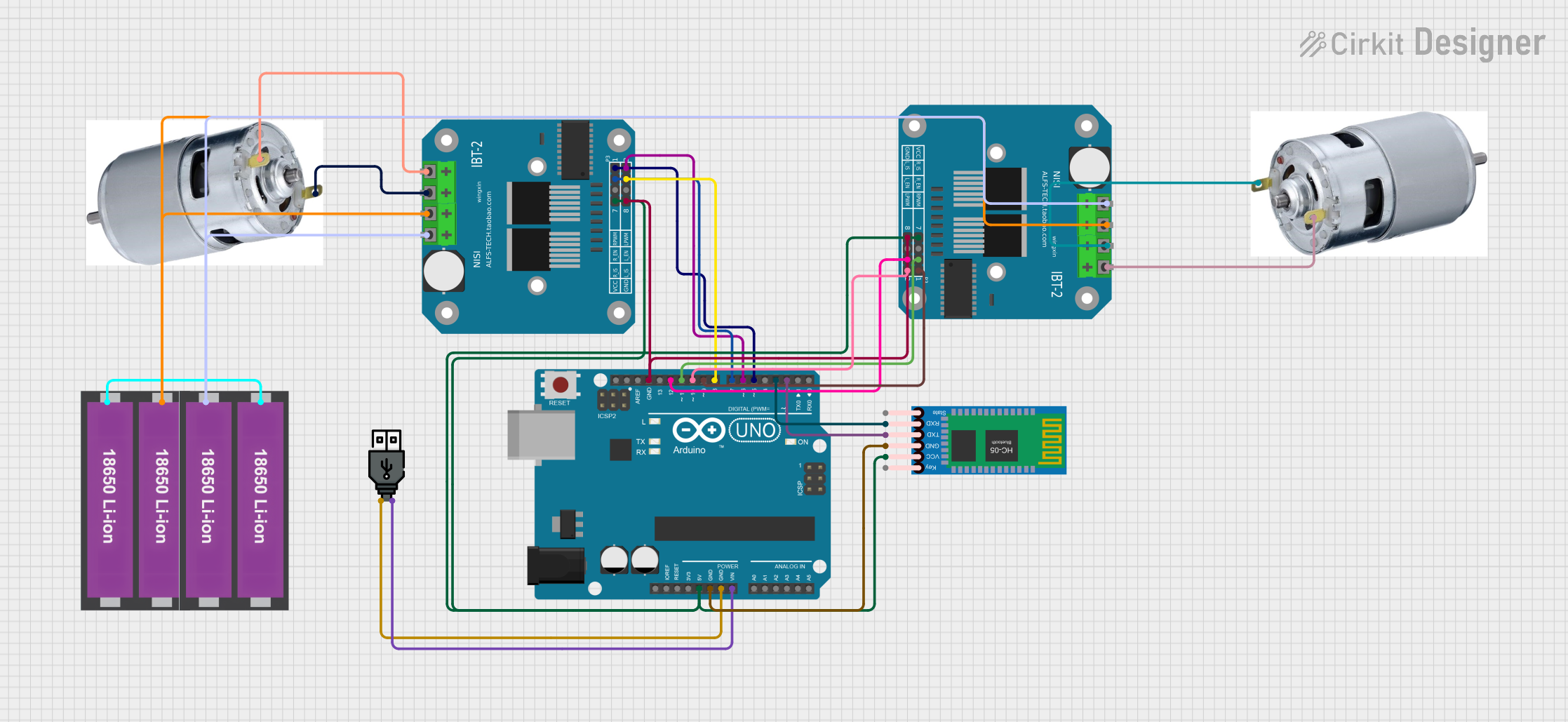
Circuit Documentation
Summary
This circuit is designed to control two 775 motors using an Arduino UNO and two BTS7960 motor drivers. The circuit also includes an HC-05 Bluetooth module for wireless communication and is powered by a USB power source and two sets of 18650 Li-ion batteries.
Component List
Arduino UNO
- Description: Microcontroller board based on the ATmega328P.
- Pins: UNUSED, IOREF, Reset, 3.3V, 5V, GND, Vin, A0, A1, A2, A3, A4, A5, SCL, SDA, AREF, D13, D12, D11, D10, D9, D8, D7, D6, D5, D4, D3, D2, D1, D0
BTS7960 Motor Driver (2 units)
- Description: High-current motor driver module.
- Pins: Pin 1, Pin 2, Pin 3, Pin 4, Pin 5, Pin 6, Pin 7, Pin 8, Pin 9, Pin 10, Pin 11, Pin 12
18650 Li-ion Battery x 2 (2 units)
- Description: Rechargeable lithium-ion battery.
- Pins: +, -
775 Motor (2 units)
- Description: High-torque DC motor.
- Pins: positive, negative
USB Power
- Description: USB power source.
- Pins: +, -
HC-05 Bluetooth Module
- Description: Bluetooth module for wireless communication.
- Pins: Key, VCC, GND, TXD, RXD, State
Wiring Details
Arduino UNO
- 5V: Connected to Pin 5 of both BTS7960 Motor Drivers and VCC of HC-05 Bluetooth Module.
- GND: Connected to GND of HC-05 Bluetooth Module, USB power (-), and Pin 1 of both BTS7960 Motor Drivers.
- Vin: Connected to USB power (+).
- D12: Connected to Pin 3 of BTS7960 Motor Driver (Right).
- D11: Connected to Pin 7 of BTS7960 Motor Driver (Right).
- D10: Connected to Pin 4 of BTS7960 Motor Driver (Right).
- D9: Connected to Pin 8 of BTS7960 Motor Driver (Right).
- D8: Connected to Pin 3 of BTS7960 Motor Driver (Left).
- D7: Connected to Pin 7 of BTS7960 Motor Driver (Left).
- D6: Connected to Pin 4 of BTS7960 Motor Driver (Left).
- D5: Connected to Pin 8 of BTS7960 Motor Driver (Left).
- D3: Connected to RXD of HC-05 Bluetooth Module.
- D2: Connected to TXD of HC-05 Bluetooth Module.
BTS7960 Motor Driver (Left)
- Pin 1: Connected to GND of Arduino UNO.
- Pin 3: Connected to D8 of Arduino UNO.
- Pin 4: Connected to D6 of Arduino UNO.
- Pin 5: Connected to 5V of Arduino UNO.
- Pin 7: Connected to D7 of Arduino UNO.
- Pin 8: Connected to D5 of Arduino UNO.
- Pin 9: Connected to negative of 775 Motor (Left).
- Pin 10: Connected to positive of 775 Motor (Left).
- Pin 11: Connected to + of 18650 Li-ion Battery.
- Pin 12: Connected to - of 18650 Li-ion Battery.
BTS7960 Motor Driver (Right)
- Pin 1: Connected to GND of Arduino UNO.
- Pin 3: Connected to D12 of Arduino UNO.
- Pin 4: Connected to D10 of Arduino UNO.
- Pin 5: Connected to 5V of Arduino UNO.
- Pin 7: Connected to D11 of Arduino UNO.
- Pin 8: Connected to D9 of Arduino UNO.
- Pin 9: Connected to negative of 775 Motor (Right).
- Pin 10: Connected to positive of 775 Motor (Right).
- Pin 11: Connected to + of 18650 Li-ion Battery.
- Pin 12: Connected to - of 18650 Li-ion Battery.
18650 Li-ion Battery x 2
- +: Connected to Pin 11 of both BTS7960 Motor Drivers.
- -: Connected to Pin 12 of both BTS7960 Motor Drivers.
775 Motor (Left)
- negative: Connected to Pin 9 of BTS7960 Motor Driver (Left).
- positive: Connected to Pin 10 of BTS7960 Motor Driver (Left).
775 Motor (Right)
- negative: Connected to Pin 9 of BTS7960 Motor Driver (Right).
- positive: Connected to Pin 10 of BTS7960 Motor Driver (Right).
USB Power
- +: Connected to Vin of Arduino UNO.
- -: Connected to GND of Arduino UNO.
HC-05 Bluetooth Module
- VCC: Connected to 5V of Arduino UNO.
- GND: Connected to GND of Arduino UNO.
- RXD: Connected to D3 of Arduino UNO.
- TXD: Connected to D2 of Arduino UNO.
Documented Code
// Motor 1 (Left) Pins
#define RPWM1 5
#define LPWM1 6
#define REN1 7
#define LEN1 8

// Motor 2 (Right) Pins
#define RPWM2 9
#define LPWM2 10
#define REN2 11
#define LEN2 12

void setup() {
  // Set pins as output
  pinMode(RPWM1, OUTPUT);
  pinMode(LPWM1, OUTPUT);
  pinMode(REN1, OUTPUT);
  pinMode(LEN1, OUTPUT);

  pinMode(RPWM2, OUTPUT);
  pinMode(LPWM2, OUTPUT);
  pinMode(REN2, OUTPUT);
  pinMode(LEN2, OUTPUT);

  // Enable both motors
  digitalWrite(REN1, HIGH);
  digitalWrite(LEN1, HIGH);
  digitalWrite(REN2, HIGH);
  digitalWrite(LEN2, HIGH);
}

void loop() {
  // Move Forward
  moveForward(200); // Speed: 0-255
  delay(2000);

  // Move Backward
  moveBackward(200); // Speed: 0-255
  delay(2000);

  // Turn Left
  turnLeft(200); // Speed: 0-255
  delay(2000);

  // Turn Right
  turnRight(200); // Speed: 0-255
  delay(2000);

  // Stop
  stopMotors();
  delay(2000);
}

// Function to move forward
void moveForward(int speed) {
  analogWrite(RPWM1, speed);
  analogWrite(LPWM1, 0);
  analogWrite(RPWM2, speed);
  analogWrite(LPWM2, 0);
}

// Function to move backward
void moveBackward(int speed) {
  analogWrite(RPWM1, 0);
  analogWrite(LPWM1, speed);
  analogWrite(RPWM2, 0);
  analogWrite(LPWM2, speed);
}

// Function to turn left
void turnLeft(int speed) {
  analogWrite(RPWM1, 0);
  analogWrite(LPWM1, speed); // Left motor moves backward
  analogWrite(RPWM2, speed);
  analogWrite(LPWM2, 0); // Right motor moves forward
}

// Function to turn right
void turnRight(int speed) {
  analogWrite(RPWM1, speed);
  analogWrite(LPWM1, 0); // Left motor moves forward
  analogWrite(RPWM2, 0);
  analogWrite(LPWM2, speed); // Right motor moves backward
}

// Function to stop both motors
void stopMotors() {
  analogWrite(RPWM1, 0);
  analogWrite(LPWM1, 0);
  analogWrite(RPWM2, 0);
  analogWrite(LPWM2, 0);
}