
Arduino Nano-Based Sign Language Translator with Flex Sensors and MPU-6050
View and Edit Project In Cirkit Designer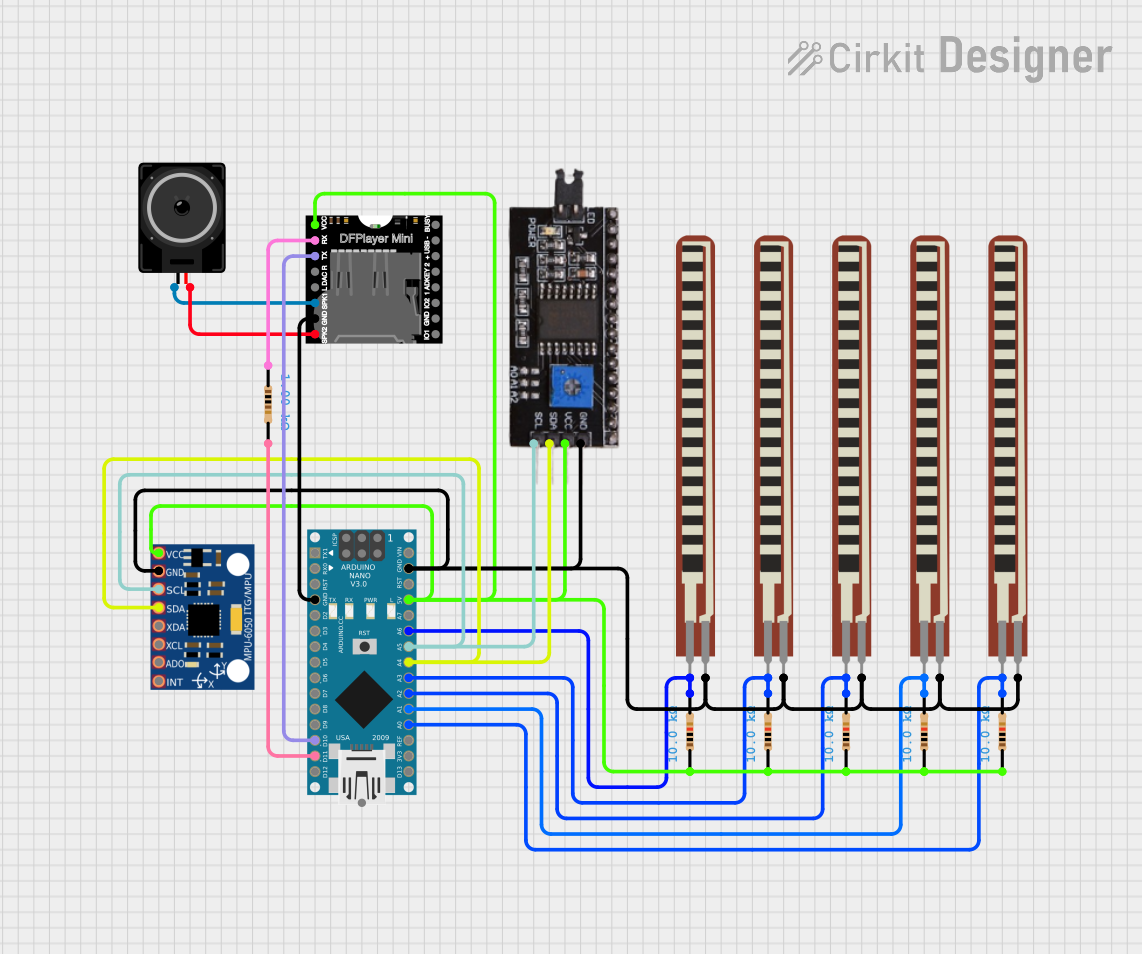
Circuit Documentation
Summary of the Circuit
This circuit is designed to function as a Sign Language Translator. It utilizes an Arduino Nano microcontroller to read values from five flex sensors and an MPU-6050 gyroscope/accelerometer. The data from these sensors is processed by the Arduino Nano and outputted to the serial monitor for translation. Additionally, the circuit includes a DFPlayer MINI module for audio playback, which is connected to a loudspeaker.
Component List
Arduino Nano
- Microcontroller board based on the ATmega328P
- It has a variety of digital and analog I/O pins.
Resistor (10k Ohms)
- Passive two-terminal electrical component
- Used to limit current or divide voltages in the circuit.
2.2 inch Basic Flex Resistor
- A flexible sensor that changes resistance as it is bent.
- Used to detect bending or flexing.
MPU-6050
- A motion-tracking device with a 3-axis gyroscope and a 3-axis accelerometer.
- Used for motion sensing in six degrees of freedom.
DFPlayer MINI
- A small and low-cost MP3 module with a simplified output directly to the speaker.
- Used for audio playback.
Loudspeaker
- An electroacoustic transducer that converts an electrical audio signal into a corresponding sound.
- Connected to the DFPlayer MINI for sound output.
I2C module
- A communication module that allows multiple slave devices to be controlled with just two wires.
- Used for communication between the Arduino Nano and other I2C devices.
Wiring Details
Arduino Nano
GNDconnected to the ground of the circuit.D10connected to theTXpin of the DFPlayer MINI.D11/MOSIconnected to a 10k Ohm resistor.5Vconnected to theVCCof the I2C module, DFPlayer MINI, and MPU-6050.A0toA3,A6connected to the 2.2 inch Basic Flex Resistors.A4(SDA) andA5(SCL) connected to the I2C module and MPU-6050 for I2C communication.
Resistor (10k Ohms)
- One pin connected to the Arduino Nano or other components as per the net list.
- The other pin connected to the 2.2 inch Basic Flex Resistors or DFPlayer MINI.
2.2 inch Basic Flex Resistor
- One pin connected to the analog pins
A0toA3,A6on the Arduino Nano. - The other pin connected to the 10k Ohm resistors.
MPU-6050
VCCconnected to the 5V supply from the Arduino Nano.GNDconnected to the ground of the circuit.SCLandSDAconnected to theA5andA4pins of the Arduino Nano for I2C communication.
DFPlayer MINI
VCCconnected to the 5V supply from the Arduino Nano.GNDconnected to the ground of the circuit.TXconnected toD10on the Arduino Nano.RXconnected through a 1k Ohm resistor to the Arduino Nano.SPK1andSPK2connected to the loudspeaker.
Loudspeaker
- One pin connected to
SPK1and the other toSPK2on the DFPlayer MINI.
I2C module
SCLandSDAconnected to theA5andA4pins of the Arduino Nano for I2C communication.VCCconnected to the 5V supply from the Arduino Nano.GNDconnected to the ground of the circuit.
Documented Code
/*
 * Sign Language Translator
 * This Arduino sketch reads values from 5 flex sensors and an MPU-6050
 * gyroscope/accelerometer. It then prints these values to the serial monitor.
 */

#include <Wire.h>
#include <MPU6050.h>

// Flex sensor pins
const int flexPins[5] = {A0, A1, A2, A3, A6};

// MPU-6050 instance
MPU6050 mpu;

void setup() {
  Serial.begin(9600);
  Wire.begin();
  mpu.initialize();
  if (!mpu.testConnection()) {
    Serial.println("MPU6050 connection failed");
    while (1);
  }
  Serial.println("MPU6050 connection successful");
}

void loop() {
  // Read flex sensor values
  int flexValues[5];
  for (int i = 0; i < 5; i++) {
    flexValues[i] = analogRead(flexPins[i]);
  }

  // Read MPU-6050 values
  int16_t ax, ay, az, gx, gy, gz;
  mpu.getMotion6(&ax, &ay, &az, &gx, &gy, &gz);

  // Print flex sensor values
  Serial.print("Flex: ");
  for (int i = 0; i < 5; i++) {
    Serial.print(flexValues[i]);
    if (i < 4) Serial.print(", ");
  }
  Serial.print("\t");

  // Print MPU-6050 values
  Serial.print("Accel: ");
  Serial.print(ax); Serial.print(", ");
  Serial.print(ay); Serial.print(", ");
  Serial.print(az); Serial.print("\t");
  Serial.print("Gyro: ");
  Serial.print(gx); Serial.print(", ");
  Serial.print(gy); Serial.print(", ");
  Serial.print(gz);
  Serial.println();

  delay(500); // Delay for readability
}
This code is responsible for initializing the MPU-6050 sensor and reading the values from the flex sensors and the MPU-6050. It then prints these values to the serial monitor for further processing or display.