
Smart Water Bottle with Arduino UNO and ESP8266 for Real-Time Monitoring
View and Edit Project In Cirkit Designer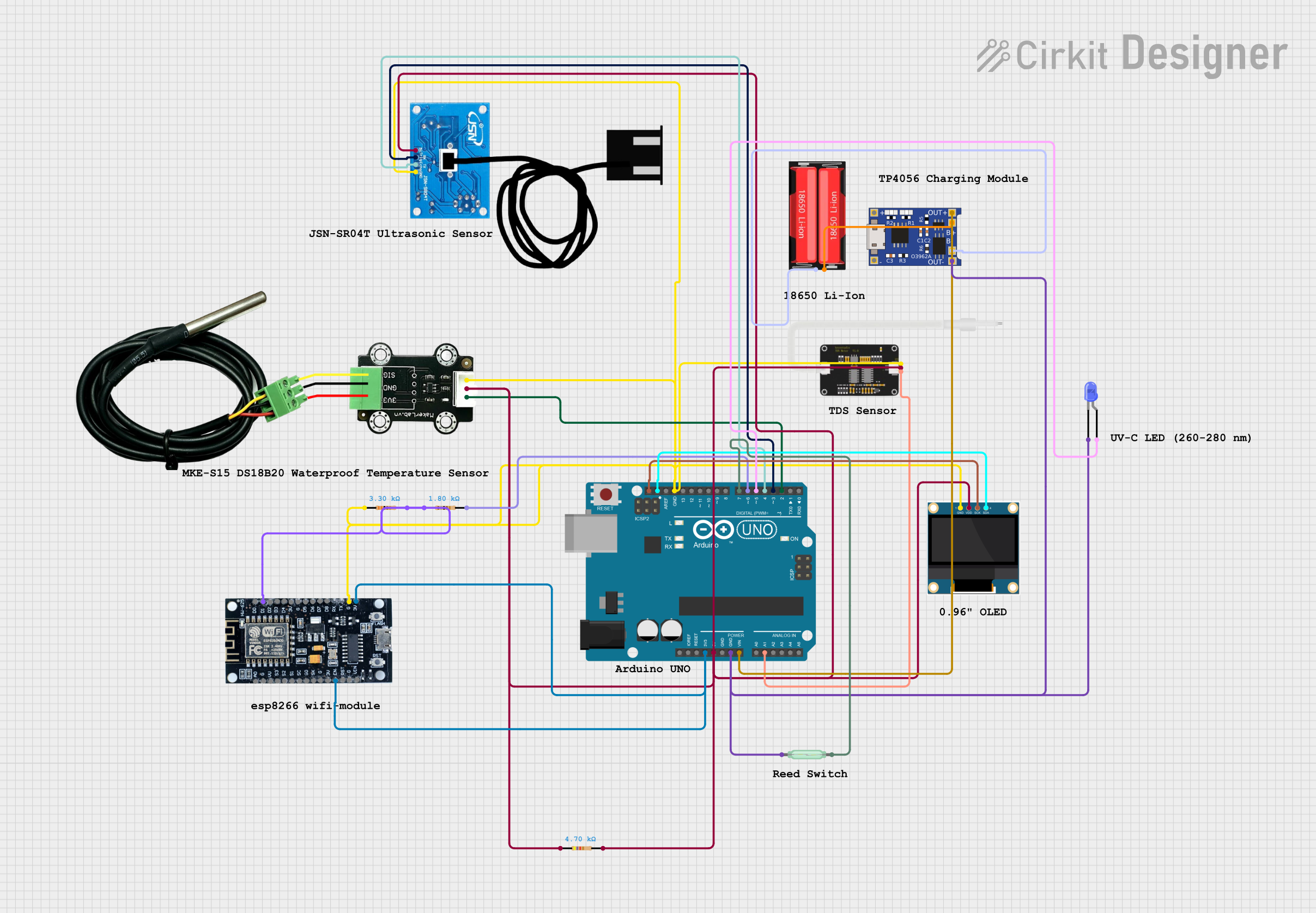
Smart Water Bottle Circuit Documentation
Summary
This document provides a detailed overview of the Smart Water Bottle circuit. The circuit monitors water quality, temperature, water level, and lid status using various sensors. The data is displayed on an OLED screen and can be accessed wirelessly via WiFi. The circuit includes an Arduino UNO, an ESP8266 module, and several sensors and components.
Component List
MKE-S15 DS18B20 Waterproof Temperature Sensor
- Pins: SIG, 5V, GND
- Description: Measures the temperature of the water.
Resistor (4700 Ohms)
- Pins: pin1, pin2
- Description: Used for current limiting or voltage division.
TDS Sensor
- Pins: AI, GND, 5V
- Description: Measures the Total Dissolved Solids (TDS) in the water.
Resistor (1800 Ohms)
- Pins: pin1, pin2
- Description: Used for current limiting or voltage division.
Resistor (3300 Ohms)
- Pins: pin1, pin2
- Description: Used for current limiting or voltage division.
18650 Li-Ion Battery
- Pins: Positive, Negative
- Description: Provides power to the circuit.
TP4056
- Pins: OUT-, B-, B+, OUT+, IN-, IN+
- Description: Battery charging module for the 18650 Li-Ion battery.
Reed Switch
- Pins: pin 1, pin 2
- Description: Detects the status of the water bottle lid.
Arduino UNO
- Pins: UNUSED, IOREF, Reset, 3.3V, 5V, GND, Vin, A0, A1, A2, A3, A4, A5, SCL, SDA, AREF, D13, D12, D11, D10, D9, D8, D7, D6, D5, D4, D3, D2, D1, D0
- Description: Main microcontroller for the circuit.
JSN-SR04T Ultrasonic Sensor
- Pins: 5V, Trig, Echo, GND
- Description: Measures the water level in the bottle.
ESP8266
- Pins: 3V, G, D8, D7, D6, D5, D4, D3, D2, D1, D0, A0, S3, S2, S1, SC, S0, SK, EN, VIN, RST, VU
- Description: WiFi module for wireless communication.
0.96" OLED
- Pins: GND, VDD, SCK, SDA
- Description: Displays the sensor data.
LED: Two Pin (blue)
- Pins: cathode, anode
- Description: Indicates the status of the circuit.
Wiring Details
MKE-S15 DS18B20 Waterproof Temperature Sensor
- SIG: Connected to Arduino UNO D2
- 5V: Connected to Arduino UNO 5V
- GND: Connected to common ground
Resistor (4700 Ohms)
- pin1: Connected to Arduino UNO 5V
- pin2: Connected to Arduino UNO 5V
TDS Sensor
- AI: Connected to Arduino UNO A1
- 5V: Connected to Arduino UNO 5V
- GND: Connected to common ground
Resistor (1800 Ohms)
- pin1: Connected to ESP8266 D1
- pin2: Connected to Arduino UNO D6
Resistor (3300 Ohms)
- pin1: Connected to common ground
- pin2: Connected to ESP8266 D1
18650 Li-Ion Battery
- Positive: Connected to TP4056 B+
- Negative: Connected to TP4056 B-
TP4056
- OUT-: Connected to common ground
- OUT+: Connected to Arduino UNO Vin
- B+: Connected to 18650 Li-Ion Battery Positive
- B-: Connected to 18650 Li-Ion Battery Negative
Reed Switch
- pin 1: Connected to common ground
- pin 2: Connected to Arduino UNO D7
Arduino UNO
- 3.3V: Connected to ESP8266 3V
- 5V: Connected to JSN-SR04T Ultrasonic Sensor 5V, MKE-S15 DS18B20 Waterproof Temperature Sensor 5V, 0.96" OLED VDD, TDS Sensor 5V, Resistor (4700 Ohms) pin1, Resistor (4700 Ohms) pin2
- GND: Connected to common ground, LED: Two Pin (blue) cathode, Reed Switch pin 1, TP4056 OUT-
- Vin: Connected to TP4056 OUT+
- A1: Connected to TDS Sensor AI
- SCL: Connected to 0.96" OLED SCK
- SDA: Connected to 0.96" OLED SDA
- D2: Connected to MKE-S15 DS18B20 Waterproof Temperature Sensor SIG
- D3: Connected to JSN-SR04T Ultrasonic Sensor Trig
- D4: Connected to JSN-SR04T Ultrasonic Sensor Echo
- D5: Connected to LED: Two Pin (blue) anode
- D6: Connected to Resistor (1800 Ohms) pin2
- D7: Connected to Reed Switch pin 2
JSN-SR04T Ultrasonic Sensor
- 5V: Connected to Arduino UNO 5V
- Trig: Connected to Arduino UNO D3
- Echo: Connected to Arduino UNO D4
- GND: Connected to common ground
ESP8266
- 3V: Connected to Arduino UNO 3.3V
- G: Connected to common ground
- D1: Connected to Resistor (3300 Ohms) pin2, Resistor (1800 Ohms) pin1
- EN: Connected to ESP8266 3V
0.96" OLED
- GND: Connected to common ground
- VDD: Connected to Arduino UNO 5V
- SCK: Connected to Arduino UNO SCL
- SDA: Connected to Arduino UNO SDA
LED: Two Pin (blue)
- cathode: Connected to common ground
- anode: Connected to Arduino UNO D5
Documented Code
Arduino UNO Code
/*
 * Smart Water Bottle
 * This Arduino sketch reads data from a temperature sensor, TDS sensor,
 * ultrasonic sensor, and reed switch to monitor the water quality,
 * temperature, level, and lid status of a smart water bottle. The data
 * is displayed on an OLED screen and can be accessed wirelessly via WiFi.
 */

#include <Wire.h>
#include <Adafruit_GFX.h>
#include <Adafruit_SSD1306.h>
#include <OneWire.h>
#include <DallasTemperature.h>
#include <ESP8266WiFi.h>

#define SCREEN_WIDTH 128
#define SCREEN_HEIGHT 64
#define OLED_RESET -1
Adafruit_SSD1306 display(SCREEN_WIDTH, SCREEN_HEIGHT, &Wire, OLED_RESET);

#define ONE_WIRE_BUS 2
OneWire oneWire(ONE_WIRE_BUS);
DallasTemperature sensors(&oneWire);

#define TDS_PIN A1
#define TRIG_PIN 3
#define ECHO_PIN 4
#define REED_PIN 7

const char* ssid = "your_SSID";
const char* password = "your_PASSWORD";

WiFiServer server(80);

const int maxWaterLevel = 30; // Maximum water level in cm
int previousWaterLevel = maxWaterLevel;

void setup() {
  Serial.begin(9600);
  sensors.begin();
  pinMode(TRIG_PIN, OUTPUT);
  pinMode(ECHO_PIN, INPUT);
  pinMode(REED_PIN, INPUT);
  if(!display.begin(SSD1306_I2C_ADDRESS, OLED_RESET)) {
    Serial.println(F("SSD1306 allocation failed"));
    for(;;);
  }
  display.display();
  delay(2000);
  display.clearDisplay();

  WiFi.begin(ssid, password);
  while (WiFi.status() != WL_CONNECTED) {
    delay(500);
    Serial.print(F("."));
  }
  Serial.println(F("WiFi connected"));
  server.begin();
  Serial.println(F("Server started"));
  Serial.print(F("IP Address: "));
  Serial.println(WiFi.localIP());
}

void loop() {
  sensors.requestTemperatures();
  float temperature = sensors.getTempCByIndex(0);
  int tdsValue = analogRead(TDS_PIN);
  long duration, distance;
  digitalWrite(TRIG_PIN, LOW);
  delayMicroseconds(2);
  digitalWrite(TRIG_PIN, HIGH);
  delay