
Arduino UNO Temperature Monitoring System with DS18B20 Sensor and Pull-Up Resistor
View and Edit Project In Cirkit Designer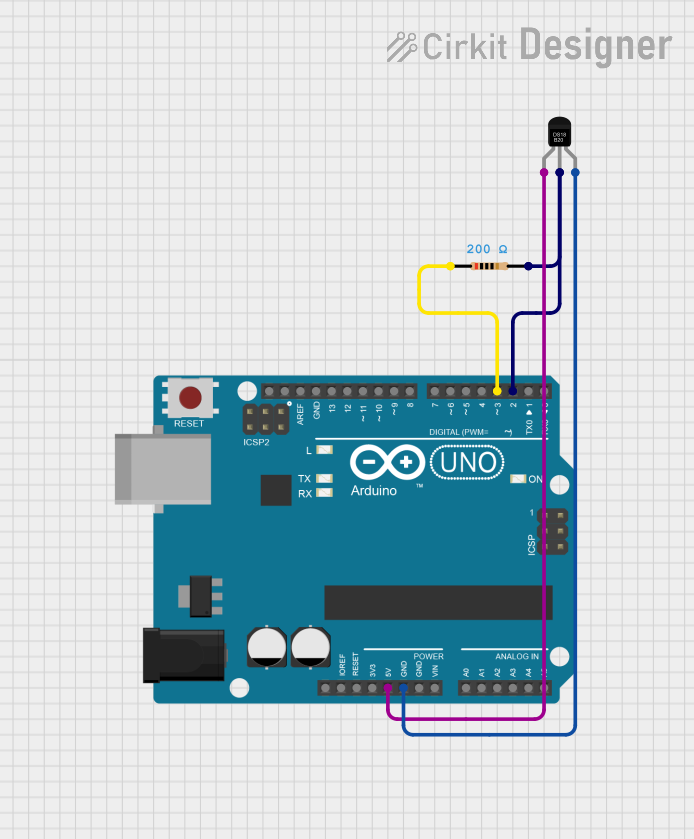
Circuit Documentation
Summary
This circuit is designed to read temperature data from a DS18B20 sensor using an Arduino UNO. The temperature data is then printed to the serial console. A pull-up resistor is used on the data line of the DS18B20 sensor.
Component List
Arduino UNO
- Description: A microcontroller board based on the ATmega328P.
- Pins: UNUSED, IOREF, Reset, 3.3V, 5V, GND, Vin, A0, A1, A2, A3, A4, A5, SCL, SDA, AREF, D13, D12, D11, D10, D9, D8, D7, D6, D5, D4, D3, D2, D1, D0
DS18B20
- Description: A digital temperature sensor.
- Pins: VDD, DQ, GND
Resistor
- Description: A resistor with a resistance of 200 Ohms.
- Pins: pin1, pin2
- Properties:
- Resistance: 200 Ohms
Wiring Details
Arduino UNO
- 5V is connected to VDD of the DS18B20.
- GND is connected to GND of the DS18B20.
- D3 is connected to pin1 of the Resistor.
- D2 is connected to DQ of the DS18B20 and pin2 of the Resistor.
DS18B20
- VDD is connected to 5V of the Arduino UNO.
- GND is connected to GND of the Arduino UNO.
- DQ is connected to D2 of the Arduino UNO and pin2 of the Resistor.
Resistor
- pin1 is connected to D3 of the Arduino UNO.
- pin2 is connected to DQ of the DS18B20 and D2 of the Arduino UNO.
Code Documentation
/*
 * This Arduino sketch reads temperature data from a DS18B20 sensor
 * connected to pin D2 and prints the temperature to the serial console.
 * Pin D3 is set to HIGH to act as a pull-up resistor for the DS18B20 data line.
 */

#include <OneWire.h>
#include <DallasTemperature.h>

#define ONE_WIRE_BUS 2
#define PULLUP_PIN 3

OneWire oneWire(ONE_WIRE_BUS);
DallasTemperature sensors(&oneWire);

void setup() {
  // Set D3 as output and set it HIGH for pull-up
  pinMode(3, OUTPUT);
  digitalWrite(3, HIGH);

  // Start serial communication
  Serial.begin(9600);
  // Start up the library
  sensors.begin();
}

void loop() {
  // Request temperature readings
  sensors.requestTemperatures();
  // Fetch and print the temperature in Celsius
  float temperatureC = sensors.getTempCByIndex(0);
  Serial.print("Temperature: ");
  Serial.print(temperatureC);
  Serial.println(" °C");
  // Wait 1 second before repeating
  delay(1000);
}
This code initializes the DS18B20 sensor and sets up a pull-up resistor on pin D3. It then continuously reads the temperature from the sensor and prints it to the serial console every second.