
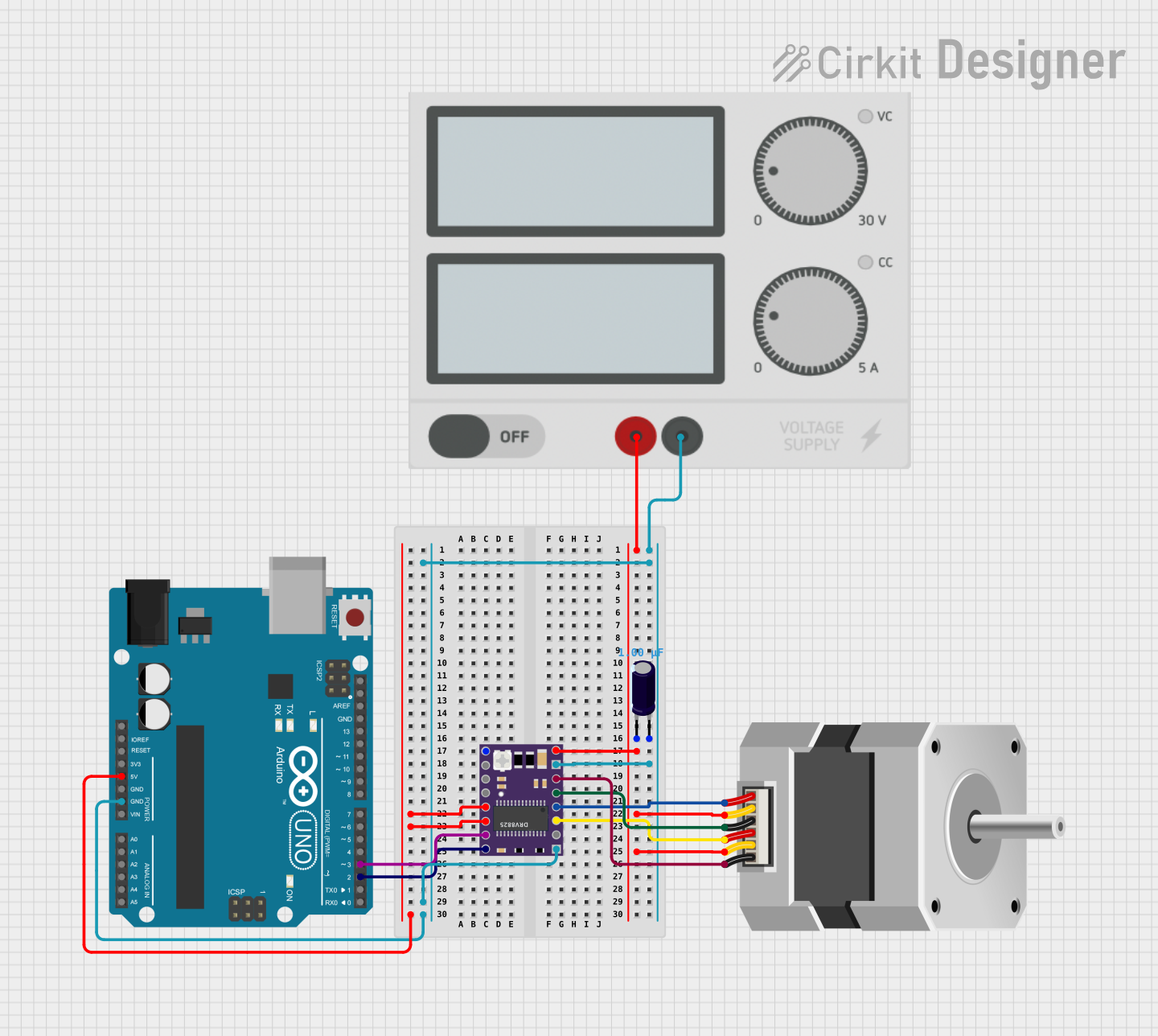
Circuit Documentation
Summary
This circuit is designed to control a unipolar stepper motor using a DRV8825 stepper motor driver module, which is interfaced with an Arduino UNO microcontroller. The DRV8825 module allows for precise control of the motor steps, while the Arduino UNO is programmed to set the direction and speed of the motor. An electrolytic capacitor is used to stabilize the power supply to the motor driver. The power supply provides the necessary voltage and current to drive the motor.
Component List
DRV 8825 Stepper Motor Driver
- Pins: EN, M0, M1, M2, RST, SLP, STEP, DIR, VMOT, GND MOTOR, B2, B1, A1, A2, FAULT, GND LOGIC
- Description: A module used to drive stepper motors with up to 1/32 microstepping.
Stepper Motor (Unipolar)
- Pins: D, COMMON_2, B, C, COMMON_1, A
- Description: A unipolar stepper motor that converts digital pulses into mechanical rotation.
Arduino UNO
- Pins: UNUSED, IOREF, Reset, 3.3V, 5V, GND, Vin, A0, A1, A2, A3, A4, A5, SCL, SDA, AREF, D13, D12, D11, D10, D9, D8, D7, D6, D5, D4, D3, D2, D1, D0
- Description: A microcontroller board based on the ATmega328P, used for controlling the logic of the circuit.
Electrolytic Capacitor
- Pins: -, +
- Description: A capacitor used for filtering and stabilizing the DC power supply.
- Properties: Capacitance: 1 µF (microfarads)
Power Supply
- Pins: +, -
- Description: Provides the required DC voltage and current to power the circuit components.
Wiring Details
DRV 8825 Stepper Motor Driver
- VMOT connected to Power Supply (+)
- GND MOTOR connected to Power Supply (-)
- GND LOGIC connected to Arduino UNO (GND)
- RST connected to Arduino UNO (5V)
- SLP connected to Arduino UNO (5V)
- STEP connected to Arduino UNO (D3)
- DIR connected to Arduino UNO (D2)
- B2 connected to Stepper Motor (D)
- B1 connected to Stepper Motor (C)
- A1 connected to Stepper Motor (A)
- A2 connected to Stepper Motor (B)
Stepper Motor (Unipolar)
- COMMON_1 connected to Power Supply (+)
- COMMON_2 connected to Power Supply (+)
- D connected to DRV 8825 (B2)
- C connected to DRV 8825 (B1)
- A connected to DRV 8825 (A1)
- B connected to DRV 8825 (A2)
Arduino UNO
- GND connected to DRV 8825 (GND LOGIC)
- 5V connected to DRV 8825 (RST, SLP)
- D3 connected to DRV 8825 (STEP)
- D2 connected to DRV 8825 (DIR)
Electrolytic Capacitor
-
- (negative) connected to Power Supply (+)
-
- (positive) connected to Power Supply (-)
Power Supply
-
- connected to DRV 8825 (VMOT), Stepper Motor (COMMON_1, COMMON_2), Electrolytic Capacitor (-)
-
- connected to DRV 8825 (GND MOTOR), Electrolytic Capacitor (+)
Documented Code
/* Example sketch to control a stepper motor with
   DRV8825 stepper motor driver, AccelStepper library
   and Arduino: continuous rotation.
   More info: https://www.makerguides.com */

#include "AccelStepper.h"

// Define stepper motor connections and motor interface type. Motor interface type must be set to 1 when using a driver:
#define dirPin 2
#define stepPin 3
#define motorInterfaceType 1

// Create a new instance of the AccelStepper class:
AccelStepper stepper = AccelStepper(motorInterfaceType, stepPin, dirPin);

void setup() {
  // Set the maximum speed in steps per second:
  stepper.setMaxSpeed(1000);
}

void loop() {
  // Set the speed in steps per second:
  stepper.setSpeed(400);
  // Step the motor with a constant speed as set by setSpeed():
  stepper.runSpeed();
}
This code is designed to run on the Arduino UNO microcontroller. It uses the AccelStepper library to control the stepper motor via the DRV8825 driver. The dirPin and stepPin are defined according to the Arduino's digital pins connected to the driver's DIR and STEP pins, respectively. The setup() function initializes the motor's maximum speed, and the loop() function continuously sets the motor speed and executes the stepping action.