
Arduino UNO Based Ultrasonic Distance Detection System with Visual and Audio Alerts
View and Edit Project In Cirkit Designer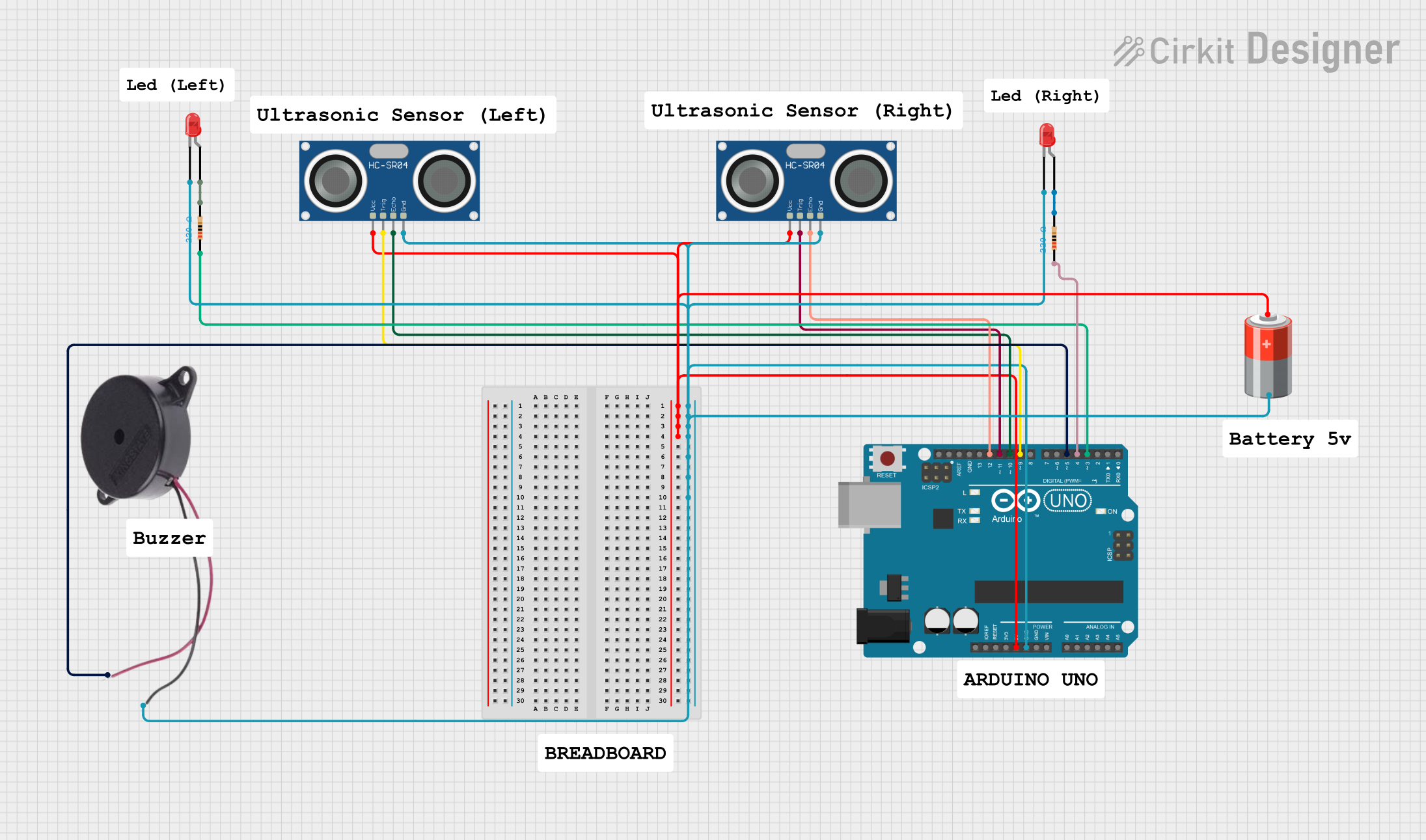
Circuit Documentation
Summary
This circuit is designed to utilize an Arduino UNO microcontroller to interface with two HC-SR04 Ultrasonic Sensors, two red LEDs, and a buzzer. The ultrasonic sensors are used to measure distances, and based on these measurements, the LEDs and buzzer are controlled to indicate proximity of objects. The circuit is powered by a 5V battery, and the LEDs are connected through 220 Ohm resistors to limit the current.
Component List
Arduino UNO
- Microcontroller board based on the ATmega328P
- It has 14 digital input/output pins, 6 analog inputs, a 16 MHz quartz crystal, a USB connection, a power jack, an ICSP header, and a reset button.
HC-SR04 Ultrasonic Sensor (x2)
- Ultrasonic distance measuring module
- It operates on 5V and provides non-contact distance measurement from 2cm to 400cm with an accuracy of 3mm.
LED: Two Pin (red) (x2)
- Standard red LEDs for indication
- Forward voltage typically around 2V, with a maximum current of around 20mA.
Buzzer
- An electromechanical component that produces sound
- Typically used for audible alerts or alarms.
Resistor (x2)
- 220 Ohm resistors used to limit current to the LEDs
- Helps to protect the LEDs from excessive current that could damage them.
5V Battery
- Power source for the circuit
- Provides a stable 5V supply to power the Arduino and other components.
Wiring Details
Arduino UNO
5Vconnected to the VCC pins of both HC-SR04 Ultrasonic Sensors and the positive terminal of the 5V battery.GNDconnected to the GND pins of both HC-SR04 Ultrasonic Sensors, the cathodes of both LEDs, the negative terminal of the buzzer, and the negative terminal of the 5V battery.D12connected to the ECHO pin of the right HC-SR04 Ultrasonic Sensor.D11connected to the TRIG pin of the right HC-SR04 Ultrasonic Sensor.D10connected to the ECHO pin of the left HC-SR04 Ultrasonic Sensor.D9connected to the TRIG pin of the left HC-SR04 Ultrasonic Sensor.D5connected to the positive terminal of the buzzer.D4connected to one end of a 220 Ohm resistor (right LED circuit).D3connected to one end of a 220 Ohm resistor (left LED circuit).
HC-SR04 Ultrasonic Sensor
VCCconnected to the 5V supply from the Arduino and the 5V battery.GNDconnected to the common ground in the circuit.ECHOconnected to eitherD12orD10on the Arduino, depending on the sensor (right or left).TRIGconnected to eitherD11orD9on the Arduino, depending on the sensor (right or left).
LED: Two Pin (red)
cathodeconnected to the common ground in the circuit.anodeconnected to the other end of the respective 220 Ohm resistor.
Buzzer
NEGATIVEconnected to the common ground in the circuit.POSITIVEconnected toD5on the Arduino.
Resistor
- One end connected to either
D4orD3on the Arduino (depending on the LED it is associated with). - The other end connected to the anode of the respective LED.
5V Battery
+connected to the 5V supply rail in the circuit.-connected to the common ground in the circuit.
Documented Code
#define LEFT_TRIGGER_PIN 9
#define LEFT_ECHO_PIN 10
#define RIGHT_TRIGGER_PIN 11
#define RIGHT_ECHO_PIN 12
#define LEFT_LED_PIN 3
#define RIGHT_LED_PIN 4
#define BUZZER_PIN 5

void setup() {
    Serial.begin(9600);
    pinMode(LEFT_TRIGGER_PIN, OUTPUT);
    pinMode(LEFT_ECHO_PIN, INPUT);
    pinMode(RIGHT_TRIGGER_PIN, OUTPUT);
    pinMode(RIGHT_ECHO_PIN, INPUT);
    pinMode(LEFT_LED_PIN, OUTPUT);
    pinMode(RIGHT_LED_PIN, OUTPUT);
    pinMode(BUZZER_PIN, OUTPUT);
}

void loop() {
    long leftDistance = getDistance(LEFT_TRIGGER_PIN, LEFT_ECHO_PIN);
    long rightDistance = getDistance(RIGHT_TRIGGER_PIN, RIGHT_ECHO_PIN);

    // Process left sensor
    if (leftDistance < 100) { // Object detected less than 1 meter
        digitalWrite(LEFT_LED_PIN, HIGH);
        tone(BUZZER_PIN, 1000); // Buzzer ON
        delay(200); // Short delay for buzzing
        digitalWrite(LEFT_LED_PIN, LOW);
        delay(200); // LED OFF for blinking
    } else if (leftDistance < 150) { // Object detected between 1 and 1.5 meters
        digitalWrite(LEFT_LED_PIN, HIGH); // LED ON
        noTone(BUZZER_PIN); // Buzzer OFF
    } else { // Object detected more than 1.5 meters
        digitalWrite(LEFT_LED_PIN, LOW); // LED OFF
        noTone(BUZZER_PIN); // Buzzer OFF
    }

    // Process right sensor
    if (rightDistance < 100) { // Object detected less than 1 meter
        digitalWrite(RIGHT_LED_PIN, HIGH);
        tone(BUZZER_PIN, 1000); // Buzzer ON
        delay(200); // Short delay for buzzing
        digitalWrite(RIGHT_LED_PIN, LOW);
        delay(200); // LED OFF for blinking
    } else if (rightDistance < 150) { // Object detected between 1 and 1.5 meters
        digitalWrite(RIGHT_LED_PIN, HIGH); // LED ON
        noTone(BUZZER_PIN); // Buzzer OFF
    } else { // Object detected more than 1.5 meters
        digitalWrite(RIGHT_LED_PIN, LOW); // LED OFF
        noTone(BUZZER_PIN); // Buzzer OFF
    }

    delay(100); // Short delay before next reading
}

long getDistance(int triggerPin, int echoPin) {
    // Clear the trigger
    digitalWrite(triggerPin, LOW);
    delayMicroseconds(2);

    // Set the trigger on
    digitalWrite(triggerPin, HIGH);
    delayMicroseconds(10);
    digitalWrite(triggerPin, LOW);

    // Read the echo pin
    long duration = pulseIn(echoPin, HIGH);

    // Calculate the distance in cm
    long distance = duration * 0.034 / 2; // Speed of sound is 0.034 cm/us
    return distance;
}
This code is designed to be uploaded to the Arduino UNO microcontroller. It initializes the pins connected to the ultrasonic sensors, LEDs, and buzzer. In the main loop, it measures distances using the ultrasonic sensors and then activates the LEDs and buzzer based on the distance thresholds defined. The getDistance function is used to encapsulate the logic for triggering the ultrasonic sensor and reading the echo to calculate the distance.