
Arduino UNO Controlled Ultrasonic Distance Measurement with LED Indicators
View and Edit Project In Cirkit Designer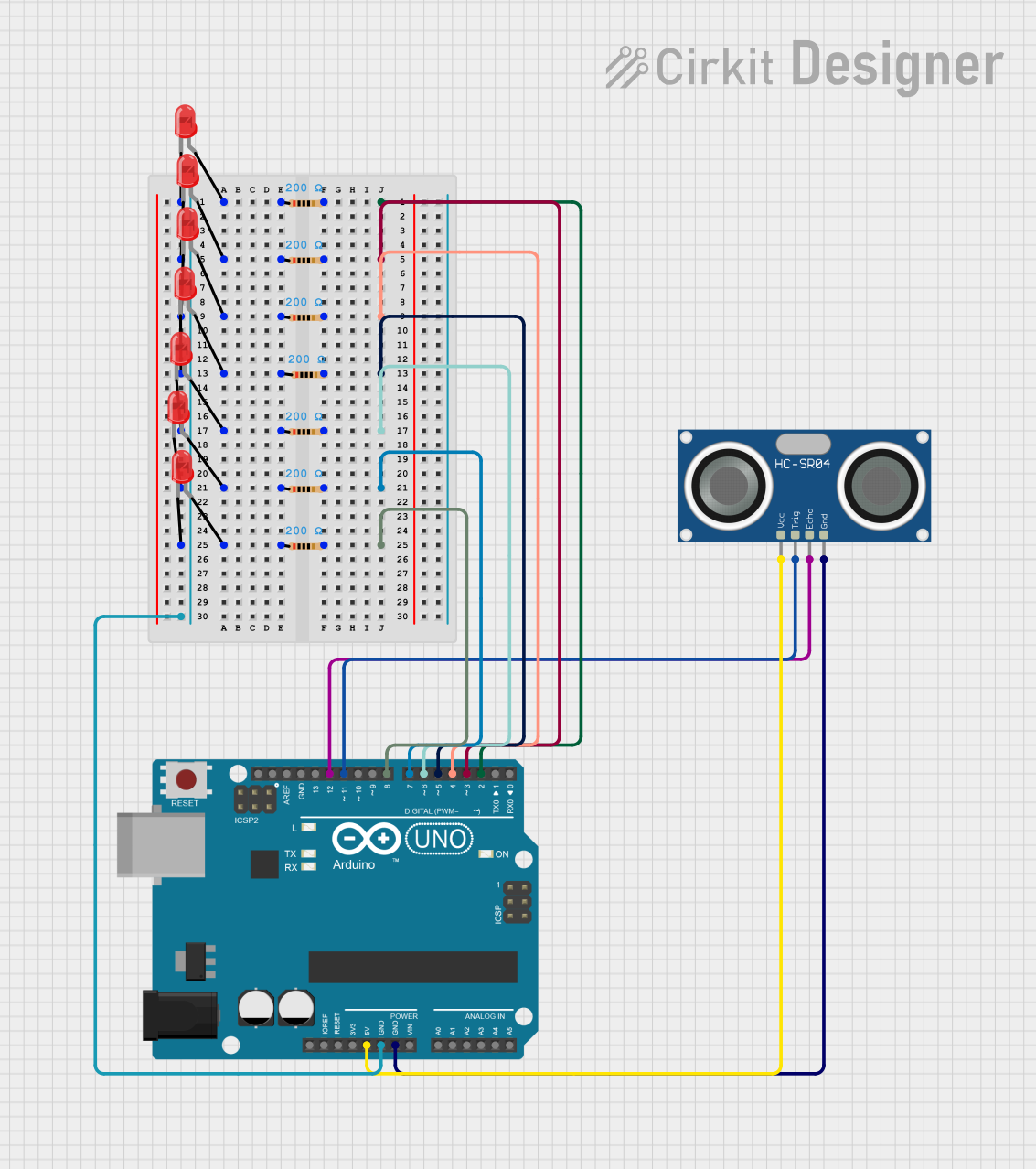
Circuit Documentation
Summary of the Circuit
This circuit integrates an HC-SR04 Ultrasonic Sensor with an Arduino UNO to measure distances and display the range through a series of LEDs. The HC-SR04 sensor sends out an ultrasonic pulse and receives the echo. The time taken for the echo to return is used by the Arduino to calculate the distance to an object. Depending on the measured distance, a corresponding LED is lit up. The circuit uses a series of resistors to limit the current to the LEDs, ensuring they operate within safe parameters.
Component List
HC-SR04 Ultrasonic Sensor
- Description: A sensor that measures distance by emitting ultrasonic waves and measuring the time taken for the echo to return.
- Pins: VCC, TRIG, ECHO, GND
Arduino UNO
- Description: A microcontroller board based on the ATmega328P, used for controlling the logic of the circuit.
- Pins: UNUSED, IOREF, Reset, 3.3V, 5V, GND, Vin, A0-A5, SCL, SDA, AREF, D0-D13
LEDs: Two Pin (red)
- Description: Light Emitting Diodes used to indicate the distance range measured by the sensor.
- Pins: cathode, anode
Resistors (200 Ohms)
- Description: Resistors used to limit the current through the LEDs.
- Pins: pin1, pin2
- Value: 200 Ohms
Wiring Details
HC-SR04 Ultrasonic Sensor
- VCC connected to Arduino UNO 5V
- TRIG connected to Arduino UNO D11
- ECHO connected to Arduino UNO D12
- GND connected to Arduino UNO GND
Arduino UNO
- 5V used to power the HC-SR04 Ultrasonic Sensor
- GND connected to the cathodes of all LEDs through a common ground
- D2-D8 connected to the anodes of LEDs through 200 Ohm resistors
LEDs: Two Pin (red)
- cathode connected to Arduino UNO GND
- anode connected to one end of a 200 Ohm resistor, the other end of which is connected to a digital pin on the Arduino UNO (D2-D8)
Resistors (200 Ohms)
- pin1 connected to the anode of an LED
- pin2 connected to a digital pin on the Arduino UNO (D2-D8)
Documented Code
const int trig = 11;
const int echo = 12;

const int LED1 = 2;
const int LED2 = 3;
const int LED3 = 4;
const int LED4 = 5;
const int LED5 = 6;
const int LED6 = 7;
const int LED7 = 8;

int duration = 0;
int distance = 0;

void setup()
{
  pinMode(trig , OUTPUT);
  pinMode(echo , INPUT);

  pinMode(LED1 , OUTPUT);
  pinMode(LED2 , OUTPUT);
  pinMode(LED3 , OUTPUT);
  pinMode(LED4 , OUTPUT);
  pinMode(LED5 , OUTPUT);
  pinMode(LED6 , OUTPUT);
  pinMode(LED7 , OUTPUT);

  Serial.begin(9600);

}

void loop()
{
  digitalWrite(trig , HIGH);
  delayMicroseconds(1000);
  digitalWrite(trig , LOW);

  duration = pulseIn(echo , HIGH);
  distance = (duration/2) / 28.5 ;
  Serial.println(distance);


  if ( distance <= 5 )
  {
    digitalWrite(LED1, HIGH);
  }
  else
  {
    digitalWrite(LED1, LOW);
  }
  if ( distance <= 7 )
  {
    digitalWrite(LED2, HIGH);
  }
  else
  {
    digitalWrite(LED2, LOW);
  }
  if ( distance <= 10 )
  {
    digitalWrite(LED3, HIGH);
  }
  else
  {
    digitalWrite(LED3, LOW);
  }
  if ( distance <= 15 )
  {
    digitalWrite(LED4, HIGH);
  }
  else
  {
    digitalWrite(LED4, LOW);
  }
  if ( distance <= 17 )
  {
    digitalWrite(LED5, HIGH);
  }
  else
  {
    digitalWrite(LED5, LOW);
  }
  if ( distance <= 20 )
  {
    digitalWrite(LED6, HIGH);
  }
  else
  {
    digitalWrite(LED6, LOW);
  }
  if ( distance <= 25 )
  {
    digitalWrite(LED7, HIGH);
  }
  else
  {
    digitalWrite(LED7, LOW);
  }
}
This code configures the Arduino UNO to control the HC-SR04 Ultrasonic Sensor and light up the LEDs based on the distance measured. The trig and echo pins are used to interface with the sensor, while the LED1 to LED7 pins control the LEDs. The loop function continuously measures the distance and updates the state of the LEDs accordingly.