
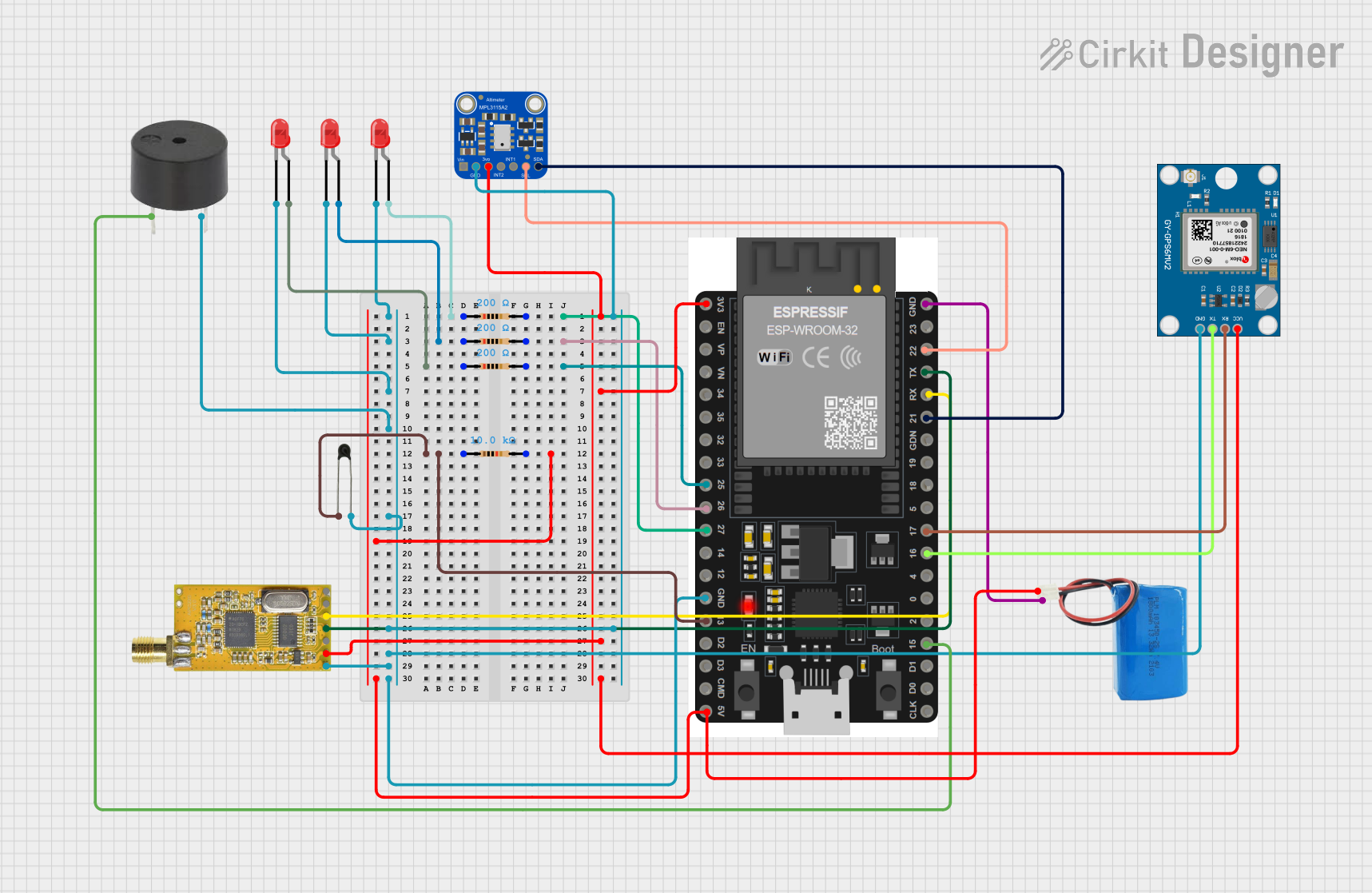
Circuit Documentation
Summary
This circuit is designed to interface an ESP32 microcontroller with various sensors and modules, including a GPS module, a barometric pressure sensor, an NTC thermistor, LEDs, a buzzer, and an APC220 communication module. The ESP32 collects data from these sensors and modules, processes it, and controls the LEDs and buzzer based on the sensor readings.
Component List
ESP32 38 PINS
- Description: A powerful microcontroller with built-in Wi-Fi and Bluetooth capabilities.
- Pins: GND, 23, 22/SCL, 1, 2, 21/SDA, 19, 18, 5, 17/TX2, 16/RX2, 4, 0, 15, D1, D0, CLK, 3V3, EN, VP, VN, 34, 35, 32, 33, 25, 26, 27, 14, 12, 13, D2, D3, 11, 5V/VIN
Neo 6M GPS Module
- Description: A GPS module used for obtaining location data.
- Pins: GND, TX, RX, VCC
5V Battery
- Description: A power source for the circuit.
- Pins: positive, negative
Adafruit MPL3115A2 I2C Barometric Pressure, Altitude, Temperature Sensor
- Description: A sensor for measuring barometric pressure, altitude, and temperature.
- Pins: VIN, GND, +3V3, INT2, INT1, SCL, SDA
LED: Two Pin (red)
- Description: A red LED used for visual indication.
- Pins: cathode, anode
Resistor (200 Ohms)
- Description: A resistor with a resistance of 200 Ohms.
- Pins: pin1, pin2
Resistor (10k Ohms)
- Description: A resistor with a resistance of 10k Ohms.
- Pins: pin1, pin2
Buzzer
- Description: A buzzer used for audible alerts.
- Pins: PIN, GND
NTC
- Description: A thermistor used for temperature measurement.
- Pins: A0, A1
APC220
- Description: A communication module for wireless data transmission.
- Pins: GND, VCC, EN, RXD, TXD, AUX, SET
Wiring Details
ESP32 38 PINS
- GND: Connected to the GND pins of the Neo 6M GPS Module, APC220, Adafruit MPL3115A2, NTC, buzzer, and all LEDs.
- 3V3: Connected to the +3V3 pin of the Adafruit MPL3115A2 and the VCC pins of the APC220 and Neo 6M GPS Module.
- 5V/VIN: Connected to the positive pin of the 5V battery through a 10k Ohm resistor.
- 22/SCL: Connected to the SCL pin of the Adafruit MPL3115A2.
- 21/SDA: Connected to the SDA pin of the Adafruit MPL3115A2.
- 17/TX2: Connected to the RX pin of the Neo 6M GPS Module.
- 16/RX2: Connected to the TX pin of the Neo 6M GPS Module.
- 15: Connected to the PIN of the buzzer.
- 27: Connected to the anode of an LED through a 200 Ohm resistor.
- 26: Connected to the anode of another LED through a 200 Ohm resistor.
- 25: Connected to the anode of another LED through a 200 Ohm resistor.
- 13: Connected to the A0 pin of the NTC through a 10k Ohm resistor.
- 1: Connected to the RXD pin of the APC220.
- 2: Connected to the TXD pin of the APC220.
Neo 6M GPS Module
- GND: Connected to the GND pin of the ESP32.
- TX: Connected to the RX2 pin of the ESP32.
- RX: Connected to the TX2 pin of the ESP32.
- VCC: Connected to the 3V3 pin of the ESP32.
5V Battery
- positive: Connected to the 5V/VIN pin of the ESP32 through a 10k Ohm resistor.
- negative: Connected to the GND pin of the ESP32.
Adafruit MPL3115A2 I2C Barometric Pressure, Altitude, Temperature Sensor
- GND: Connected to the GND pin of the ESP32.
- +3V3: Connected to the 3V3 pin of the ESP32.
- SCL: Connected to the 22/SCL pin of the ESP32.
- SDA: Connected to the 21/SDA pin of the ESP32.
LED: Two Pin (red)
- cathode: Connected to the GND pin of the ESP32.
- anode: Connected to the 27, 26, and 25 pins of the ESP32 through 200 Ohm resistors.
Resistor (200 Ohms)
- pin1: Connected to the anode of the LEDs.
- pin2: Connected to the 27, 26, and 25 pins of the ESP32.
Resistor (10k Ohms)
- pin1: Connected to the A0 pin of the NTC.
- pin2: Connected to the 5V/VIN pin of the ESP32 and the positive pin of the 5V battery.
Buzzer
- PIN: Connected to the 15 pin of the ESP32.
- GND: Connected to the GND pin of the ESP32.
NTC
- A0: Connected to the 13 pin of the ESP32 through a 10k Ohm resistor.
- A1: Connected to the GND pin of the ESP32.
APC220
- GND: Connected to the GND pin of the ESP32.
- VCC: Connected to the 3V3 pin of the ESP32.
- RXD: Connected to the 1 pin of the ESP32.
- TXD: Connected to the 2 pin of the ESP32.
Code Documentation
#include <TinyGPSPlus.h>
#include <Wire.h>
#include <Adafruit_MPL3115A2.h>
#include <SoftwareSerial.h>

// GPS setup
TinyGPSPlus gps;
SoftwareSerial ss(1, 2); // RX, TX

// Barometric sensor setup
Adafruit_MPL3115A2 baro = Adafruit_MPL3115A2();

// APC220 setup
SoftwareSerial apc220(3, 4); // RX, TX

// Pin definitions
const int led1Pin = 27;
const int led2Pin = 26;
const int led3Pin = 25;
const int buzzerPin = 15;
const int ntcPin = 13;

void setup() {
  // Serial setup
  Serial.begin(115200);
  ss.begin(9600);
  apc220.begin(9600);

  // Barometric sensor setup
  if (!baro.begin()) {
    Serial.println("Could not find a valid MPL3115A2 sensor, check wiring!");
    while (1);
  }

  // Pin modes
  pinMode(led1Pin, OUTPUT);
  pinMode(led2Pin, OUTPUT);
  pinMode(led3Pin, OUTPUT);
  pinMode(buzzerPin, OUTPUT);
  pinMode(ntcPin, INPUT);

  // Initial states
  digitalWrite(led1Pin, LOW);
  digitalWrite(led2Pin, LOW);
  digitalWrite(led3Pin, LOW);
  digitalWrite(buzzerPin, LOW);
}

void loop() {
  // GPS data handling
  while (ss.available() > 0) {
    if (gps.encode(ss.read())) {
      if (millis() > 5000 && gps.charsProcessed() < 10) {
        Serial.println(F("No GPS detected: check wiring."));
        digitalWrite(buzzerPin, HIGH);
        delay(100);
        digitalWrite(buzzerPin, LOW);
        while (true);
      }
    }
  }

  // Barometric sensor data
  float pressure = baro.getPressure();
  float altitude = baro.getAltitude();
  float temperature = baro.getTemperature();
  Serial.print("Pressure: "); Serial.print(pressure); Serial.println(" Pa");
  Serial.print("Altitude: "); Serial.print(altitude); Serial.println(" m");
  Serial.print("Temperature: "); Serial.print(temperature); Serial.println(" C");

  // NTC thermistor data
  int ntcValue = analogRead(ntcPin);
  Serial.print("NTC Value: "); Serial.println(ntcValue);

  // LED control (example logic)
  if