
Arduino Nano Controlled Robotic Cleaner with Ultrasonic Sensors and I2C LCD Interface
View and Edit Project In Cirkit Designer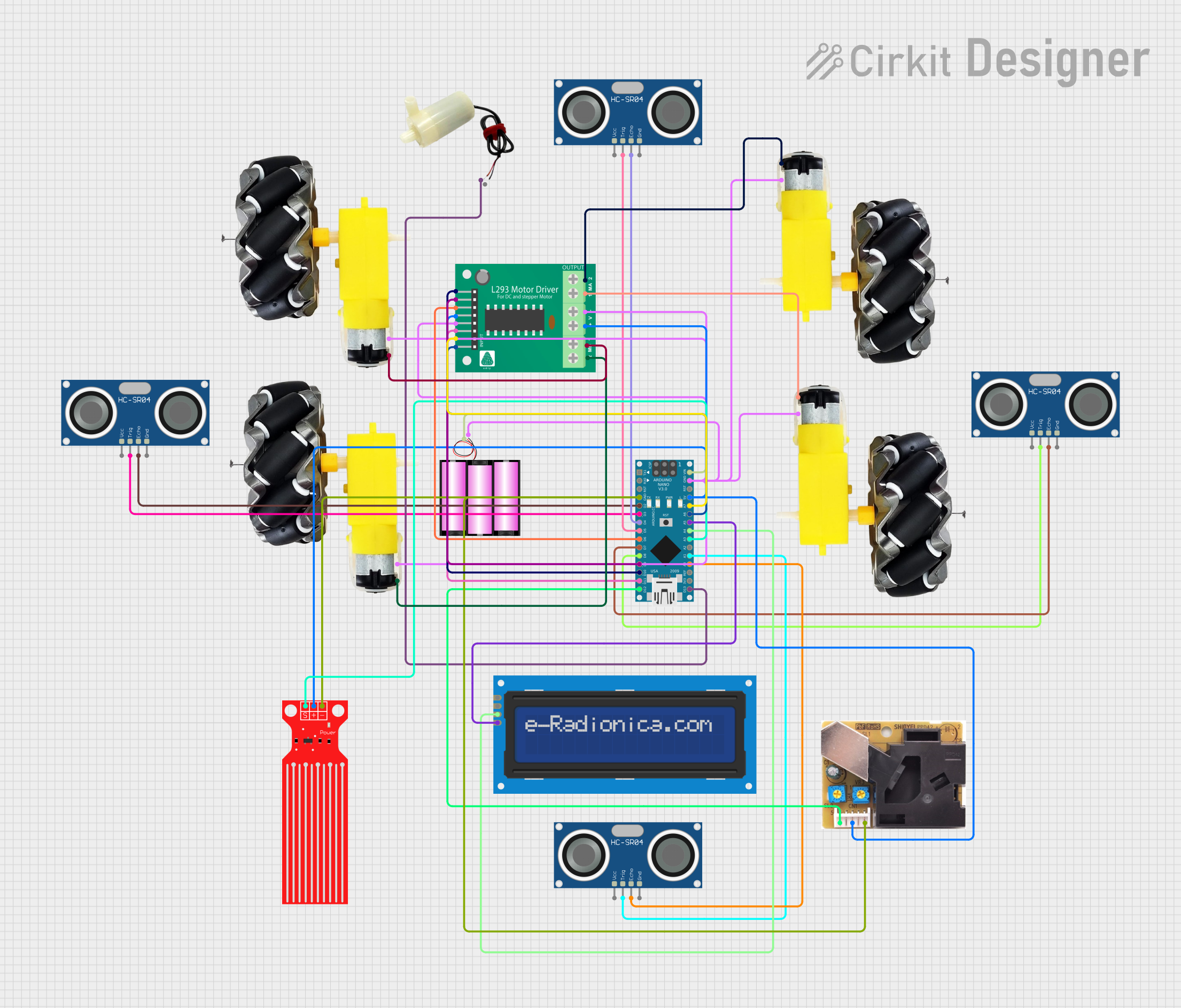
Circuit Documentation
Summary
The circuit in question is designed to control a robotic cleaning system equipped with various sensors and actuators. It includes a central Arduino Nano microcontroller that interfaces with ultrasonic sensors for navigation, a dust sensor for detecting cleanliness, a water level sensor for monitoring water supply during wet cleaning, and a motor driver to control the movement of the robot. The system can operate in both wet and dry cleaning modes, with an I2C LCD screen providing user feedback and mode selection.
Component List
- Battery 12V: Provides power to the circuit.
- Motor and Wheels (x4): Actuators that enable the robot's movement.
- 5V Mini Water Pump: Used for wet cleaning mode to spray water.
- Water Level Sensor: Monitors the water level in the tank to ensure there is enough water for wet cleaning.
- Dust Sensor: Measures the dust level to assess the cleaning performance.
- HC-SR04 Ultrasonic Sensor (x4): Used for obstacle detection and navigation.
- L293D Motor Driver: Controls the direction and speed of the motors.
- Arduino Nano: The central microcontroller that manages sensor readings, controls actuators, and communicates with the user interface.
- LCD Screen 16x2 I2C: Displays the current mode of operation and other status messages.
Wiring Details
Battery 12V
+to Arduino Nano VIN-to GND net (common ground)
Motor and Wheels
vccto L293D Motor Driver MPIN_x (where x is 1 to 4 for each motor)GNDto GND net (common ground)
5V Mini Water Pump
positive pinto Arduino Nano D13/SCKnegative pinto GND net (common ground)
Water Level Sensor
SIGto Arduino Nano A3VCCto 5V netGNDto GND net (common ground)
Dust Sensor
D8to Arduino Nano D12/MISO5Vto 5V netGNDto GND net (common ground)
HC-SR04 Ultrasonic Sensor
VCCto 5V netTRIGto Arduino Nano D2, D3, D4, D5, D7, D8, A0, A1 (one for each sensor)ECHOto Arduino Nano D2, D3, D4, D5, D7, D8, A0, A1 (one for each sensor)GNDto GND net (common ground)
L293D Motor Driver
B1,B2,A1,A2to Arduino Nano A6, A7, D10, D9EN_B,EN_Ato Arduino Nano D11/MOSI, D6GNDto GND net (common ground)VCC,+to 5V net-to GND net (common ground)MPIN_1toMPIN_4to respective Motor and Wheelsvcc
Arduino Nano
VINto Battery 12V +GNDto GND net (common ground)5Vto 5V net- Digital and Analog pins to respective components as per the wiring details above
LCD Screen 16x2 I2C
SCLto Arduino Nano A5SDAto Arduino Nano A4VCCto 5V netGNDto GND net (common ground)
Documented Code
#include <NewPing.h>    // Import libraries for ultrasonic sensors
#include <LiquidCrystal_I2C.h>     // I2C LCD library
#include <Wire.h>                 // I2C library

// Initialize pin numbers for ultrasonic sensors
const int echo_L = 2;
const int trig_L = 3;
const int echo_M = 4;
const int trig_M = 5;
const int echo_R = 7;
const int trig_R = 8;

// Initialize pin numbers for motor control
const int L1 = 6;
const int L2 = 9;
const int R1 = 10;
const int R2 = 11;

// Pump control for wet cleaning
const int pump = 13;

// Additional sensor for crack detection
const int echo_Crack = A0;
const int trig_Crack = A1;

// SDS011 dust sensor pin
const int dustSensorPin = A2; // Dust sensor

// Water level sensor pin
const int waterLevelPin = A3;
const int waterLevelThreshold = 200; // Threshold for low water level

int motor_speed = 255;    // Speed of the motor can be set between 125 (minimum) and 255 (maximum)
int max_distance = 200;   // Max distance of ultrasonic sensors is set to 200cm

// Distance readings for sensors
int distance_L = 0;
int distance_M = 0;
int distance_R = 0;
int distance_Crack = 0;

bool isWetCleaning = false;  // Boolean flag for mode selection
bool isWaterLow = false;     // Boolean flag for low water level detection
unsigned long lastPumpTime = 0; // Timer to control pump intervals

// Initialize all the ultrasonic sensors
NewPing sonar_L(trig_L, echo_L, max_distance);
NewPing sonar_M(trig_M, echo_M, max_distance);
NewPing sonar_R(trig_R, echo_R, max_distance);
NewPing sonar_Crack(trig_Crack, echo_Crack, max_distance);  // Crack detection sensor

// Initialize I2C LCD with address 0x27 and display size of 16x2
LiquidCrystal_I2C lcd(0x27, 16, 2);  // I2C address for LCD, update if necessary

void setup() {
  // Initialize pins as output or input
  pinMode(L1, OUTPUT);
  pinMode(L2, OUTPUT);
  pinMode(R1, OUTPUT);
  pinMode(R2, OUTPUT);
  pinMode(pump, OUTPUT);

  // Set all motor control pins to LOW initially
  digitalWrite(L1, LOW);
  digitalWrite(L2, LOW);
  digitalWrite(R1, LOW);
  digitalWrite(R2, LOW);
  digitalWrite(pump, LOW); // Water pump is initially set to LOW

  lcd.begin(16, 2); // LCD setup
  lcd.print("Choose Mode");
  Serial.begin(9600);   // Begin serial communication at 9600 baud rate
  delay(2000);
}

void loop() {
  // Mode Selection - Dry or Wet
  if (Serial.available() > 0) {
    char mode = Serial.read();
    if (mode == '1') {
      isWetCleaning = false;  // Dry cleaning mode
      lcd.clear();
      lcd.print("Dry Cleaning");
    } else if (mode == '2') {
      isWetCleaning = true;  // Wet cleaning mode
      lcd.clear();
      lcd.print("Wet Cleaning");
    }
    delay(1000);
  }

  // Read distance from all the sensors
  distance_L = readSensor_L();
  distance_M = readSensor_M();
  distance_R = readSensor_R();
  distance_Crack = readSensor_Crack(); // Read surface crack distance

  // Check for surface cracks
  if (distance_Crack <= 10) {  // Assuming a crack is detected if the distance is less than 10 cm
    displayDistances();        // Display all distances on the LCD
    delay(2000);               // Delay for observation
  }

  // Robot movement logic
  if (distance_M <= 20) {    // If middle sensor distance is less than 20cm
    if (distance_R > distance_L) {   // Check if there is space at right or left
      if ((distance_R <= 20) && (distance_L <= 20)) {    // If there is no space on both sides
        moveStop();
        delay(200);
        moveBackward();   // Move back
        delay(2000);
      } else {
        moveBackward();  // Move back then turn right
        delay(500);
        moveRight();
        delay(2000);
      }
    } else if (distance_R < distance_L) {
      if ((distance_R <= 20) && (distance_L <= 20)) {
        moveStop();   // Move back
        delay(200);
        moveBackward();
        delay(2000);
      } else {
        moveBackward();   // Move back then turn left
        delay(500);
        moveLeft();
        delay(2000);
      }
    }
  } else if (distance_R <= 15) {    // If right sensor distance is less than 20cm
    moveLeft();   // Turn left
    delay(500);
  } else if (distance_L <= 15) {    // If left sensor distance is less than 20cm
    moveRight();    // Turn right
    delay(500);
  } else {
    moveForward();