
Arduino UNO-Based Smart Water Level and Distance Monitoring System with LCD Display
View and Edit Project In Cirkit Designer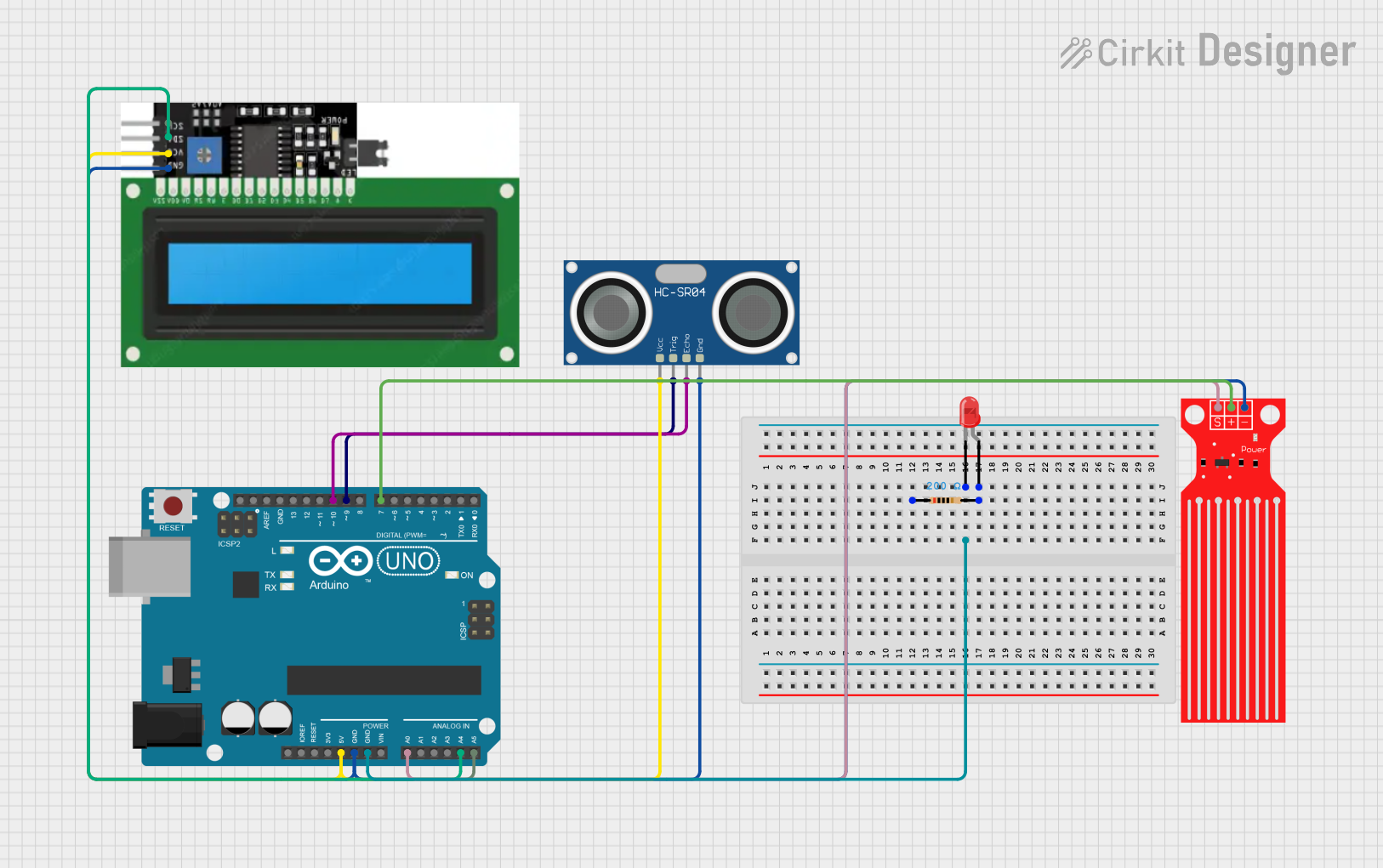
Circuit Documentation
Summary
This circuit interfaces an Arduino UNO with an ultrasonic sensor, a water level sensor, an LED, and an I2C LCD screen. The ultrasonic sensor measures distance, the water level sensor detects water levels, and the LED indicates the status. The LCD screen displays the readings from the sensors.
Component List
Arduino UNO
- Description: A microcontroller board based on the ATmega328P.
- Pins: UNUSED, IOREF, Reset, 3.3V, 5V, GND, Vin, A0, A1, A2, A3, A4, A5, SCL, SDA, AREF, D13, D12, D11, D10, D9, D8, D7, D6, D5, D4, D3, D2, D1, D0
Water Level Sensor
- Description: A sensor used to detect water levels.
- Pins: SIG, VCC, GND
HC-SR04 Ultrasonic Sensor
- Description: An ultrasonic sensor used to measure distance.
- Pins: VCC, TRIG, ECHO, GND
I2C DISPLAY
- Description: An I2C LCD screen used to display sensor readings.
- Pins: GND, VCC, SDL, SCL
LED: Two Pin (red)
- Description: A red LED used to indicate status.
- Pins: cathode, anode
Resistor
- Description: A resistor used to limit current.
- Properties: Resistance: 200 Ohms
- Pins: pin1, pin2
Wiring Details
Arduino UNO
- 5V connected to VCC of I2C DISPLAY and HC-SR04 Ultrasonic Sensor
- GND connected to GND of Water Level Sensor, I2C DISPLAY, HC-SR04 Ultrasonic Sensor, and cathode of LED
- A0 connected to SIG of Water Level Sensor
- A4 connected to SDL of I2C DISPLAY
- A5 connected to SCL of I2C DISPLAY
- D10 connected to ECHO of HC-SR04 Ultrasonic Sensor
- D9 connected to TRIG of HC-SR04 Ultrasonic Sensor
- D7 connected to VCC of Water Level Sensor
Water Level Sensor
- SIG connected to A0 of Arduino UNO
- VCC connected to D7 of Arduino UNO
- GND connected to GND of Arduino UNO
HC-SR04 Ultrasonic Sensor
- VCC connected to 5V of Arduino UNO
- TRIG connected to D9 of Arduino UNO
- ECHO connected to D10 of Arduino UNO
- GND connected to GND of Arduino UNO
I2C DISPLAY
- GND connected to GND of Arduino UNO
- VCC connected to 5V of Arduino UNO
- SDL connected to A4 of Arduino UNO
- SCL connected to A5 of Arduino UNO
LED: Two Pin (red)
- cathode connected to GND of Arduino UNO
- anode connected to pin2 of Resistor
Resistor
- pin1 connected to anode of LED
- pin2 connected to D7 of Arduino UNO
Code Documentation
/*
 * This Arduino sketch interfaces with an ultrasonic sensor, a water level sensor,
 * an LED, and an I2C LCD screen. The ultrasonic sensor measures distance, the
 * water level sensor detects water levels, and the LED indicates the status.
 * The LCD screen displays the readings from the sensors.
 */

#include <Wire.h>
#include <LiquidCrystal_I2C.h>

// Pin definitions
const int trigPin = 9;
const int echoPin = 10;
const int waterSensorPin = A0;
const int ledPin = 7;

// LCD setup
LiquidCrystal_I2C lcd(0x27, 16, 2);

void setup() {
  // Initialize serial communication
  Serial.begin(9600);

  // Initialize pins
  pinMode(trigPin, OUTPUT);
  pinMode(echoPin, INPUT);
  pinMode(waterSensorPin, INPUT);
  pinMode(ledPin, OUTPUT);

  // Initialize LCD
  lcd.init();
  lcd.backlight();
}

void loop() {
  // Measure distance using ultrasonic sensor
  long duration, distance;
  digitalWrite(trigPin, LOW);
  delayMicroseconds(2);
  digitalWrite(trigPin, HIGH);
  delayMicroseconds(10);
  digitalWrite(trigPin, LOW);
  duration = pulseIn(echoPin, HIGH);
  distance = (duration / 2) / 29.1;

  // Read water level sensor
  int waterLevel = analogRead(waterSensorPin);

  // Display readings on LCD
  lcd.clear();
  lcd.setCursor(0, 0);
  lcd.print("Distance: ");
  lcd.print(distance);
  lcd.print(" cm");
  lcd.setCursor(0, 1);
  lcd.print("Water Level: ");
  lcd.print(waterLevel);

  // Control LED based on water level
  if (waterLevel > 500) {
    digitalWrite(ledPin, HIGH);
  } else {
    digitalWrite(ledPin, LOW);
  }

  // Print readings to serial monitor
  Serial.print("Distance: ");
  Serial.print(distance);
  Serial.println(" cm");
  Serial.print("Water Level: ");
  Serial.println(waterLevel);

  // Wait before next loop
  delay(1000);
}
This code initializes the pins and the LCD screen, measures the distance using the ultrasonic sensor, reads the water level from the water level sensor, displays the readings on the LCD screen, controls the LED based on the water level, and prints the readings to the serial monitor. The loop runs every second.