
Arduino UNO Bluetooth-Controlled Robotic Car with L298N Motor Driver
View and Edit Project In Cirkit Designer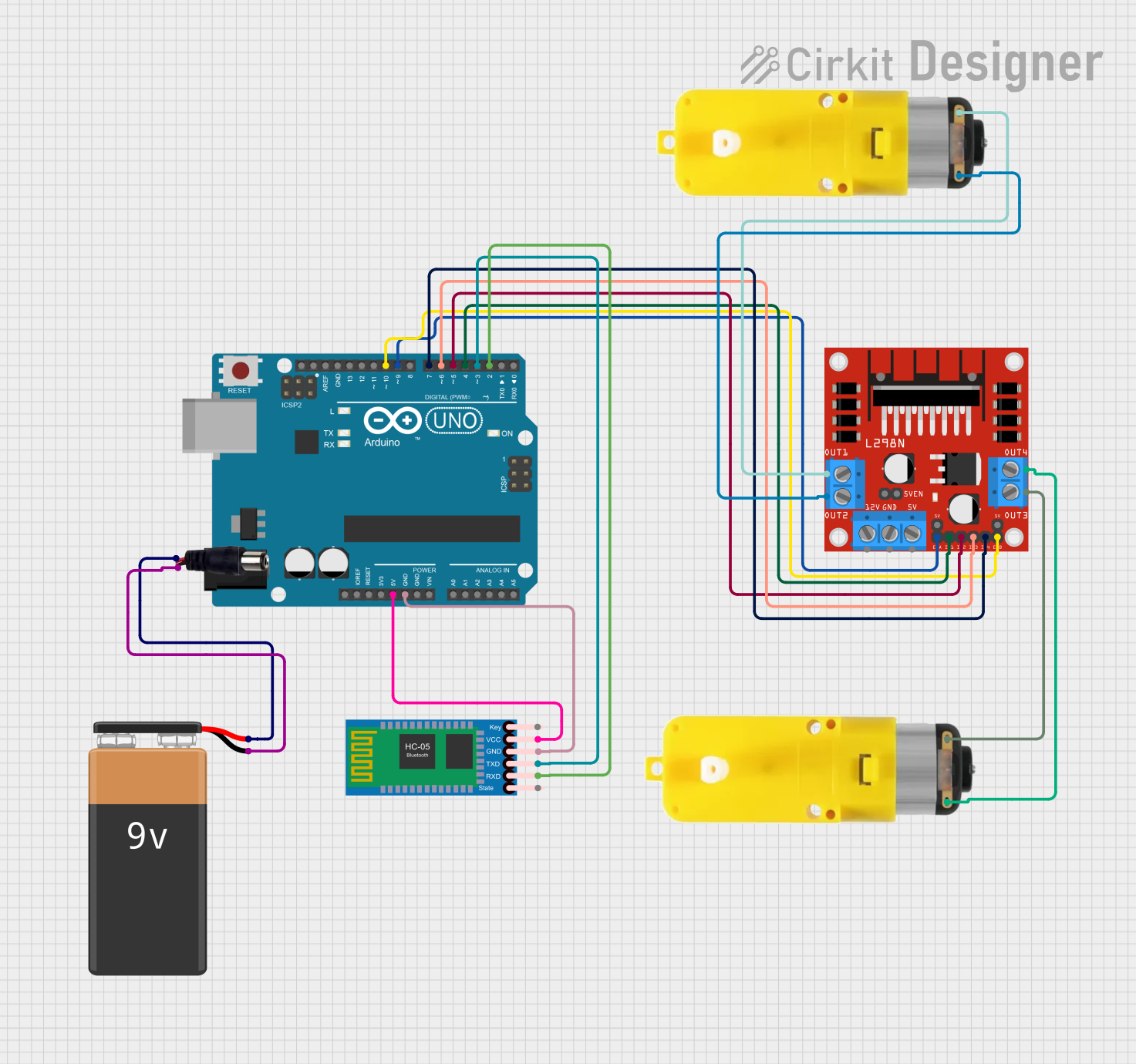
Circuit Documentation
Summary
This circuit is designed to control a Bluetooth-enabled car using an Arduino UNO. The car is powered by a 9V battery and includes two motors controlled by an L298N DC motor driver. The HC-05 Bluetooth module allows for wireless communication with the Arduino, enabling remote control of the car's movements.
Component List
Arduino UNO
- Description: Microcontroller board based on the ATmega328P.
- Pins: UNUSED, IOREF, Reset, 3.3V, 5V, GND, Vin, A0, A1, A2, A3, A4, A5, SCL, SDA, AREF, D13, D12, D11, D10, D9, D8, D7, D6, D5, D4, D3, D2, D1, D0
9V Battery
- Description: Provides power to the circuit.
- Pins: -, +
Power Jack
- Description: Connects the 9V battery to the circuit.
- Pins: POSITIF, NEGATIF
Motor with Reducer (Motor 1)
- Description: DC motor with a gear reducer.
- Pins: 3 - 6 VCC, GND
Motor with Reducer (Motor 2)
- Description: DC motor with a gear reducer.
- Pins: 3 - 6 VCC, GND
L298N DC Motor Driver
- Description: Dual H-Bridge motor driver.
- Pins: OUT1, OUT2, 12V, GND, 5V, OUT3, OUT4, 5V-ENA-JMP-I, 5V-ENA-JMP-O, +5V-J1, +5V-J2, ENA, IN1, IN2, IN3, IN4, ENB
HC-05 Bluetooth Module
- Description: Bluetooth module for wireless communication.
- Pins: Key, VCC, TXD, RXD, State, GND
Wiring Details
Arduino UNO
- 5V connected to VCC of HC-05 Bluetooth Module
- GND connected to GND of HC-05 Bluetooth Module
- D10 connected to ENB of L298N DC Motor Driver
- D9 connected to ENA of L298N DC Motor Driver
- D7 connected to IN4 of L298N DC Motor Driver
- D6 connected to IN3 of L298N DC Motor Driver
- D5 connected to IN2 of L298N DC Motor Driver
- D4 connected to IN1 of L298N DC Motor Driver
- D3 connected to TXD of HC-05 Bluetooth Module
- D2 connected to RXD of HC-05 Bluetooth Module
9V Battery
- - connected to NEGATIF of Power Jack
- + connected to POSITIF of Power Jack
Power Jack
- NEGATIF connected to - of 9V Battery
- POSITIF connected to + of 9V Battery
Motor with Reducer (Motor 1)
- 3 - 6 VCC connected to OUT1 of L298N DC Motor Driver
- GND connected to OUT2 of L298N DC Motor Driver
Motor with Reducer (Motor 2)
- 3 - 6 VCC connected to OUT3 of L298N DC Motor Driver
- GND connected to OUT4 of L298N DC Motor Driver
L298N DC Motor Driver
- ENB connected to D10 of Arduino UNO
- ENA connected to D9 of Arduino UNO
- IN4 connected to D7 of Arduino UNO
- IN3 connected to D6 of Arduino UNO
- IN2 connected to D5 of Arduino UNO
- IN1 connected to D4 of Arduino UNO
- OUT1 connected to 3 - 6 VCC of Motor 1
- OUT2 connected to GND of Motor 1
- OUT3 connected to 3 - 6 VCC of Motor 2
- OUT4 connected to GND of Motor 2
HC-05 Bluetooth Module
- VCC connected to 5V of Arduino UNO
- GND connected to GND of Arduino UNO
- TXD connected to D3 of Arduino UNO
- RXD connected to D2 of Arduino UNO
Code Documentation
#include <SoftwareSerial.h>

// Bluetooth module connected to pins 2 (RX) and 3 (TX)
SoftwareSerial mySerial(2, 3);

// Motor driver pins
int Rightmotor1 = 4;
int Rightmotor2 = 5;
int leftmotor1 = 6;
int leftmotor2 = 7;
int en1 = 9;
int en2 = 10;

// String to hold incoming Bluetooth data
String command = "";

void setup() {
  // Initialize motor pins
  pinMode(Rightmotor1, OUTPUT);
  pinMode(Rightmotor2, OUTPUT);
  pinMode(leftmotor1, OUTPUT);
  pinMode(leftmotor2, OUTPUT);
  pinMode(en1, OUTPUT);
  pinMode(en2, OUTPUT);

  // Start serial communication for debugging and Bluetooth
  Serial.begin(9600);
  mySerial.begin(9600);

  Serial.println("Bluetooth Car Ready!");
}

void loop() {
  if (mySerial.available()) {
    char received = mySerial.read(); // Read the single character command
    if (received == 'F') {
      moveForward(); // Move forward
    } else if (received == 'B') {
      moveBackward(); // Move backward
    } else if (received == 'L') {
      turnLeft(); // Turn left
    } else if (received == 'R') {
      turnRight(); // Turn right
    } else if (received == 'S') {
      stopMotors(); // Stop
    }
  }
}

// Movement functions
void moveForward() {
  digitalWrite(Rightmotor1, HIGH);
  digitalWrite(Rightmotor2, LOW);
  digitalWrite(leftmotor1, HIGH);
  digitalWrite(leftmotor2, LOW);
  analogWrite(en1, 200);  // Adjust speed as needed (0-255)
  analogWrite(en2, 200);
  Serial.println("Moving Forward");
}

void moveBackward() {
  digitalWrite(Rightmotor1, LOW);
  digitalWrite(Rightmotor2, HIGH);
  digitalWrite(leftmotor1, LOW);
  digitalWrite(leftmotor2, HIGH);
  analogWrite(en1, 200);
  analogWrite(en2, 200);
  Serial.println("Moving Backward");
}

void turnLeft() {
  digitalWrite(Rightmotor1, HIGH);
  digitalWrite(Rightmotor2, LOW);
  digitalWrite(leftmotor1, LOW);
  digitalWrite(leftmotor2, HIGH);
  analogWrite(en1, 150); // Reduced speed for turning
  analogWrite(en2, 150);
  Serial.println("Turning Left");
}

void turnRight() {
  digitalWrite(Rightmotor1, LOW);
  digitalWrite(Rightmotor2, HIGH);
  digitalWrite(leftmotor1, HIGH);
  digitalWrite(leftmotor2, LOW);
  analogWrite(en1, 150);
  analogWrite(en2, 150);
  Serial.println("Turning Right");
}

void stopMotors() {
  digitalWrite(Rightmotor1, LOW);
  digitalWrite(Rightmotor2, LOW);
  digitalWrite(leftmotor1, LOW);
  digitalWrite(leftmotor2, LOW);
  analogWrite(en1, 0);
  analogWrite(en2, 0);
  Serial.println("Motors Stopped");
}
This code initializes the motor driver pins and sets up serial communication for both debugging and Bluetooth. The loop function reads commands from the Bluetooth module and calls the appropriate movement functions to control the car.