
Arduino UNO Color Detector with Audio Feedback and LCD Display
View and Edit Project In Cirkit Designer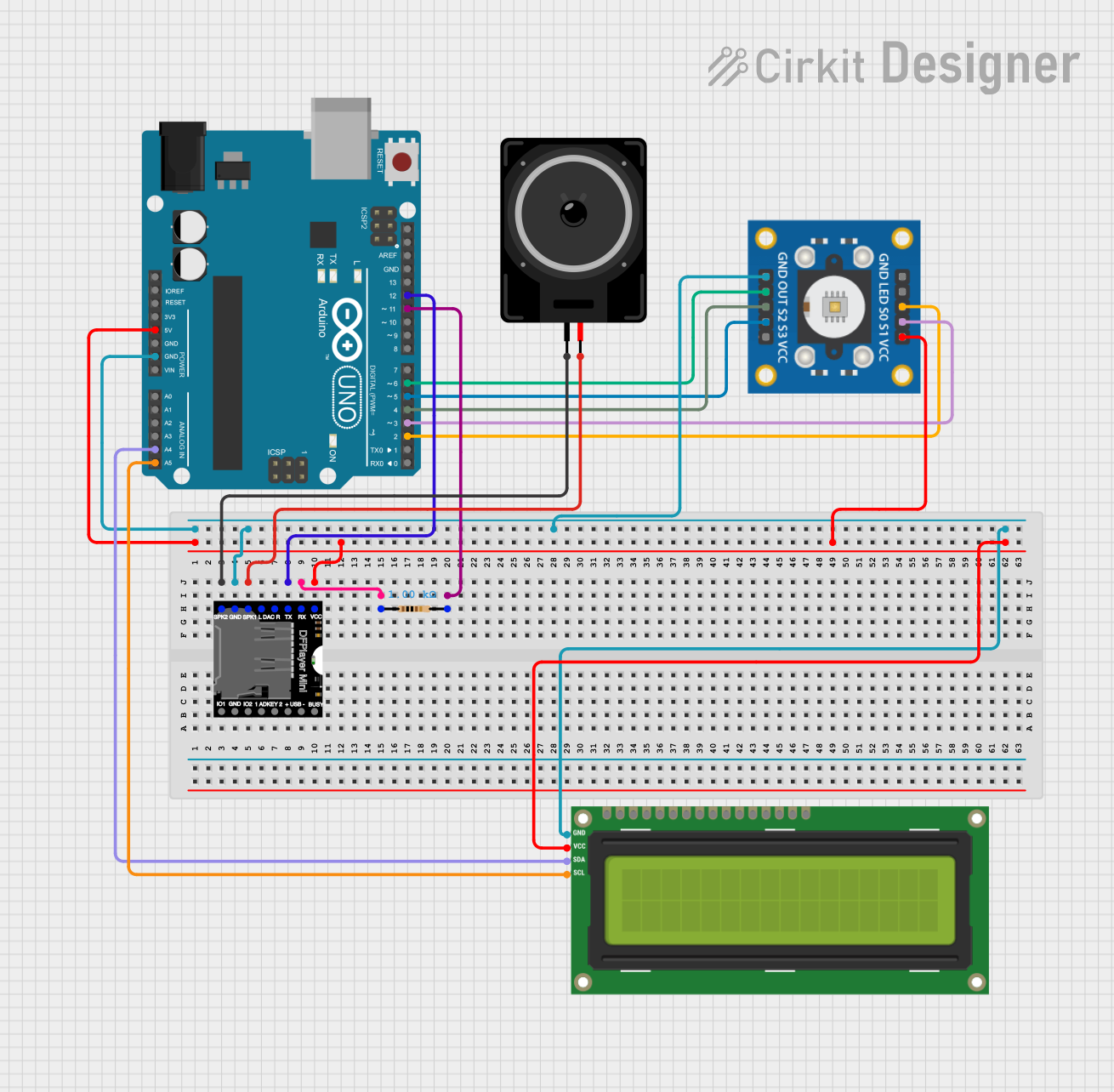
Circuit Documentation
Summary
This circuit is designed to detect colors using a TCS3200 color sensor and display the detected color on an I2C LCD 16x2 screen. Additionally, it plays corresponding audio files using a DFPlayer Mini and a loudspeaker. The entire system is controlled by an Arduino UNO.
Component List
Loudspeaker
- Description: Converts electrical signals into sound.
- Pins: pin1, pin2
I2C LCD 16x2 Screen
- Description: Displays text and information.
- Pins: SCL, SDA, VCC (5V), GND, VDD, VO, RS, RW, E, D0, D1, D2, D3, D4, D5, D6, D7, BLA, BLK
TCS3200 Color Sensor
- Description: Detects colors by measuring the frequency of light.
- Pins: GND, OUT, S2, S3, VCC, LED, S0, S1
Arduino UNO
- Description: Microcontroller board used to control the circuit.
- Pins: UNUSED, IOREF, Reset, 3.3V, 5V, GND, Vin, A0, A1, A2, A3, A4, A5, SCL, SDA, AREF, D13, D12, D11, D10, D9, D8, D7, D6, D5, D4, D3, D2, D1, D0
DFPlayer MINI
- Description: MP3 player module that can play audio files from a microSD card.
- Pins: VCC, BUSY, RX, USB -, TX, USB +, DAC_R, K2/ADC_KEY, DAC_L, K1/ADC_KEY, SPK1, IO 2, GND, SPK2, IO 1
Resistor
- Description: Limits the current flow in the circuit.
- Pins: pin1, pin2
- Properties: Resistance: 1000 Ohms
Wiring Details
Loudspeaker
- pin1 is connected to SPK2 of the DFPlayer MINI.
- pin2 is connected to SPK1 of the DFPlayer MINI.
I2C LCD 16x2 Screen
- SCL is connected to A5 of the Arduino UNO.
- SDA is connected to A4 of the Arduino UNO.
- VCC (5V) is connected to 5V of the Arduino UNO.
- GND is connected to GND of the Arduino UNO.
TCS3200 Color Sensor
- GND is connected to GND of the Arduino UNO.
- OUT is connected to D6 of the Arduino UNO.
- S2 is connected to D4 of the Arduino UNO.
- S3 is connected to D5 of the Arduino UNO.
- VCC is connected to 5V of the Arduino UNO.
- S0 is connected to D2 of the Arduino UNO.
- S1 is connected to D3 of the Arduino UNO.
Arduino UNO
- GND is connected to GND of the DFPlayer MINI, TCS3200, and I2C LCD 16x2 Screen.
- 5V is connected to VCC of the DFPlayer MINI, TCS3200, and I2C LCD 16x2 Screen.
- D12 is connected to TX of the DFPlayer MINI.
- D11 is connected to pin2 of the Resistor.
- A5 is connected to SCL of the I2C LCD 16x2 Screen.
- A4 is connected to SDA of the I2C LCD 16x2 Screen.
- D6 is connected to OUT of the TCS3200.
- D4 is connected to S2 of the TCS3200.
- D5 is connected to S3 of the TCS3200.
- D2 is connected to S0 of the TCS3200.
- D3 is connected to S1 of the TCS3200.
DFPlayer MINI
- SPK2 is connected to pin1 of the Loudspeaker.
- SPK1 is connected to pin2 of the Loudspeaker.
- GND is connected to GND of the Arduino UNO.
- TX is connected to D12 of the Arduino UNO.
- RX is connected to pin1 of the Resistor.
- VCC is connected to 5V of the Arduino UNO.
Resistor
- pin1 is connected to RX of the DFPlayer MINI.
- pin2 is connected to D11 of the Arduino UNO.
Code Documentation
#include <Wire.h>
#include <LiquidCrystal_I2C.h> // For LCD
#include "DFRobotDFPlayerMini.h" // For DFPlayer Mini
#include <SoftwareSerial.h> // For DFPlayer communication

// Color sensor pins
#define S0 2
#define S1 3
#define S2 4
#define S3 5
#define OUT 6

// DFPlayer Mini pins
SoftwareSerial mySerial(10, 11); // RX, TX
DFRobotDFPlayerMini dfplayer;

// Initialize LCD (optional, I2C address: 0x27, 16x2)
LiquidCrystal_I2C lcd(0x27, 16, 2);

void setup() {
  Serial.begin(9600);
  mySerial.begin(9600);

  // Initialize DFPlayer Mini
  if (!dfplayer.begin(mySerial)) {
    Serial.println("DFPlayer Mini Initialization Failed!");
    while (true);
  }
  dfplayer.volume(20); // Set volume (0-30)

  // Set up TCS3200
  pinMode(S0, OUTPUT);
  pinMode(S1, OUTPUT);
  pinMode(S2, OUTPUT);
  pinMode(S3, OUTPUT);
  pinMode(OUT, INPUT);
  digitalWrite(S0, HIGH);
  digitalWrite(S1, LOW);

  // Initialize LCD (optional)
  lcd.init();
  lcd.backlight();
  lcd.setCursor(0, 0);
  lcd.print("Color Detector");
  delay(2000);
  lcd.clear();
}

void loop() {
  int red = readColor(LOW, LOW);    // Red detection
  int green = readColor(HIGH, HIGH); // Green detection
  int blue = readColor(LOW, HIGH);   // Blue detection

  String color = detectColor(red, green, blue);
  Serial.println("Detected Color: " + color);

  lcd.setCursor(0, 0);
  lcd.print("Detected: ");
  lcd.setCursor(0, 1);
  lcd.print(color);

  playAudioForColor(color);

  delay(3000); // Pause before next detection
}

// Function to read color frequency
int readColor(bool s2, bool s3) {
  digitalWrite(S2, s2);
  digitalWrite(S3, s3);
  return pulseIn(OUT, LOW);
}

// Function to detect color
String detectColor(int red, int green, int blue) {
  // Normalize values to reduce interference
  red = map(red, 0, 255, 0, 100);
  green = map(green, 0, 255, 0, 100);
  blue = map(blue, 0, 255, 0, 100);

  if (red > 50 && green < 30 && blue < 30) return "Red";
  else if (green > 50 && red < 30 && blue < 30) return "Green";
  else if (blue > 50 && red < 30 && green < 30) return "Blue";
  else if (red > 50 && green > 50 && blue < 30) return "Yellow";
  else if (blue > 50 && green > 50 && red < 30) return "Cyan";
  else if (red > 50 && blue > 50 && green < 30) return "Magenta";
  else if (red < 20 && green < 20 && blue < 20) return "Black";
  else if (red > 80 && green > 80 and blue > 80) return "White";
  else return "Unknown";
}

// Function to play audio for each color
void playAudioForColor(String color) {
  if (color == "Red") dfplayer.play(1); // 0001.mp3
  else if (color == "Green") dfplayer.play(2); // 0002.mp3
  else if (color == "Blue") dfplayer.play(3); // 0003.mp3
  else if (color == "Yellow") dfplayer.play(4); // 0004.mp