
Arduino UNO Controlled Rain Sensor with Servo Actuators and Alert System
View and Edit Project In Cirkit Designer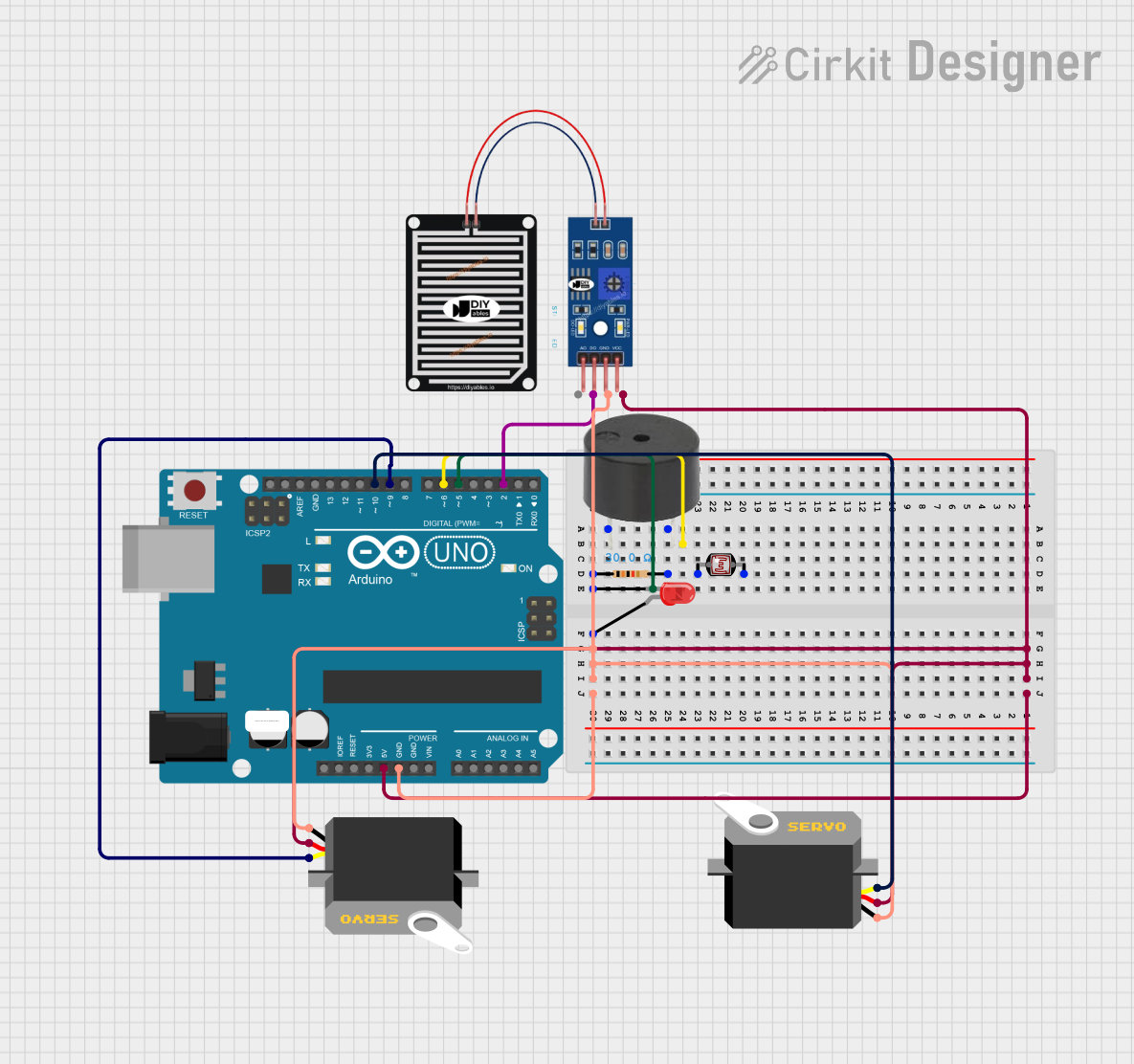
Circuit Documentation
Summary
This circuit is designed to interface with various components including servos, a rain sensor, an LED, a buzzer, and a photocell (LDR) using an Arduino UNO as the central microcontroller. The circuit's primary function is to respond to rain detection by activating servos and providing visual and audible alerts through an LED and a buzzer. The Arduino UNO controls the servos' movement and the signaling devices based on the input from the rain sensor.
Component List
Arduino UNO
- Description: A microcontroller board based on the ATmega328P.
- Purpose: Acts as the central processing unit for controlling other components in the circuit.
- Pins: UNUSED, IOREF, Reset, 3.3V, 5V, GND, Vin, A0-A5, SCL, SDA, AREF, D0-D13.
Servo (2 instances)
- Description: A rotary actuator or linear actuator that allows for precise control of angular or linear position.
- Purpose: To perform physical movements in response to rain sensor input.
- Pins: gnd, vcc, pulse.
Rain Sensor
- Description: A weather sensor capable of detecting rain.
- Purpose: To provide input to the Arduino UNO for activating servos and alerts.
- Pins: AO, DO, GRD, VCC.
LED: Two Pin (red)
- Description: A red light-emitting diode.
- Purpose: To provide a visual alert when rain is detected.
- Pins: cathode, anode.
Buzzer
- Description: An electronic buzzer capable of producing sound.
- Purpose: To provide an audible alert when rain is detected.
- Pins: PIN, GND.
Resistor
- Description: A passive two-terminal electrical component that implements electrical resistance as a circuit element.
- Purpose: To limit the current flowing through the LED.
- Properties: Resistance - 30 Ohms.
Photocell (LDR)
- Description: A light-dependent resistor whose resistance decreases with increasing incident light intensity.
- Purpose: Not specified in the circuit.
- Pins: pin 0, pin 1.
Wiring Details
Arduino UNO
- 5V pin connected to:
- Servo VCC (2 instances)
- Rain Sensor VCC
- GND pin connected to:
- Servo GND (2 instances)
- Rain Sensor GRD
- LED cathode (through Resistor)
- Buzzer GND
- D2 pin connected to Rain Sensor DO.
- D6 pin connected to LED anode.
- D9 pin connected to Servo pulse (instance 1).
- D10 pin connected to Servo pulse (instance 2).
Servo (2 instances)
- GND pin connected to Arduino UNO GND.
- VCC pin connected to Arduino UNO 5V.
- Pulse pin connected to Arduino UNO D9 (instance 1) and D10 (instance 2).
Rain Sensor
- GRD pin connected to Arduino UNO GND.
- VCC pin connected to Arduino UNO 5V.
- DO pin connected to Arduino UNO D2.
LED: Two Pin (red)
- Anode connected to Arduino UNO D6.
- Cathode connected to Arduino UNO GND through a Resistor.
Buzzer
- PIN connected to Resistor pin2 (not directly connected to Arduino UNO).
- GND connected to Arduino UNO GND.
Resistor
- Pin1 connected to LED cathode.
- Pin2 connected to Buzzer PIN.
Documented Code
#include <Servo.h>  // Include the Servo library

// Define pin numbers
const int rainSensorPin = 2;   // Pin for the rain sensor
const int ledPin = 6;          // Pin for the LED
const int buzzerPin = 7;       // Pin for the buzzer
const int motor1Pin = 9;       // Pin for Motor 1
const int motor2Pin = 10;      // Pin for Motor 2

Servo motor1;  // Create servo object for Motor 1
Servo motor2;  // Create servo object for Motor 2

bool motor1Activated = false;   // Track if Motor 1 has been activated
bool motor2Activated = false;   // Track if Motor 2 has been activated

void setup() {
  pinMode(rainSensorPin, INPUT);  // Set the rain sensor pin as input
  pinMode(ledPin, OUTPUT);         // Set the LED pin as output
  pinMode(buzzerPin, OUTPUT);      // Set the buzzer pin as output

  motor1.attach(motor1Pin);        // Attach Motor 1 to its pin
  motor2.attach(motor2Pin);        // Attach Motor 2 to its pin
}

void loop() {
  int rainStatus = digitalRead(rainSensorPin);  // Read the rain sensor status

  // Case 1: Rain detected, activate Motor 1 (Clockwise 360 degrees)
  if (rainStatus == LOW && !motor1Activated) {
    activateMotor1();  // Activate Motor 1
    motor1Activated = true;  // Set Motor 1 as activated
    motor2Activated = false;  // Reset Motor 2 activation
  }

  // Case 2: No rain detected, activate Motor 2 (Clockwise 180 degrees)
  else if (rainStatus == HIGH && !motor2Activated) {
    activateMotor2();  // Activate Motor 2
    motor2Activated = true;  // Set Motor 2 as activated
    motor1Activated = false;  // Reset Motor 1 activation
  }

  delay(500);  // Delay to avoid rapid sensor reading
}

// Function to activate Motor 1 (clockwise 360 degrees, one time)
void activateMotor1() {
  motor1.write(0);               // Move motor to start position (0 degrees)
  delay(500);                    // Short delay before starting

  motor1.write(180);             // Rotate Motor 1 clockwise to 180 degrees
  delay(2000);                   // Time to complete the 360-degree rotation (adjust as needed)

  // LED and Buzzer turn on for 1 second during the rotation of Motor 1
  for (int j = 0; j < 2; j++) {
    digitalWrite(ledPin, HIGH);   // Turn on LED
    tone(buzzerPin, 300);         // Turn on buzzer at 300Hz
    delay(500);                   // Keep both on for 500ms
    digitalWrite(ledPin, LOW);    // Turn off LED
    noTone(buzzerPin);            // Turn off buzzer
    delay(500);                   // Small pause
  }

  motor1.write(90);              // Neutral position to stop the motor after completing the turn
}

// Function to activate Motor 2 (clockwise 180 degrees, one time)
void activateMotor2() {
  motor2.write(0);               // Move motor to start position (0 degrees)
  delay(500);                    // Short delay before starting

  motor2.write(180);             // Rotate Motor 2 clockwise to 180 degrees
  delay(1000);                   // Time to complete the 180-degree rotation (adjust as needed)

  motor2.write(90);              // Neutral position to stop the motor after completing the turn
}
This code is designed to run on an Arduino UNO and controls two servo motors, an LED, and a buzzer based on the input from a rain sensor. When rain is detected, Motor 1 is activated, and the LED and buzzer are turned on. When no rain is detected, Motor 2 is activated. The code includes setup and loop functions, as well as two additional functions to activate each motor.