
Arduino Nano Multiwatt Charger with OLED Display and Keypad Control
View and Edit Project In Cirkit Designer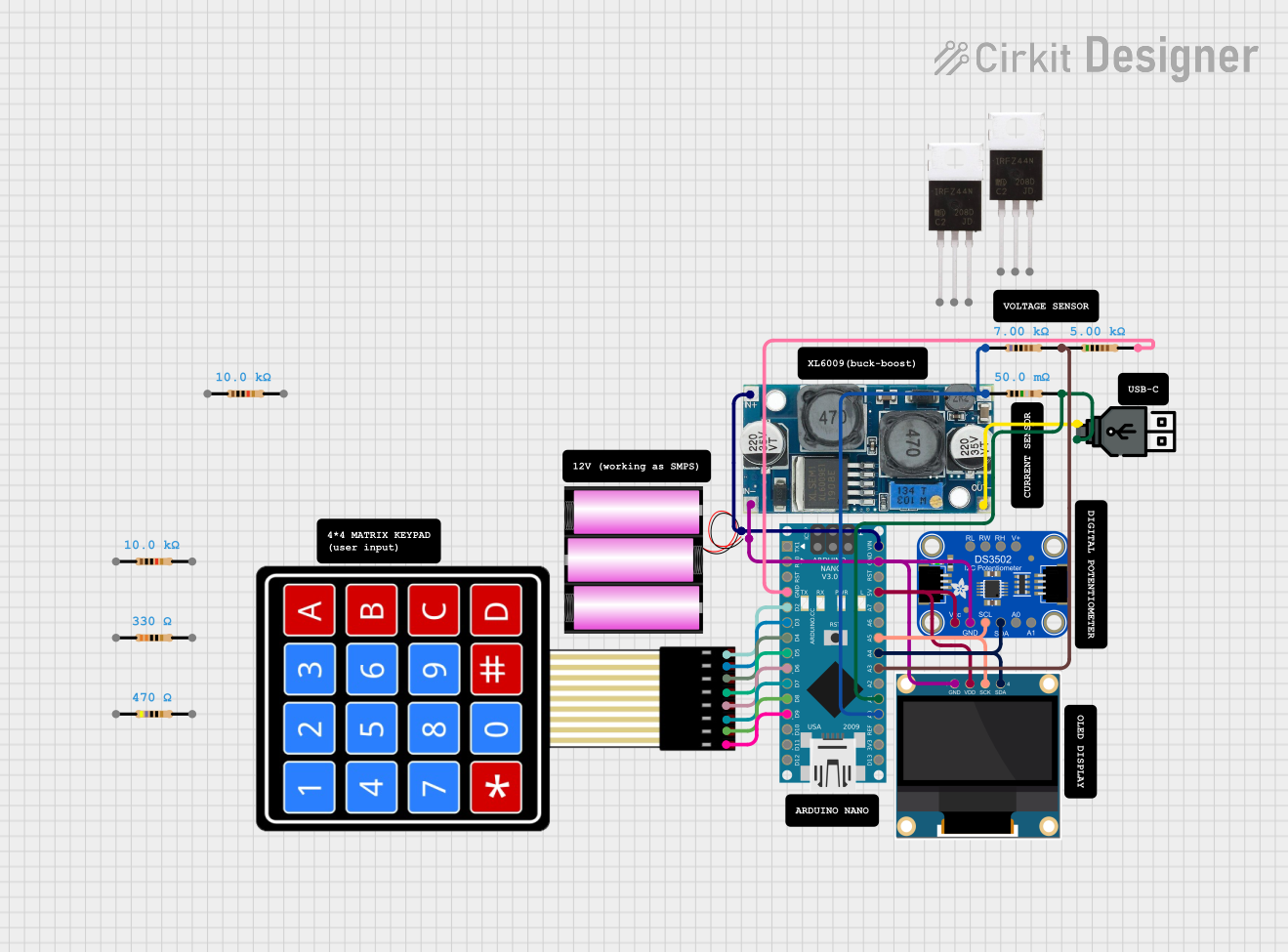
Circuit Documentation
Summary
This circuit is a multiwatt charger that utilizes an Arduino Nano to control and monitor the charging process. The system includes a 0.96" OLED display for visual feedback, a 4x4 membrane matrix keypad for user input, an Adafruit DS3502 digital potentiometer for voltage adjustment, and various resistors for voltage and current sensing. The circuit is powered by a 12V battery, regulated by an XL6009 voltage regulator.
Component List
Arduino Nano
- Description: Microcontroller board based on the ATmega328P.
- Pins: D1/TX, D0/RX, RESET, GND, D2, D3, D4, D5, D6, D7, D8, D9, D10, D11/MOSI, D12/MISO, VIN, 5V, A7, A6, A5, A4, A3, A2, A1, A0, AREF, 3V3, D13/SCK
0.96" OLED
- Description: OLED display module.
- Pins: GND, VDD, SCK, SDA
XL6009 Voltage Regulator
- Description: DC-DC step-up (boost) converter.
- Pins: OUT +, OUT -, IN +, IN -
Battery 12V
- Description: 12V power source.
- Pins: +, -
Adafruit DS3502
- Description: I2C digital potentiometer.
- Pins: RL, RW, RH, V+, VCC, GND, SCL, SDA, A0, A1
4X4 Membrane Matrix Keypad
- Description: Keypad for user input.
- Pins: R1, R2, R3, R4, C1, C2, C3, C4
Resistors
- Description: Various resistors used for voltage and current sensing.
- Instances:
- 5000 Ohms
- 7000 Ohms
- 0.05 Ohms
- 10000 Ohms
- 330 Ohms
- 470 Ohms
USB Power
- Description: USB power source.
- Pins: +, -
IRFZ44N
- Description: N-channel MOSFET.
- Pins: Gate, Drain, Source
Wiring Details
Arduino Nano
- GND: Connected to GND of 0.96" OLED, XL6009 Voltage Regulator, Adafruit DS3502, and battery 12V.
- D2: Connected to C4 of 4X4 Membrane Matrix Keypad.
- D3: Connected to C3 of 4X4 Membrane Matrix Keypad.
- D4: Connected to C2 of 4X4 Membrane Matrix Keypad.
- D5: Connected to C1 of 4X4 Membrane Matrix Keypad.
- D6: Connected to R4 of 4X4 Membrane Matrix Keypad.
- D7: Connected to R3 of 4X4 Membrane Matrix Keypad.
- D8: Connected to R2 of 4X4 Membrane Matrix Keypad.
- D9: Connected to R1 of 4X4 Membrane Matrix Keypad.
- VIN: Connected to IN + of XL6009 Voltage Regulator and + of battery 12V.
- 5V: Connected to VDD of 0.96" OLED and VCC of Adafruit DS3502.
- A5: Connected to SCK of 0.96" OLED and SCL of Adafruit DS3502.
- A4: Connected to SDA of 0.96" OLED and SDA of Adafruit DS3502.
- A3: Connected to pin1 of 5000 Ohms resistor.
- A1: Connected to pin2 of 0.05 Ohms resistor and + of USB power.
- A0: Connected to pin1 of 0.05 Ohms resistor and pin1 of 7000 Ohms resistor.
- AREF: Not connected.
- 3V3: Not connected.
- D13/SCK: Not connected.
0.96" OLED
- GND: Connected to GND of Arduino Nano, XL6009 Voltage Regulator, Adafruit DS3502, and battery 12V.
- VDD: Connected to 5V of Arduino Nano and VCC of Adafruit DS3502.
- SCK: Connected to A5 of Arduino Nano and SCL of Adafruit DS3502.
- SDA: Connected to A4 of Arduino Nano and SDA of Adafruit DS3502.
XL6009 Voltage Regulator
- OUT +: Connected to pin1 of 0.05 Ohms resistor.
- OUT -: Connected to - of USB power.
- IN +: Connected to VIN of Arduino Nano and + of battery 12V.
- IN -: Connected to GND of Arduino Nano, 0.96" OLED, Adafruit DS3502, and battery 12V.
Battery 12V
- +: Connected to IN + of XL6009 Voltage Regulator and VIN of Arduino Nano.
- -: Connected to GND of Arduino Nano, 0.96" OLED, XL6009 Voltage Regulator, and Adafruit DS3502.
Adafruit DS3502
- GND: Connected to GND of Arduino Nano, 0.96" OLED, XL6009 Voltage Regulator, and battery 12V.
- VCC: Connected to 5V of Arduino Nano and VDD of 0.96" OLED.
- SCL: Connected to A5 of Arduino Nano and SCK of 0.96" OLED.
- SDA: Connected to A4 of Arduino Nano and SDA of 0.96" OLED.
4X4 Membrane Matrix Keypad
- C4: Connected to D2 of Arduino Nano.
- C3: Connected to D3 of Arduino Nano.
- C2: Connected to D4 of Arduino Nano.
- C1: Connected to D5 of Arduino Nano.
- R4: Connected to D6 of Arduino Nano.
- R3: Connected to D7 of Arduino Nano.
- R2: Connected to D8 of Arduino Nano.
- R1: Connected to D9 of Arduino Nano.
Resistors
- 5000 Ohms: pin1 connected to A3 of Arduino Nano, pin2 connected to GND of Arduino Nano.
- 7000 Ohms: pin1 connected to A0 of Arduino Nano and pin1 of 0.05 Ohms resistor, pin2 connected to pin1 of 5000 Ohms resistor.
- 0.05 Ohms: pin1 connected to A0 of Arduino Nano and pin1 of 7000 Ohms resistor, pin2 connected to A1 of Arduino Nano and + of USB power.
- 10000 Ohms: Not connected.
- 330 Ohms: Not connected.
- 470 Ohms: Not connected.
USB Power
- +: Connected to pin2 of 0.05 Ohms resistor and A1 of Arduino Nano.
- -: Connected to OUT - of XL6009 Voltage Regulator.
IRFZ44N
- Gate: Not connected.
- Drain: Not connected.
- Source: Not connected.
Code Documentation
#include <Wire.h>
#include <Adafruit_GFX.h>
#include <Adafruit_SSD1306.h>
#include <Keypad.h>
#include <Adafruit_DS3502.h>

// Pin definitions
#define VOLTAGE_SENSOR_PIN A0
#define CURRENT_SENSOR_PIN A1
#define OLED_RESET -1

// OLED display dimensions
#define SCREEN_WIDTH 128
#define SCREEN_HEIGHT 64

// Define the I2C address for the OLED display
#define SSD1306_I2C_ADDRESS 0x3C

// Keypad setup
const byte ROWS = 4; // 4 rows
const byte COLS = 4; // 4 columns
char keys[ROWS][COLS] = {
  {'1', '2', '3', 'A'},
  {'4', '5', '6', 'B'},
  {'7', '8', '9', 'C'},
  {'*', '0', '#', 'D'}
};
byte rowPins[ROWS] = {9, 8, 7, 6};
byte colPins[COLS] = {5, 4, 3, 2};
Keypad keypad = Keypad(makeKeymap(keys), rowPins, colPins, ROWS, COLS);

// DS3502 potentiometer
Adafruit_DS3502 pot = Adafruit_DS3502();

// OLED display
Adafruit_SSD1306 display(SCREEN_WIDTH, SCREEN_HEIGHT, &Wire, OLED_RESET);

// Constants
const float VOLTAGE_DIVIDER