
ESP32-Based Posture Monitoring System with Wi-Fi and Vibration Feedback
View and Edit Project In Cirkit Designer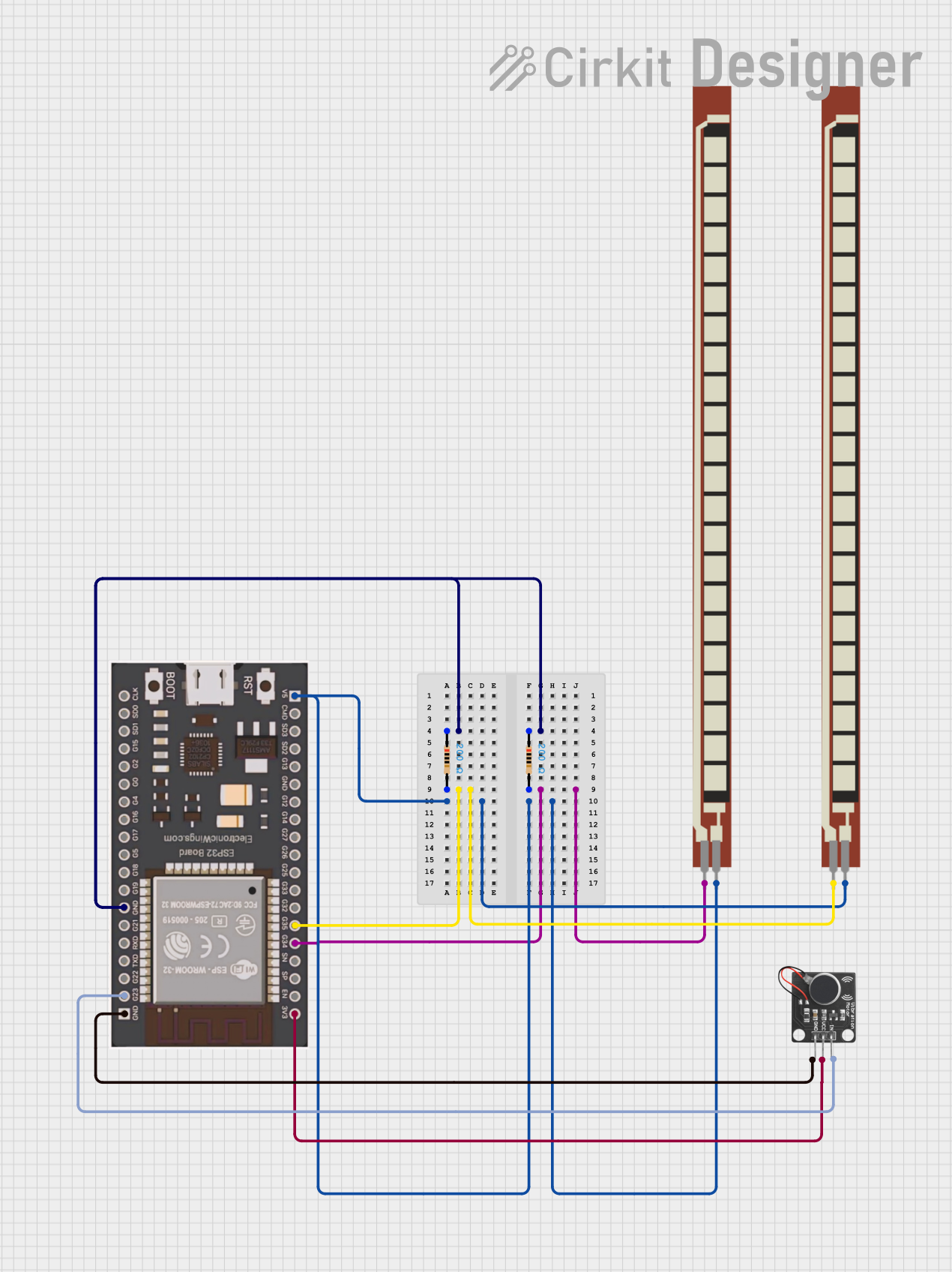
Circuit Documentation
Summary
This circuit is designed to monitor the flexion angle using flex sensors and control a vibration motor based on the detected angle. The circuit also sends the flexion data to a server over Wi-Fi. The main components include an ESP32 microcontroller, resistors, flex sensors, and a PWM vibration motor sensor module switch.
Component List
Resistor
- Description: A resistor with a resistance of 200 Ohms.
- Pins: pin1, pin2
Basic Flex Resistor
- Description: A basic flex resistor used to measure flexion.
- Pins: Pin 1, Pin 2
PWM Vibration Motor Sensor Module Switch
- Description: A module that controls a vibration motor based on PWM signals.
- Pins: Signal, Vcc, Ground
ESP32
- Description: A microcontroller with Wi-Fi capabilities.
- Pins: V5, CMD, SD3, SD2, G13, GND, G12, G14, G27, G26, G25, G33, G32, G35, G34, SN, SP, EN, 3V3, G23, G22, TXD, RXD, G21, G19, G18, G5, G17, G16, G4, G0, G2, G15, SD1, SD0, CLK
Wiring Details
Resistor
Resistor 1:
- pin1: Connected to pin1 of another resistor and GND of ESP32.
- pin2: Connected to G35 of ESP32 and Pin 1 of a Basic Flex Resistor.
Resistor 2:
- pin1: Connected to pin1 of another resistor and GND of ESP32.
- pin2: Connected to G34 of ESP32 and Pin 1 of a Basic Flex Resistor.
Basic Flex Resistor
Flex Resistor 1:
- Pin 1: Connected to pin2 of a resistor and G35 of ESP32.
- Pin 2: Connected to V5 of ESP32 and Pin 2 of another Basic Flex Resistor.
Flex Resistor 2:
- Pin 1: Connected to pin2 of a resistor and G34 of ESP32.
- Pin 2: Connected to V5 of ESP32 and Pin 2 of another Basic Flex Resistor.
PWM Vibration Motor Sensor Module Switch
- Signal: Connected to G23 of ESP32.
- Vcc: Connected to 3V3 of ESP32.
- Ground: Connected to GND of ESP32.
ESP32
- GND: Connected to pin1 of two resistors and Ground of PWM Vibration Motor Sensor Module Switch.
- G35: Connected to pin2 of a resistor and Pin 1 of a Basic Flex Resistor.
- G34: Connected to pin2 of a resistor and Pin 1 of a Basic Flex Resistor.
- V5: Connected to Pin 2 of two Basic Flex Resistors.
- G23: Connected to Signal of PWM Vibration Motor Sensor Module Switch.
- 3V3: Connected to Vcc of PWM Vibration Motor Sensor Module Switch.
Code Documentation
Code for ESP32
#include <WiFi.h>
#include <HTTPClient.h>

// Wi-Fi credentials
const char* ssid = "kishi";
const char* password = "bobSEM31";

// Sensor pin
const int flexPin = 34; // Flex sensor connected to analog pin 34
const int motorPin = 23; // Vibration motor module connected to digital pin 23

// Server URL to send data
const String serverURL = "http://192.168.91.139:3000/data"; // Replace with your server URL

// Constants
const int idleFlexValue = 1740;  // Idle value representing 0° flexion
const int maxFlexValue = 4095;  // Maximum raw value (ESP32 ADC: 12-bit)
const int maxDegrees = 180;     // Maximum angle in degrees
const int angleThreshold = 5;   // Threshold angle for triggering vibration

void setup() {
  // Start the serial monitor for debugging
  Serial.begin(115200);

  // Initialize motor pin as output
  pinMode(motorPin, OUTPUT);

  // Connect to Wi-Fi
  WiFi.begin(ssid, password);

  // Wait for the connection to establish
  while (WiFi.status() != WL_CONNECTED) {
    delay(1000);
    Serial.println("Connecting to WiFi...");
  }

  Serial.println("Connected to WiFi");
  Serial.print("IP Address: ");
  Serial.println(WiFi.localIP());
}

void loop() {
  // Read raw value from the flex sensor
  int rawFlexValue = analogRead(flexPin);

  // Print the raw sensor value to the Serial Monitor
  Serial.print("Raw Flex Sensor Value: ");
  Serial.println(rawFlexValue);

  // Normalize the value by subtracting the idle value
  int normalizedValue = max(0, rawFlexValue - idleFlexValue); // Prevent negative values

  // Map the normalized value to degrees (0° to maxDegrees)
  int flexValue = map(normalizedValue, 0, maxFlexValue - idleFlexValue, 0, maxDegrees);

  // Print the mapped flex value to the Serial Monitor
  Serial.print("Flex Sensor Angle (°): ");
  Serial.println(flexValue);

  // Control the vibration motor based on the angle threshold
  if (flexValue >= angleThreshold && flexValue < 40) {
    // Slouching: Slow burst (1000ms)
    Serial.println("Slouching detected: Vibration Motor ON (slow burst)");
    digitalWrite(motorPin, HIGH);
    delay(1000); // Vibrate for 1000ms
    digitalWrite(motorPin, LOW);
    Serial.println("Vibration Motor OFF");
  } else if (flexValue >= 40) {
    // Very slouching: Long burst (2000ms)
    Serial.println("Very slouching detected: Vibration Motor ON (long burst)");
    digitalWrite(motorPin, HIGH);
    delay(2000); // Vibrate for 2000ms
    digitalWrite(motorPin, LOW);
    Serial.println("Vibration Motor OFF");
  }

  // Send the data to the server
  if (WiFi.status() == WL_CONNECTED) {
    HTTPClient http;
    http.begin(serverURL); // Specify the server URL
    http.addHeader("Content-Type", "application/json");

    // Create a JSON payload with the angle
    String jsonPayload = "{\"flex_value\": " + String(flexValue) + "}";

    // Send the POST request
    int httpResponseCode = http.POST(jsonPayload);

    // Check the response code
    if (httpResponseCode > 0) {
      Serial.print("HTTP Response Code: ");
      Serial.println(httpResponseCode);
      String response = http.getString();
      Serial.println("Response: " + response);
    } else {
      Serial.print("Error sending POST request: ");
      Serial.println(httpResponseCode);
    }

    // Close the connection
    http.end();
  } else {
    Serial.println("Wi-Fi is not connected. Skipping POST request.");
  }

  // Wait before the next loop
  delay(2000);
}
This code initializes the ESP32, connects it to a Wi-Fi network, reads data from the flex sensor, controls the vibration motor based on the flexion angle, and sends the flexion data to a server.