
Arduino UNO-Based Smart Servo Control System with IR Sensors and I2C LCD Display
View and Edit Project In Cirkit Designer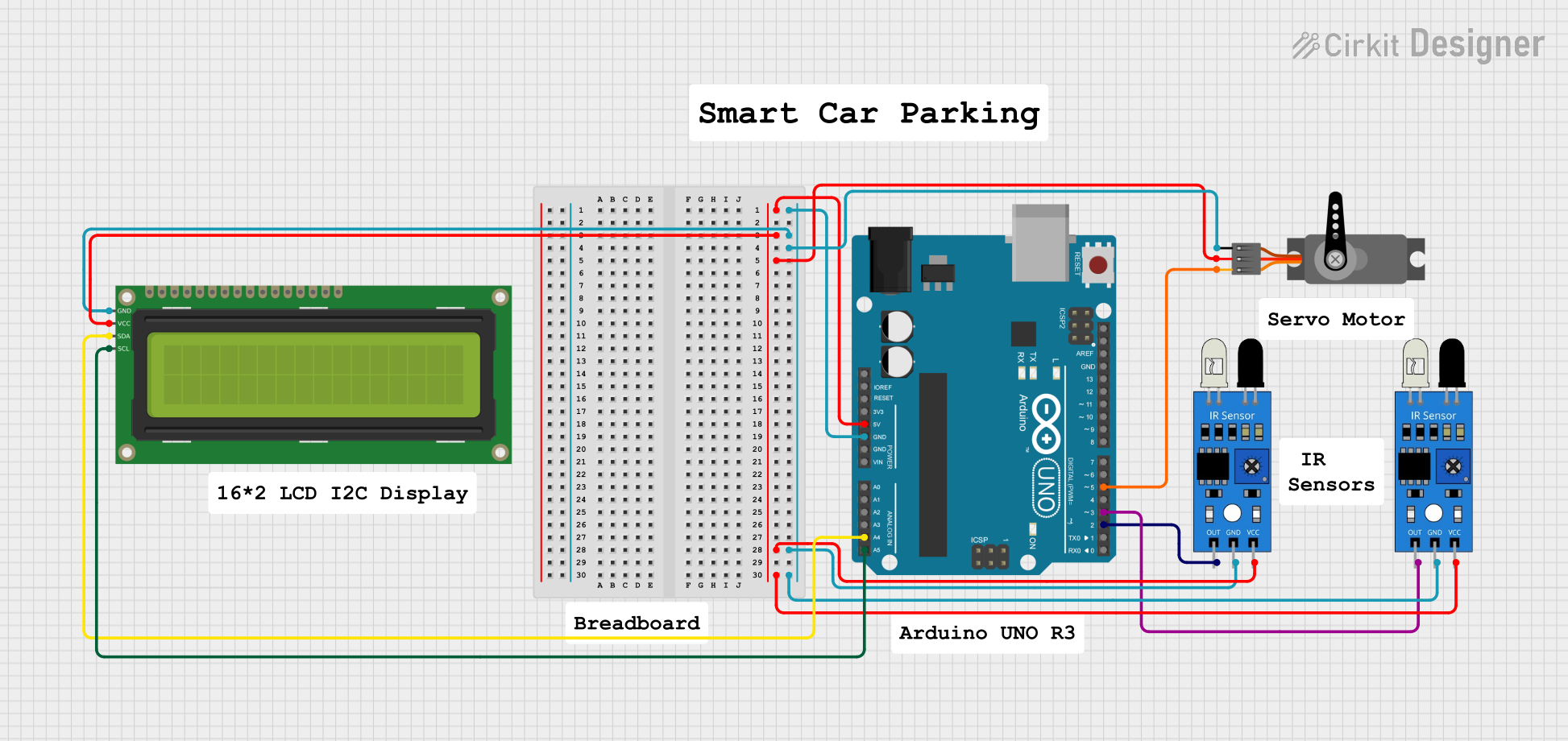
Circuit Documentation
Summary
This circuit involves an Arduino UNO microcontroller interfacing with a 16x2 I2C LCD, a servo motor, and two IR sensors. The Arduino UNO provides the necessary control signals and power to the connected components. The LCD displays information, the servo motor performs mechanical movements, and the IR sensors detect obstacles or objects.
Component List
Arduino UNO
- Description: A microcontroller board based on the ATmega328P.
- Pins: UNUSED, IOREF, Reset, 3.3V, 5V, GND, Vin, A0, A1, A2, A3, A4, A5, SCL, SDA, AREF, D13, D12, D11, D10, D9, D8, D7, D6, D5, D4, D3, D2, D1, D0
16x2 I2C LCD
- Description: A 16x2 character LCD display with I2C interface.
- Pins: GND, VCC, SDA, SCL
Servo
- Description: A servo motor for precise control of angular position.
- Pins: GND, VCC, PWM
IR Sensor (1)
- Description: An infrared sensor for object detection.
- Pins: out, gnd, vcc
IR Sensor (2)
- Description: An infrared sensor for object detection.
- Pins: out, gnd, vcc
Wiring Details
Arduino UNO
- 5V: Connected to VCC of 16x2 I2C LCD, VCC of Servo, VCC of IR Sensor (1), VCC of IR Sensor (2)
- GND: Connected to GND of 16x2 I2C LCD, GND of Servo, GND of IR Sensor (1), GND of IR Sensor (2)
- D5: Connected to PWM of Servo
- A4: Connected to SDA of 16x2 I2C LCD
- A5: Connected to SCL of 16x2 I2C LCD
- D3: Connected to out of IR Sensor (2)
- D2: Connected to out of IR Sensor (1)
16x2 I2C LCD
- VCC: Connected to 5V of Arduino UNO
- GND: Connected to GND of Arduino UNO
- SDA: Connected to A4 of Arduino UNO
- SCL: Connected to A5 of Arduino UNO
Servo
- VCC: Connected to 5V of Arduino UNO
- GND: Connected to GND of Arduino UNO
- PWM: Connected to D5 of Arduino UNO
IR Sensor (1)
- vcc: Connected to 5V of Arduino UNO
- gnd: Connected to GND of Arduino UNO
- out: Connected to D2 of Arduino UNO
IR Sensor (2)
- vcc: Connected to 5V of Arduino UNO
- gnd: Connected to GND of Arduino UNO
- out: Connected to D3 of Arduino UNO
Code Documentation
Arduino UNO Code
sketch.ino
void setup() {
  // put your setup code here, to run once:

}

void loop() {
  // put your main code here, to run repeatedly:

}
documentation.txt