
Arduino UNO Gas Detection System with I2C LCD Display and Buzzer Alert
View and Edit Project In Cirkit Designer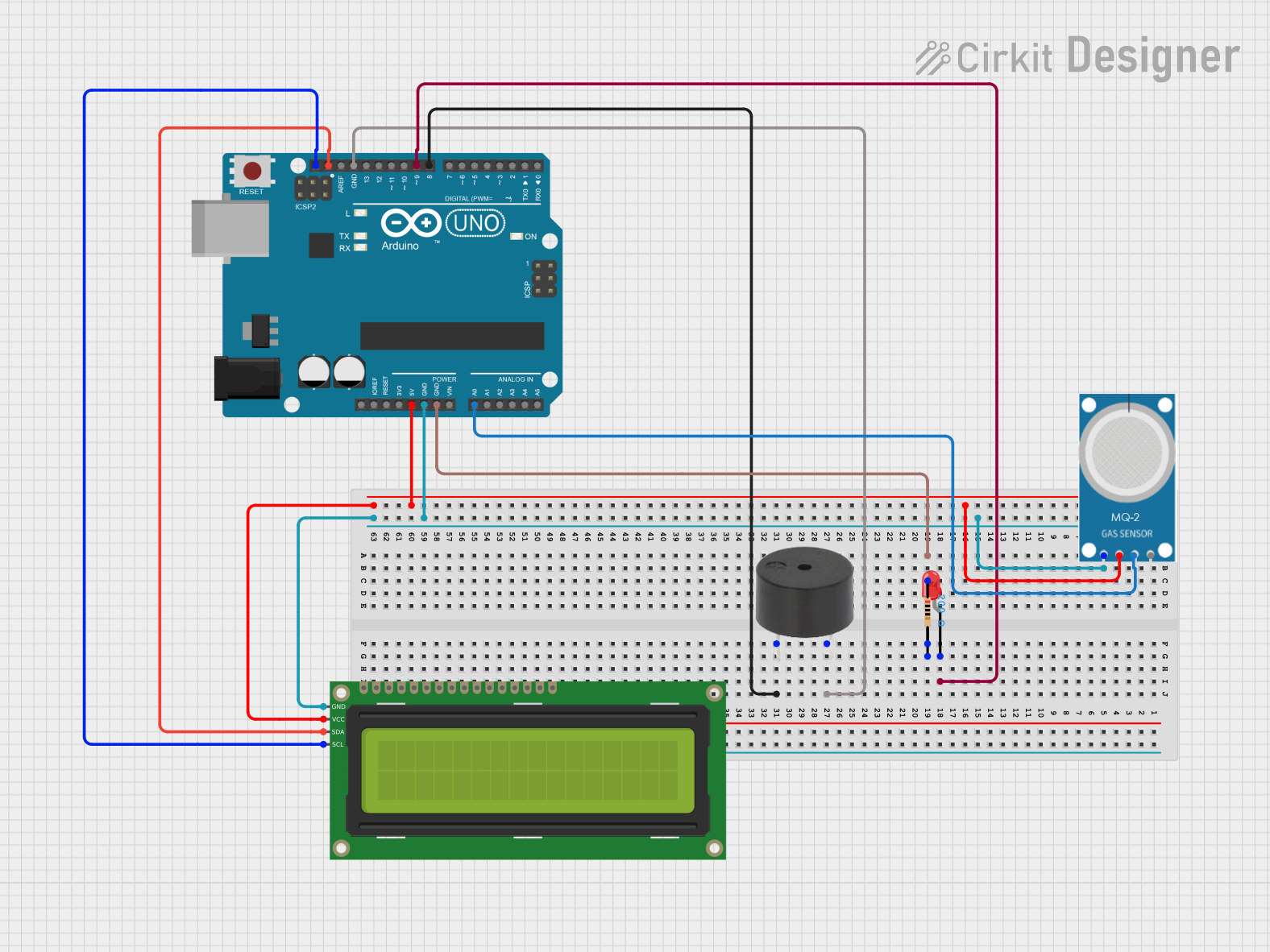
Circuit Documentation
Summary
This circuit involves an Arduino UNO microcontroller interfacing with a 16x2 I2C LCD, an MQ-2 gas sensor, a red LED, a buzzer, and a resistor. The Arduino UNO serves as the central control unit, reading data from the MQ-2 sensor and displaying information on the LCD. The LED and buzzer provide visual and auditory alerts, respectively.
Component List
Arduino UNO
- Description: A microcontroller board based on the ATmega328P.
- Pins: UNUSED, IOREF, Reset, 3.3V, 5V, GND, Vin, A0, A1, A2, A3, A4, A5, SCL, SDA, AREF, D13, D12, D11, D10, D9, D8, D7, D6, D5, D4, D3, D2, D1, D0
16x2 I2C LCD
- Description: A 16x2 character LCD display with I2C interface.
- Pins: GND, VCC, SDA, SCL
MQ-2
- Description: A gas sensor for detecting LPG, i-butane, propane, methane, alcohol, hydrogen, and smoke.
- Pins: GND, VCC, ANALOG, Digital
LED: Two Pin (red)
- Description: A red LED with two pins.
- Pins: cathode, anode
Buzzer
- Description: A simple buzzer for sound output.
- Pins: PIN, GND
Resistor
- Description: A resistor with a resistance of 200 Ohms.
- Pins: pin1, pin2
- Properties: Resistance: 200 Ohms
Wiring Details
Arduino UNO
- GND: Connected to GND of MQ-2, 16x2 I2C LCD, and Buzzer.
- 5V: Connected to VCC of MQ-2 and 16x2 I2C LCD.
- A0: Connected to ANALOG of MQ-2.
- D9: Connected to anode of LED.
- D8: Connected to PIN of Buzzer.
- SCL: Connected to SCL of 16x2 I2C LCD.
- SDA: Connected to SDA of 16x2 I2C LCD.
16x2 I2C LCD
- GND: Connected to GND of Arduino UNO.
- VCC: Connected to 5V of Arduino UNO.
- SDA: Connected to SDA of Arduino UNO.
- SCL: Connected to SCL of Arduino UNO.
MQ-2
- GND: Connected to GND of Arduino UNO.
- VCC: Connected to 5V of Arduino UNO.
- ANALOG: Connected to A0 of Arduino UNO.
LED: Two Pin (red)
- Anode: Connected to D9 of Arduino UNO.
- Cathode: Connected to pin2 of Resistor.
Buzzer
- GND: Connected to GND of Arduino UNO.
- PIN: Connected to D8 of Arduino UNO.
Resistor
- Pin1: Connected to GND of Arduino UNO.
- Pin2: Connected to cathode of LED.
Documented Code
Arduino UNO Code (sketch.ino)
void setup() {
  // put your setup code here, to run once:

}

void loop() {
  // put your main code here, to run repeatedly:

}
Additional Documentation (documentation.txt)
This documentation provides a comprehensive overview of the circuit, including a summary, detailed component list, wiring details, and the code used in the Arduino UNO.