
Arduino Nano-Based Smart Servo Control System with IR and RFID Sensors
View and Edit Project In Cirkit Designer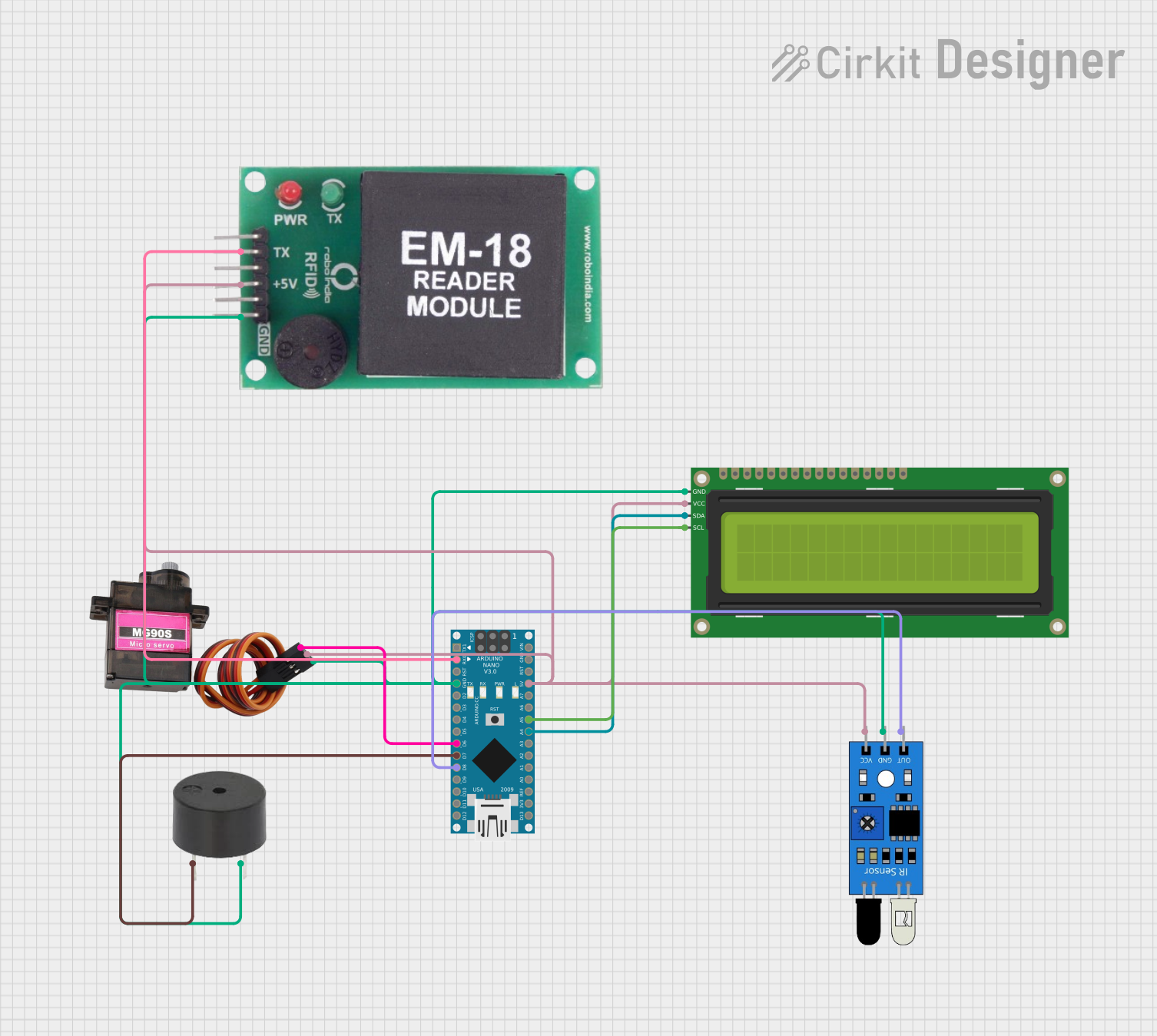
Circuit Documentation
Summary
This circuit is designed to control a servo motor based on input from an IR sensor and an RFID module. When the IR sensor detects an object, the servo motor rotates to 90 degrees. When an RFID tag is read, the servo motor returns to 0 degrees. Additionally, a buzzer will sound when the IR sensor is triggered, and an I2C LCD will display messages based on the sensor and RFID status. The entire system is controlled by an Arduino Nano microcontroller.
Component List
IR Sensor
- Pins: out, gnd, vcc
- Description: Detects the presence of an object.
- Purpose in Circuit: Triggers the servo motor and buzzer when an object is detected.
MG90S Servo Motor
- Pins: SIG, VCC, GND
- Description: A small servo motor.
- Purpose in Circuit: Rotates to specified angles based on sensor inputs.
Buzzer
- Pins: PIN, GND
- Description: Emits sound when activated.
- Purpose in Circuit: Sounds an alert when the IR sensor is triggered.
16x2 I2C LCD
- Pins: GND, VCC, SDA, SCL
- Description: A 16x2 character LCD with I2C interface.
- Purpose in Circuit: Displays messages based on sensor and RFID status.
EM-18 RFID Module
- Pins: TX, VCC, GND
- Description: Reads RFID tags.
- Purpose in Circuit: Provides RFID tag data to the microcontroller.
Arduino Nano
- Pins: D1/TX, D0/RX, RESET, GND, D2, D3, D4, D5, D6, D7, D8, D9, D10, D11/MOSI, D12/MISO, VIN, 5V, A7, A6, A5, A4, A3, A2, A1, A0, AREF, 3V3, D13/SCK
- Description: A small, complete, and breadboard-friendly microcontroller board.
- Purpose in Circuit: Controls all components and processes sensor inputs.
Wiring Details
IR Sensor
- out: Connected to Arduino Nano pin D8
- gnd: Connected to common ground (GND)
- vcc: Connected to 5V power supply
MG90S Servo Motor
- SIG: Connected to Arduino Nano pin D6
- VCC: Connected to 5V power supply
- GND: Connected to common ground (GND)
Buzzer
- PIN: Connected to Arduino Nano pin D7
- GND: Connected to common ground (GND)
16x2 I2C LCD
- GND: Connected to common ground (GND)
- VCC: Connected to 5V power supply
- SDA: Connected to Arduino Nano pin A4
- SCL: Connected to Arduino Nano pin A5
EM-18 RFID Module
- TX: Connected to Arduino Nano pin D0/RX
- VCC: Connected to 5V power supply
- GND: Connected to common ground (GND)
Arduino Nano
- D8: Connected to IR Sensor out
- GND: Connected to common ground (GND)
- 5V: Connected to 5V power supply
- D6: Connected to MG90S Servo Motor SIG
- D7: Connected to Buzzer PIN
- A4: Connected to 16x2 I2C LCD SDA
- A5: Connected to 16x2 I2C LCD SCL
- D0/RX: Connected to EM-18 RFID Module TX
Code Documentation
/*
 * This Arduino sketch controls a servo motor based on input from an IR sensor
 * and an RFID module. When the IR sensor detects an object, the servo motor
 * rotates to 90 degrees. When an RFID tag is read, the servo motor returns to
 * 0 degrees. Additionally, a buzzer will sound when the IR sensor is triggered,
 * and an I2C LCD will display messages based on the sensor and RFID status.
 */

#include <Servo.h>
#include <Wire.h>
#include <LiquidCrystal_I2C.h>

// Pin definitions
const int irSensorPin = 8;
const int servoPin = 6;
const int buzzerPin = 7;
const int rfidRxPin = 0;

// Servo object
Servo myServo;

// LCD object
LiquidCrystal_I2C lcd(0x27, 16, 2);

void setup() {
  // Initialize serial communication
  Serial.begin(9600);

  // Initialize IR sensor pin
  pinMode(irSensorPin, INPUT);

  // Initialize buzzer pin
  pinMode(buzzerPin, OUTPUT);

  // Attach servo to pin
  myServo.attach(servoPin);
  myServo.write(0); // Start at 0 degrees

  // Initialize LCD
  lcd.begin();
  lcd.backlight();
  lcd.setCursor(0, 0);
  lcd.print("System Ready");
}

void loop() {
  // Read IR sensor
  int irValue = digitalRead(irSensorPin);

  if (irValue == HIGH) {
    // IR sensor triggered
    myServo.write(90); // Move servo to 90 degrees
    digitalWrite(buzzerPin, HIGH); // Turn on buzzer
    lcd.setCursor(0, 1);
    lcd.print("IR Detected");
  } else {
    digitalWrite(buzzerPin, LOW); // Turn off buzzer
  }

  // Check for RFID input
  if (Serial.available() > 0) {
    String rfidTag = Serial.readString();
    myServo.write(0); // Move servo to 0 degrees
    lcd.setCursor(0, 1);
    lcd.print("RFID Read");
  }

  delay(100); // Small delay to debounce sensors
}
This code initializes the IR sensor, servo motor, buzzer, and I2C LCD. In the loop function, it continuously checks the IR sensor and RFID module for input. When the IR sensor is triggered, the servo motor moves to 90 degrees, the buzzer sounds, and the LCD displays "IR Detected". When an RFID tag is read, the servo motor returns to 0 degrees, and the LCD displays "RFID Read".