
Arduino UNO and RFID-RC522 Based Smart Traffic Light System with Priority Control
View and Edit Project In Cirkit Designer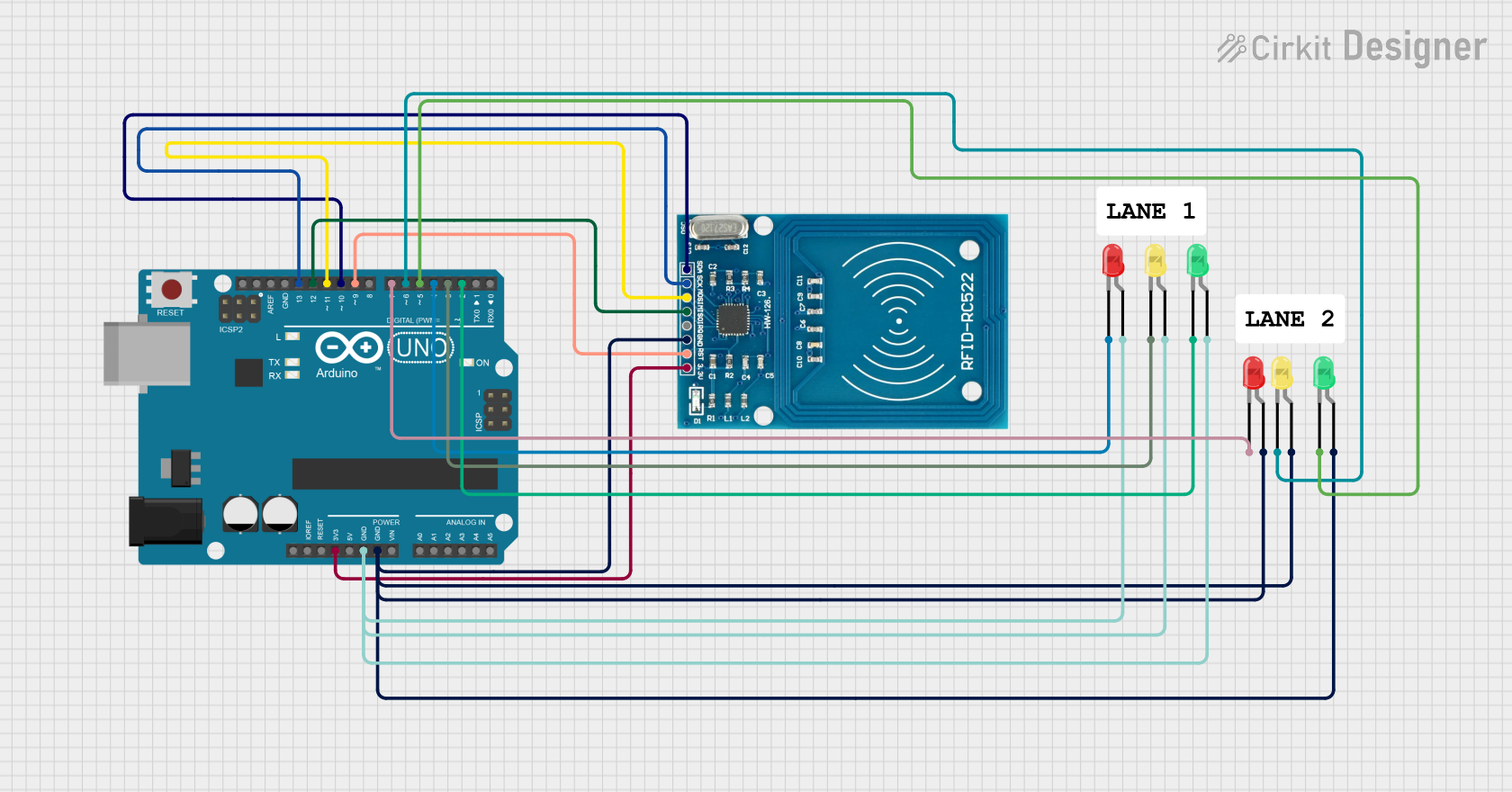
Circuit Documentation
Summary
This circuit is designed to control a traffic light system using an Arduino UNO and an RFID-RC522 module. The system allows for normal traffic light operation and can prioritize a specific lane when a valid RFID tag is detected. The circuit includes multiple LEDs to represent the traffic lights for two lanes.
Component List
RFID-RC522
- Description: RFID reader module
- Pins: VCC (3.3V), RST, GND, IRQ, MISO, MOSI, SCK, SDA
Arduino UNO
- Description: Microcontroller board
- Pins: UNUSED, IOREF, Reset, 3.3V, 5V, GND, Vin, A0, A1, A2, A3, A4, A5, SCL, SDA, AREF, D13, D12, D11, D10, D9, D8, D7, D6, D5, D4, D3, D2, D1, D0
LED: Two Pin (red)
- Description: Red LED
- Pins: cathode, anode
LED: Two Pin (green)
- Description: Green LED
- Pins: cathode, anode
LED: Two Pin (yellow)
- Description: Yellow LED
- Pins: cathode, anode
Wiring Details
RFID-RC522
- VCC (3.3V): Connected to Arduino UNO 3.3V
- RST: Connected to Arduino UNO D9
- GND: Connected to Arduino UNO GND
- MISO: Connected to Arduino UNO D12
- MOSI: Connected to Arduino UNO D11
- SCK: Connected to Arduino UNO D13
- SDA: Connected to Arduino UNO D10
Arduino UNO
- 3.3V: Connected to RFID-RC522 VCC (3.3V)
- D9: Connected to RFID-RC522 RST
- GND: Connected to RFID-RC522 GND, LED (green) anode, LED (yellow) anode, LED (red) anode
- D12: Connected to RFID-RC522 MISO
- D11: Connected to RFID-RC522 MOSI
- D13: Connected to RFID-RC522 SCK
- D10: Connected to RFID-RC522 SDA
- D7: Connected to LED (red) cathode
- D6: Connected to LED (yellow) cathode
- D5: Connected to LED (green) cathode
- D4: Connected to LED (red) cathode
- D3: Connected to LED (yellow) cathode
- D2: Connected to LED (green) cathode
LED: Two Pin (red)
- cathode: Connected to Arduino UNO D7
- anode: Connected to Arduino UNO GND
LED: Two Pin (green)
- cathode: Connected to Arduino UNO D5
- anode: Connected to Arduino UNO GND
LED: Two Pin (yellow)
- cathode: Connected to Arduino UNO D6
- anode: Connected to Arduino UNO GND
LED: Two Pin (red)
- cathode: Connected to Arduino UNO D4
- anode: Connected to Arduino UNO GND
LED: Two Pin (yellow)
- cathode: Connected to Arduino UNO D3
- anode: Connected to Arduino UNO GND
LED: Two Pin (green)
- cathode: Connected to Arduino UNO D2
- anode: Connected to Arduino UNO GND
Code Documentation
#include <SPI.h>
#include <MFRC522.h>

// RFID Pin Definitions
#define SDA_PIN 10  // SS Pin
#define RST_PIN 9   // Reset Pin

// Traffic Light Pin Definitions for Lane 1
#define LANE1_GREEN 2
#define LANE1_YELLOW 3
#define LANE1_RED 4

// Traffic Light Pin Definitions for Lane 2
#define LANE2_GREEN 5
#define LANE2_YELLOW 6
#define LANE2_RED 7

// Create MFRC522 instance
MFRC522 mfrc522(SDA_PIN, RST_PIN);

// RFID UID to trigger lane-specific behavior
String validUID = "f3632ba8";  // Replace with your actual RFID UID

// Timer variables for priority control
unsigned long priorityStartTime = 0;
bool priorityActive = false;

void setup() {
  // Initialize Serial Communication
  Serial.begin(9600);  // Ensure Serial Monitor is also set to 9600 baud
  while (!Serial) {
    ;  // Wait for serial port to connect (for Leonardo boards)
  }

  // Initialize RFID reader
  SPI.begin();
  mfrc522.PCD_Init();
  delay(50);  // Allow time for RFID module to initialize fully
  Serial.println("System Initialized. Waiting for RFID scan...");

  // Initialize Traffic Lights
  pinMode(LANE1_GREEN, OUTPUT);
  pinMode(LANE1_YELLOW, OUTPUT);
  pinMode(LANE1_RED, OUTPUT);
  pinMode(LANE2_GREEN, OUTPUT);
  pinMode(LANE2_YELLOW, OUTPUT);
  pinMode(LANE2_RED, OUTPUT);

  // Start with normal traffic cycle
  runNormalCycle();  // Initialize normal cycle on startup
}

void loop() {
  // Check for RFID card with priority
  if (mfrc522.PICC_IsNewCardPresent() && mfrc522.PICC_ReadCardSerial()) {
    handleRFID();
    return;  // Skip normal cycle if RFID detected
  }

  // Handle priority mode
  if (priorityActive) {
    if (millis() - priorityStartTime > 10000) {
      Serial.println("Priority time elapsed. Returning to normal cycle.");
      priorityActive = false;
    } else {
      return;  // Continue priority mode
    }
  }

  // Continue normal traffic light cycle
  runNormalCycle();
}

// Function to handle RFID tag scanning
void handleRFID() {
  String rfidUID = getUID();
  Serial.print("RFID Detected: ");
  Serial.println(rfidUID);

  if (rfidUID == validUID) {
    Serial.println("Valid Card Detected. Lane 1: Green, Lane 2: Red.");
    activateLane1Priority();
  } else {
    Serial.println("Invalid Card Detected. Pay Fine of 5000.");
  }

  // Halt RFID card and stop encryption
  mfrc522.PICC_HaltA();
  mfrc522.PCD_StopCrypto1();
}

// Function to get the UID of the RFID tag
String getUID() {
  String uid = "";
  for (byte i = 0; i < mfrc522.uid.size; i++) {
    uid += String(mfrc522.uid.uidByte[i], HEX);
  }
  return uid;
}

// Function to activate priority for Lane 1
void activateLane1Priority() {
  priorityActive = true;
  priorityStartTime = millis();

  // Lane 1: Green ON, Lane 2: Red ON
  digitalWrite(LANE1_GREEN, HIGH);
  digitalWrite(LANE1_YELLOW, LOW);
  digitalWrite(LANE1_RED, LOW);

  digitalWrite(LANE2_GREEN, LOW);
  digitalWrite(LANE2_YELLOW, LOW);
  digitalWrite(LANE2_RED, HIGH);
}

// Function to run the normal traffic light cycle
void runNormalCycle() {
  // Lane 1: Green ON, Lane 2: Red ON
  digitalWrite(LANE1_GREEN, HIGH);
  digitalWrite(LANE1_YELLOW, LOW);
  digitalWrite(LANE1_RED, LOW);

  digitalWrite(LANE2_GREEN, LOW);
  digitalWrite(LANE2_YELLOW, LOW);
  digitalWrite(LANE2_RED, HIGH);
  delay(1000);  // Minimal delay to prevent interference with RFID

  // Lane 1: Yellow ON, Lane 2: Red ON
  digitalWrite(LANE1_GREEN, LOW);
  digitalWrite(LANE1_YELLOW, HIGH);
  delay(500);  // Reduced delay

  // Lane 1: Red ON, Lane 2: Green ON
  digitalWrite(LANE1_YELLOW, LOW);
  digitalWrite(LANE1_RED, HIGH);

  digitalWrite(LANE2_RED, LOW);
  digitalWrite(LANE2_GREEN, HIGH);
  delay(1000);  // Minimal delay

  // Lane 1: Red ON, Lane 2: Yellow ON
  digitalWrite(LANE2_GREEN, LOW);
  digitalWrite(LANE2_YELLOW, HIGH);
  delay(500);  // Reduced delay

  // Lane 1: Green ON, Lane 2: Red ON
  digitalWrite(LANE2_YELLOW, LOW);
  digitalWrite(LANE2_RED, HIGH);
  digitalWrite(LANE1_RED, LOW);
  digitalWrite(LANE1_GREEN, HIGH);
}
This code initializes the RFID reader and traffic lights, handles RFID tag detection, and controls the traffic light