
ESP32-Based Smart Traffic Light and Environmental Monitoring System with Wi-Fi Connectivity
View and Edit Project In Cirkit Designer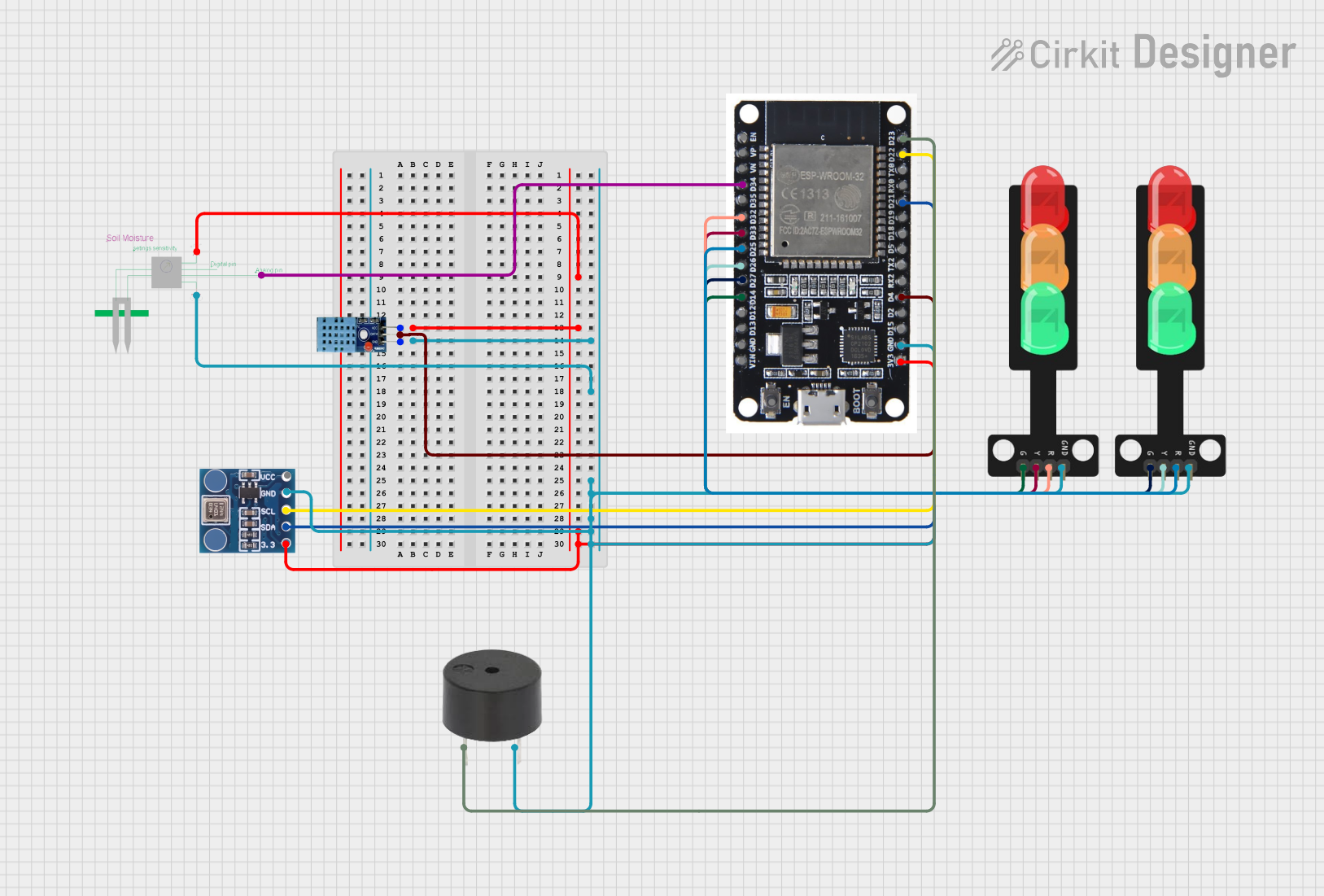
Circuit Documentation
Summary
This circuit is designed to monitor environmental conditions using various sensors and control traffic lights and a buzzer based on the sensor readings. The ESP32 microcontroller is the central unit that reads data from a DHT11 temperature and humidity sensor, a soil moisture sensor, and a BMP180 pressure sensor. The data is then sent to a Firebase database. Based on the sensor readings, the ESP32 controls two sets of traffic lights and a buzzer to indicate different conditions.
Component List
ESP32
- Description: A powerful microcontroller with Wi-Fi and Bluetooth capabilities.
- Purpose: Central processing unit for reading sensor data, controlling traffic lights and buzzer, and communicating with Firebase.
DHT11
- Description: A digital temperature and humidity sensor.
- Purpose: Measures the temperature and humidity of the environment.
Moisture Sensor
- Description: An analog sensor for measuring soil moisture levels.
- Purpose: Measures the moisture content in the soil.
BMP180
- Description: A digital barometric pressure sensor.
- Purpose: Measures atmospheric pressure.
Traffic Light (1)
- Description: A set of LEDs (Red, Yellow, Green) representing a traffic light.
- Purpose: Indicates temperature conditions.
Traffic Light (2)
- Description: A set of LEDs (Red, Yellow, Green) representing a traffic light.
- Purpose: Indicates soil moisture conditions.
Buzzer
- Description: An electronic device that produces a sound.
- Purpose: Provides an audible alert based on sensor readings.
Wiring Details
ESP32
- D34: Connected to Moisture Sensor (A0)
- D32: Connected to Traffic Light (2) (Red)
- D33: Connected to Traffic Light (2) (Yellow)
- D25: Connected to Traffic Light (1) (Red)
- D26: Connected to Traffic Light (1) (Yellow)
- D27: Connected to Traffic Light (1) (Green)
- D14: Connected to Traffic Light (2) (Green)
- 3V3: Connected to Moisture Sensor (5v+), DHT11 (VCC), BMP180 (3.3)
- GND: Connected to DHT11 (GND), Moisture Sensor (GND), Buzzer (GND), Traffic Light (1) (GND), Traffic Light (2) (GND), BMP180 (GND)
- D4: Connected to DHT11 (DATA)
- D21: Connected to BMP180 (SDA)
- D22: Connected to BMP180 (SCL)
- D23: Connected to Buzzer (PIN)
DHT11
- VCC: Connected to ESP32 (3V3)
- GND: Connected to ESP32 (GND)
- DATA: Connected to ESP32 (D4)
Moisture Sensor
- 5v+: Connected to ESP32 (3V3)
- GND: Connected to ESP32 (GND)
- A0: Connected to ESP32 (D34)
BMP180
- 3.3: Connected to ESP32 (3V3)
- SDA: Connected to ESP32 (D21)
- SCL: Connected to ESP32 (D22)
- GND: Connected to ESP32 (GND)
Traffic Light (1)
- Red: Connected to ESP32 (D25)
- Yellow: Connected to ESP32 (D26)
- Green: Connected to ESP32 (D27)
- GND: Connected to ESP32 (GND)
Traffic Light (2)
- Red: Connected to ESP32 (D32)
- Yellow: Connected to ESP32 (D33)
- Green: Connected to ESP32 (D14)
- GND: Connected to ESP32 (GND)
Buzzer
- PIN: Connected to ESP32 (D23)
- GND: Connected to ESP32 (GND)
Code Documentation
#include <WiFi.h>
#include <Firebase_ESP_Client.h>
#include <DHT11.h>
#include <Wire.h>  // For I2C communication
#include <Adafruit_Sensor.h>
#include <Adafruit_BMP085_U.h>  // BMP180 library

// Wi-Fi credentials
const char* ssid = "OPPO Reno5";
const char* password = "zyad@2020";

// Firebase project configuration
#define FIREBASE_PROJECT_ID "brick-system-bf594"
#define FIREBASE_API_KEY "AIzaSyC2Rq9AKZ6GE878ru0fzwwwzok_LyGiww0"

// DHT11 settings
#define DHTPIN 4    // GPIO pin connected to the DHT11
DHT11 dht(DHTPIN);  // Create DHT11 object

// Soil moisture sensor settings
#define SOIL_MOISTURE_PIN 35  // Analog pin connected to soil moisture sensor

// BMP180 settings
Adafruit_BMP085_Unified bmp;

// Firebase configurations
FirebaseData fbdo;
FirebaseAuth auth;
FirebaseConfig config;

// Global variables
String sessionDocumentId;
int sensorReadingId = 1;  // Incremental ID for each sensor reading

// Traffic light settings
const int buzzerPin = 23;
const int tempRedLedPin = 25;
const int tempYellowLedPin = 26;
const int tempGreenLedPin = 27;
const int moistureRedLedPin = 32;
const int moistureYellowLedPin = 33;
const int moistureGreenLedPin = 14;

// Function to synchronize the ESP32's time with NTP
void setupTime() {
  configTime(0, 0, "pool.ntp.org", "time.nist.gov");
  Serial.print("Waiting for time sync...");
  while (!time(nullptr)) {
    delay(1000);
    Serial.print(".");
  }
  Serial.println("\nTime synchronized");
}

// Function to get the current ISO 8601 timestamp in UTC
String getIso8601Timestamp() {
  time_t now = time(nullptr);
  struct tm* timeinfo = gmtime(&now);  // Use gmtime for UTC
  char buffer[25];
  strftime(buffer, sizeof(buffer), "%Y-%m-%dT%H:%M:%SZ", timeinfo);  // UTC timestamp ends with 'Z'
  return String(buffer);
}

// Function to create a new session document in Firestore
void createNewSession() {
  String documentPath = "sessions/session_" + String(millis());  // Unique session ID
  sessionDocumentId = documentPath;

  FirebaseJson sessionData;
  sessionData.set("fields/startTime/timestampValue", getIso8601Timestamp());

  if (Firebase.Firestore.createDocument(&fbdo, FIREBASE_PROJECT_ID, "", documentPath.c_str(), sessionData.raw())) {
    Serial.println("New session created: " + documentPath);
  } else {
    Serial.print("Failed to create session: ");
    Serial.println(fbdo.errorReason());
  }
}

// Function to store sensor data in Firestore
void storeSensorData(const String & sensorName, FirebaseJson& data) {
  String documentPath = sessionDocumentId + "/" + sensorName + "/reading_" + String(sensorReadingId++);

  if (Firebase.Firestore.createDocument(&fbdo, FIREBASE_PROJECT_ID, "", documentPath.c_str(), data.raw())) {
    Serial.println(sensorName + " data stored successfully at " + documentPath);
  } else {
    Serial.print("Failed to store " + sensorName + " data: ");
    Serial.println(fbdo.errorReason());
  }
}

// Function to map soil moisture sensor reading to a percentage (0-100)
int mapSoilMoisture(int rawValue) {
  return map(rawValue, 0, 4095, 100, 0);  // Map analog value (0-4095) to percentage (0-100)
}

// Function to control traffic lights and buzzer based on sensor readings
void controlTrafficLightsAndBuzzer(float temperature, float moisture) {
  // Temperature traffic light logic
  if (temperature > 30.0) {
    digitalWrite(tempRedLedPin, HIGH);
    digitalWrite(tempYellowLedPin, LOW);
    digitalWrite(tempGreenLedPin, LOW);
    digitalWrite(buzzerPin, HIGH);  // Activate buzzer
  } else if (temperature > 20.0) {
    digitalWrite(tempRedLedPin, LOW);
    digitalWrite(tempYellowLedPin, HIGH);
    digitalWrite(tempGreenLedPin, LOW);
    digitalWrite(buzzerPin, LOW);  // Deactivate buzzer
  } else {
    digitalWrite(tempRedLedPin, LOW);
    digitalWrite(tempYellowLedPin, LOW);
    digitalWrite(tempGreenLedPin, HIGH);
    digitalWrite(buzzerPin, LOW);  // Deactivate buzzer
  }

  // Moisture traffic light logic
  if (moisture < 30) {
    digitalWrite(moistureRedLedPin, HIGH);
    digitalWrite(moistureYellowLedPin, LOW);
    digitalWrite(moistureGreenLedPin, LOW);
    digitalWrite(b