
Arduino-Controlled Automated Plant Watering System with Bluetooth and Soil Moisture Sensing
View and Edit Project In Cirkit Designer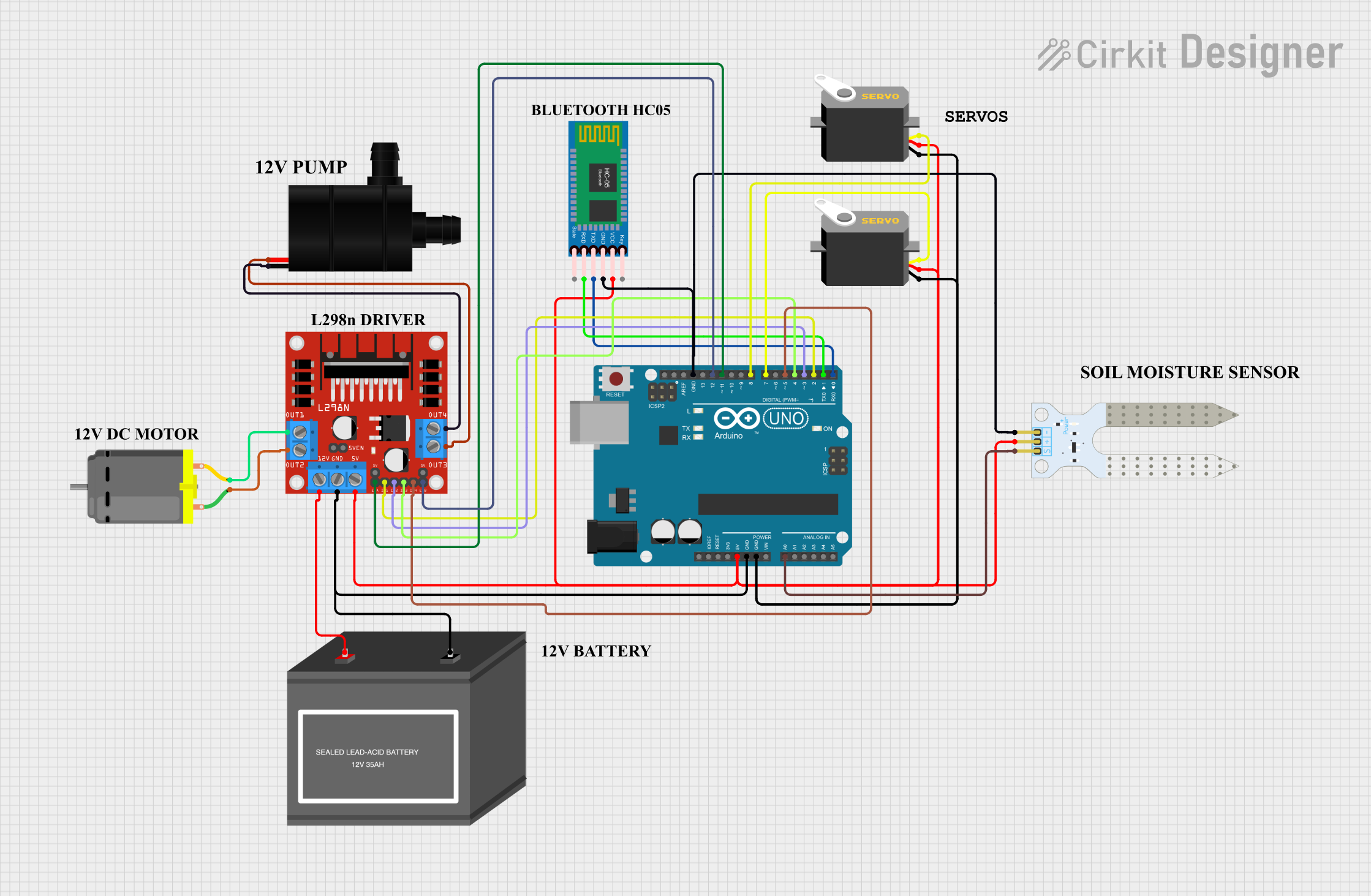
Circuit Documentation
Summary
This circuit is designed to control a soil moisture monitoring system with automated water pumping and servo actuation capabilities. It uses an Arduino UNO as the central microcontroller to read soil moisture levels, control a DC motor via an L298N motor driver, and manage two servo motors. The system also includes an HC-05 Bluetooth module for wireless communication, allowing manual control over the motor and pump. A 12V battery powers the motor driver, which in turn powers the DC motor and water pump. The servos and soil moisture sensor are powered directly by the Arduino's 5V output.
Component List
Arduino UNO
- Microcontroller board based on the ATmega328P
- Provides digital and analog I/O pins
- Powers and controls the various components in the circuit
Servo (x2)
- Rotary actuators that allow for precise control of angular position
- Used for moving parts or controlling mechanisms
Soil Moisture Sensor
- Measures the moisture level in the soil
- Provides input to the Arduino to determine when to activate the water pump
L298N DC Motor Driver
- H-Bridge motor controller
- Drives the DC motor and water pump
DC Motor
- Converts electrical energy into mechanical energy
- Used to perform work, such as turning a wheel or moving an object
HC-05 Bluetooth Module
- Wireless communication module
- Allows for remote control via Bluetooth
Water Pump
- Moves water from one place to another
- Activated by the Arduino when the soil moisture level is below a certain threshold
12V Battery (mini)
- Provides power to the motor driver, which in turn powers the DC motor and water pump
Wiring Details
Arduino UNO
5Vpin connected to the 5V power rail supplying the servos, soil moisture sensor, and Bluetooth moduleGNDpin connected to the ground railA0pin connected to theSIGpin of the Soil Moisture Sensor- Digital pins
D2toD12connected to the L298N motor driver and HC-05 Bluetooth module as per the control requirements
Servo
vccpin connected to the 5V power railgndpin connected to the ground railpulsepin connected to a digital pin on the Arduino UNO for control signals
Soil Moisture Sensor
VCCpin connected to the 5V power railGNDpin connected to the ground railSIGpin connected to theA0pin on the Arduino UNO
L298N DC Motor Driver
5Vpin connected to the 5V power railGNDpin connected to the ground rail12Vpin connected to the+pin of the 12V Battery- Control pins (
ENA,ENB,IN1,IN2,IN3,IN4) connected to corresponding digital pins on the Arduino UNO - Output pins (
OUT1,OUT2,OUT3,OUT4) connected to the DC Motor and Water Pump
DC Motor
- Two pins connected to
OUT1andOUT2on the L298N motor driver
HC-05 Bluetooth Module
VCCpin connected to the 5V power railGNDpin connected to the ground railTXDandRXDpins connected toD0(RX) andD1(TX) on the Arduino UNO for serial communication
Water Pump
VCCpin connected toOUT3on the L298N motor driverGNDpin connected toOUT4on the L298N motor driver
12V Battery (mini)
+pin connected to the12Vpin on the L298N motor driver-pin connected to the ground rail
Documented Code
#include <Servo.h>

// Define pins for L298N motor driver
#define MOTOR_A_IN1_PIN 2   // Motor A input 1
#define MOTOR_A_IN2_PIN 3   // Motor A input 2
#define MOTOR_B_IN3_PIN 4   // Motor B input 3
#define MOTOR_B_IN4_PIN 5   // Motor B input 4
#define MOTOR_A_ENABLE_PIN 9 // Motor A speed control (PWM)
#define MOTOR_B_ENABLE_PIN 10 // Motor B speed control (PWM)

// Define pins for soil moisture sensor and servos
#define SOIL_SENSOR_PIN A0   // Soil moisture sensor input
#define SERVO1_PIN 6         // Servo 1 control
#define SERVO2_PIN 7         // Servo 2 control

// Threshold for soil moisture to start the pump
const int moistureThreshold = 400; // Adjust based on your sensor readings

// Bluetooth command for manual control
char bluetoothCommand;

// Initialize servo objects
Servo servo1;
Servo servo2;

// Timing variable for Servo 1 movement
unsigned long lastServoMoveTime1 = 0;

void setup() {
  // Initialize serial communication for Bluetooth
  Serial.begin(9600);

  // Initialize motor driver pins
  pinMode(MOTOR_A_IN1_PIN, OUTPUT);
  pinMode(MOTOR_A_IN2_PIN, OUTPUT);
  pinMode(MOTOR_B_IN3_PIN, OUTPUT);
  pinMode(MOTOR_B_IN4_PIN, OUTPUT);
  pinMode(MOTOR_A_ENABLE_PIN, OUTPUT);
  pinMode(MOTOR_B_ENABLE_PIN, OUTPUT);

  // Initialize servos
  servo1.attach(SERVO1_PIN);
  servo2.attach(SERVO2_PIN);

  // Set initial positions for servos
  servo1.write(0); // Start at 0 degrees
  servo2.write(90); // Initial position for servo2
}

void loop() {
  // Check for Bluetooth commands
  if (Serial.available()) {
    bluetoothCommand = Serial.read();
    handleBluetoothCommand(bluetoothCommand);
  }

  // Read soil moisture value
  int soilMoistureValue = analogRead(SOIL_SENSOR_PIN);
  if (soilMoistureValue < moistureThreshold) {
    startPump();
  } else {
    stopPump();
  }

  // No delay here to keep the loop responsive
}

void startMotor() {
  digitalWrite(MOTOR_A_IN1_PIN, HIGH);
  digitalWrite(MOTOR_A_IN2_PIN, LOW);
  analogWrite(MOTOR_A_ENABLE_PIN, 200); // Motor A speed control
}

void stopMotor() {
  digitalWrite(MOTOR_A_IN1_PIN, LOW);
  digitalWrite(MOTOR_A_IN2_PIN, LOW);
}

void moveMotorForward() {
  digitalWrite(MOTOR_A_IN1_PIN, HIGH);
  digitalWrite(MOTOR_A_IN2_PIN, LOW);
  analogWrite(MOTOR_A_ENABLE_PIN, 200); // Move forward
}

void moveMotorBackward() {
  digitalWrite(MOTOR_A_IN1_PIN, LOW);
  digitalWrite(MOTOR_A_IN2_PIN, HIGH);
  analogWrite(MOTOR_A_ENABLE_PIN, 200); // Move backward
}

void startPump() {
  digitalWrite(MOTOR_B_IN3_PIN, HIGH);
  digitalWrite(MOTOR_B_IN4_PIN, LOW);
  analogWrite(MOTOR_B_ENABLE_PIN, 200); // Pump speed control
}

void stopPump() {
  digitalWrite(MOTOR_B_IN3_PIN, LOW);
  digitalWrite(MOTOR_B_IN4_PIN, LOW);
}

void handleBluetoothCommand(char command) {
  switch (command) {
    case 'M': // Start motor forward
      moveMotorForward();
      break;
    case 'm': // Stop motor
      stopMotor();
      break;
    case 'N': // Start motor backward
      moveMotorBackward();
      break;
    case 'P': // Start pump manually
      startPump();
      break;
    case 'p': // Stop pump manually
      stopPump();
      break;
    case 'S': // Rotate servo1 to -90 degrees and return quickly to 0
      rotateServo(servo1, -90, 0);
      break;
    case 'U': // Rotate servo1 to 90 degrees and return quickly to 0
      rotateServo(servo1, 90, 0);
      break;
    case 'T': // Rotate servo2 to 0 and 90 degrees
      rotateServo(servo2, 0, 90);
      break;
  }
}

void rotateServo(Servo &servo, int targetAngle, int returnAngle) {
  // Move to the target angle
  servo.write(targetAngle);
  delay(0); // Allow some time for the servo to reach the target

  // Immediately return to the original angle
  servo.write(returnAngle);
}
This code is designed to run on an Arduino UNO and controls the various components of the circuit based on sensor inputs and Bluetooth commands. It includes functions for starting and stopping the motor and pump, as well as for moving the servos to specific angles. The loop() function continuously checks for Bluetooth commands and the soil moisture level, activating the pump when necessary.