
Arduino-Controlled DC Motor with Dual IR Sensors and Tilt Detection
View and Edit Project In Cirkit Designer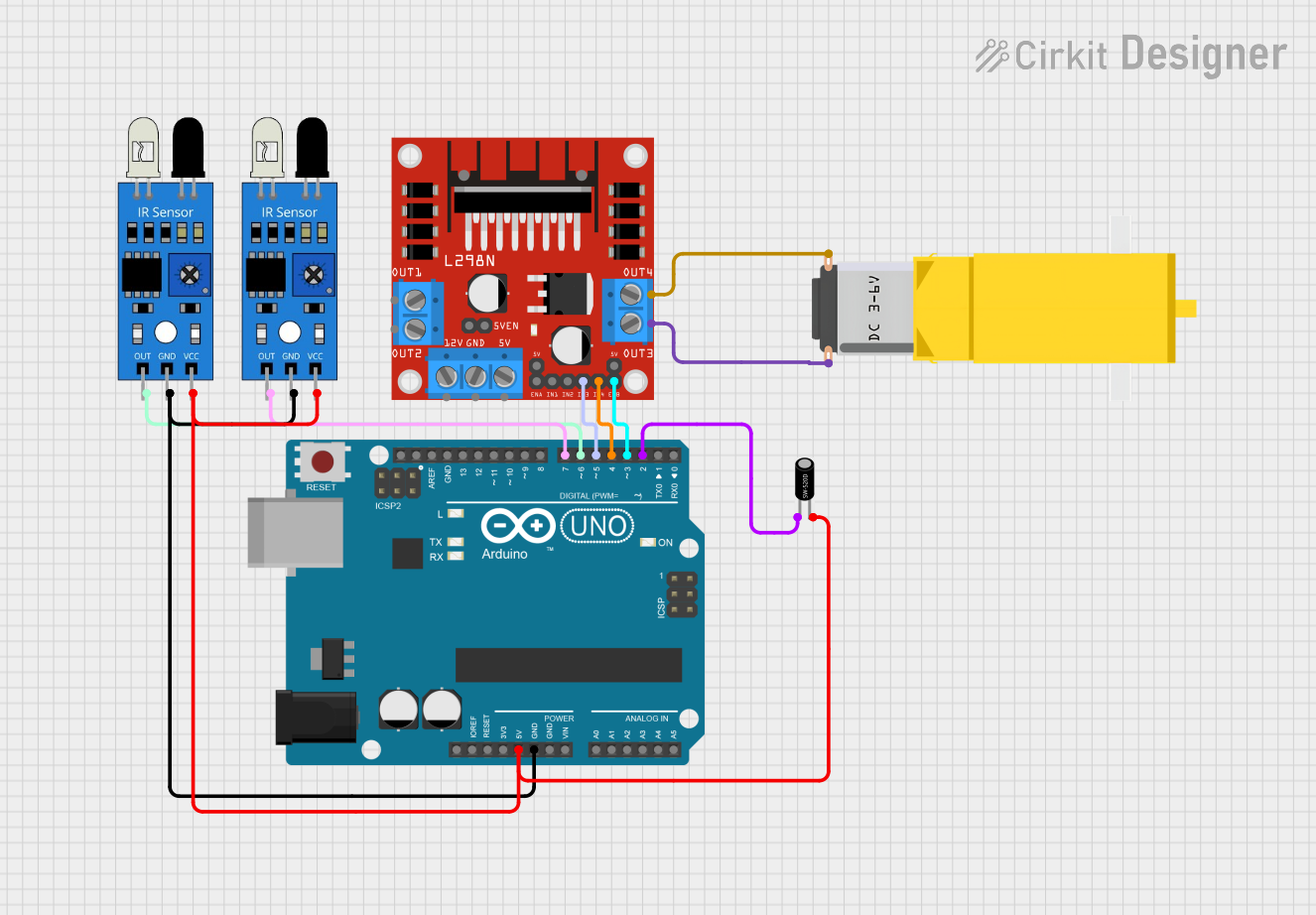
Circuit Documentation
Summary
This circuit is designed to control a DC gearmotor using an Arduino UNO microcontroller in conjunction with an L298N DC motor driver. The system also includes two IR sensors and a tilt sensor to provide input signals to the Arduino, which then processes these signals to control the motor's operation based on the sensor readings. The IR sensors are used to detect objects or movement, while the tilt sensor detects the orientation of the device. The Arduino UNO controls the motor driver, which in turn drives the gearmotor. The motor is enabled or disabled based on the logic determined by the sensor inputs.
Component List
Arduino UNO
- Microcontroller board based on the ATmega328P
- Provides digital and analog I/O pins
- Used for processing sensor inputs and controlling the motor driver
L298N DC Motor Driver
- Dual H-Bridge motor driver
- Capable of driving two DC motors or one stepper motor
- Used to control the direction and speed of the gearmotor
Gearmotor DC / Motorreductor
- A DC motor with a gearbox for increased torque
- Driven by the L298N motor driver
IR Sensor
- Infrared sensor for object detection
- Two instances of this sensor are used in the circuit
Tilt Sensor
- Detects tilting motion
- Provides a digital signal to the Arduino UNO
Wiring Details
Arduino UNO
5Vpin provides power to the IR sensors and the tilt sensorGNDpin is connected to the ground pins of the IR sensors- Digital pins
D2,D3,D4,D5,D6, andD7are used for sensor inputs and motor driver control signals
L298N DC Motor Driver
IN3andIN4pins are connected to Arduino digital pinsD5andD4for motor direction controlENBpin is connected to Arduino digital pinD3for motor enable controlOUT3andOUT4pins are connected to the gearmotor
Gearmotor DC / Motorreductor
- Connected to the
OUT3andOUT4pins of the L298N motor driver
IR Sensors
vccpins are connected to the5Vpin of the Arduino UNOgndpins are connected to theGNDpin of the Arduino UNOoutpins are connected to Arduino digital pinsD6andD7
Tilt Sensor
- One pin is connected to the
5Vpin of the Arduino UNO - The other pin is connected to Arduino digital pin
D2
Documented Code
const int irSensor1 = 6;
const int irSensor2 = 7;
const int tiltSensor = 2;
const int motorEnable = 3;
const int motorIn3 = 5;
const int motorIn4 = 4;

bool IsTilt = false;
bool OnlyOneIR = false;

void setup() {
  Serial.begin(9600);

  pinMode(irSensor1, INPUT);
  pinMode(irSensor2, INPUT);
  pinMode(tiltSensor, INPUT);

  pinMode(motorEnable, OUTPUT);
  pinMode(motorIn3, OUTPUT);
  pinMode(motorIn4, OUTPUT);

  digitalWrite(motorEnable, LOW);
  digitalWrite(motorIn3, LOW);
  digitalWrite(motorIn4, LOW);
}

void loop() {
  int irSensor1Value = digitalRead(irSensor1);
  int irSensor2Value = digitalRead(irSensor2);
  int tiltSensorValue = digitalRead(tiltSensor);

  IsTilt = (tiltSensorValue == HIGH);
  OnlyOneIR = (irSensor1Value != irSensor2Value);

  Serial.print("IsTilt: ");
  Serial.print(IsTilt);
  Serial.print(" | OnlyOneIR: ");
  Serial.println(OnlyOneIR);

  if (IsTilt && OnlyOneIR) {
    digitalWrite(motorEnable, HIGH);
    digitalWrite(motorIn3, HIGH);
    digitalWrite(motorIn4, LOW);
  } else {
    digitalWrite(motorEnable, LOW);
    digitalWrite(motorIn3, LOW);
    digitalWrite(motorIn4, LOW);
  }

  delay(737);
}
The code is written for the Arduino UNO and is responsible for reading the sensor inputs and controlling the motor driver. The IR sensors are connected to digital pins D6 and D7, while the tilt sensor is connected to digital pin D2. The motor driver's enable and input pins are controlled by digital pins D3, D4, and D5. The code includes a setup routine to initialize the pins and a loop routine that reads the sensor values, processes the logic, and controls the motor accordingly. The motor is activated only when the tilt sensor is triggered and only one of the IR sensors detects an object.