
Arduino and ESP8266-Based Smart Warehouse Monitoring System with RFID and Wi-Fi Connectivity
View and Edit Project In Cirkit Designer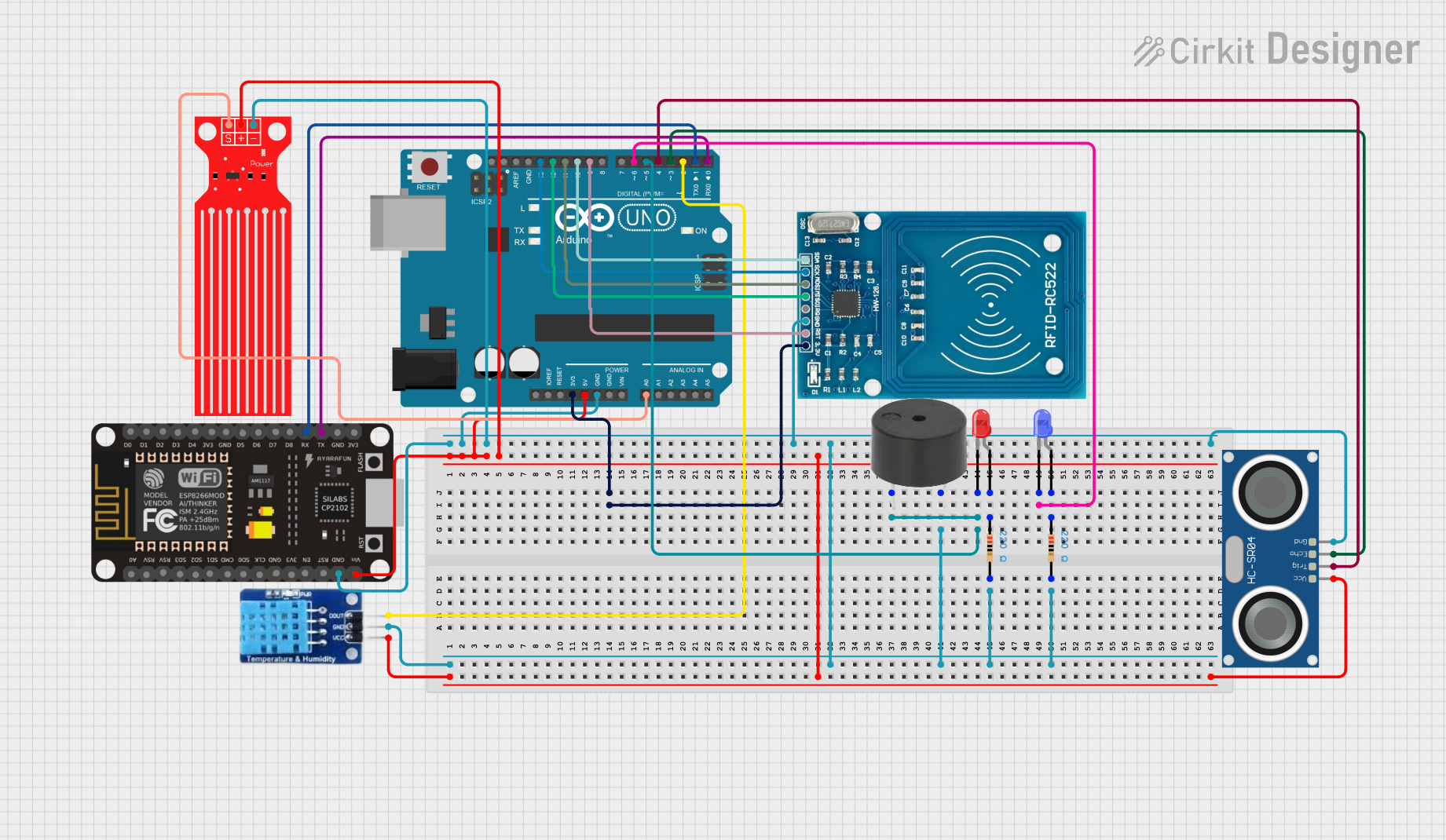
Circuit Documentation
Summary
This circuit integrates an Arduino UNO and an ESP8266 NodeMCU to monitor environmental conditions using various sensors and control devices. The Arduino UNO reads data from a DHT11 temperature and humidity sensor, an HC-SR04 ultrasonic sensor, a water level sensor, and an RFID-RC522 module. It also controls a buzzer and two LEDs (red and blue). The ESP8266 NodeMCU connects to a Firebase database to upload sensor data and receive control signals.
Component List
Arduino UNO
- Description: Microcontroller board based on the ATmega328P.
- Pins: UNUSED, IOREF, Reset, 3.3V, 5V, GND, Vin, A0, A1, A2, A3, A4, A5, SCL, SDA, AREF, D13, D12, D11, D10, D9, D8, D7, D6, D5, D4, D3, D2, D1, D0
ESP8266 NodeMCU
- Description: Wi-Fi module with integrated TCP/IP protocol stack.
- Pins: D0, D1, D2, D3, D4, 3V3, GND, D5, D6, D7, D8, RX, TX, A0, RSV, SD3, SD2, SD1, CMD, SD0, CLK, EN, RST, VIN
DHT11
- Description: Temperature and humidity sensor.
- Pins: DATA, GND, VCC
HC-SR04 Ultrasonic Sensor
- Description: Ultrasonic distance sensor.
- Pins: VCC, TRIG, ECHO, GND
Water Level Sensor
- Description: Analog water level sensor.
- Pins: SIG, VCC, GND
RFID-RC522
- Description: RFID reader module.
- Pins: VCC (3.3V), RST, GND, IRQ, MISO, MOSI, SCK, SDA
Buzzer
- Description: Simple piezoelectric buzzer.
- Pins: PIN, GND
LED: Two Pin (red)
- Description: Red LED.
- Pins: cathode, anode
LED: Two Pin (blue)
- Description: Blue LED.
- Pins: cathode, anode
Resistor (220 Ohms)
- Description: Resistor with 220 Ohms resistance.
- Pins: pin1, pin2
Wiring Details
Arduino UNO
- 3.3V: Connected to VCC (3.3V) of RFID-RC522.
- 5V: Connected to VCC of DHT11, HC-SR04 Ultrasonic Sensor, Water Level Sensor, and VIN of ESP8266 NodeMCU.
- GND: Connected to GND of Buzzer, DHT11, ESP8266 NodeMCU, Water Level Sensor, RFID-RC522, HC-SR04 Ultrasonic Sensor, and both Resistors.
- D0: Connected to TX of ESP8266 NodeMCU.
- D1: Connected to RX of ESP8266 NodeMCU.
- D2: Connected to DATA of DHT11.
- D3: Connected to ECHO of HC-SR04 Ultrasonic Sensor.
- D4: Connected to TRIG of HC-SR04 Ultrasonic Sensor.
- D5: Connected to PIN of Buzzer and cathode of Red LED.
- D6: Connected to cathode of Blue LED.
- D9: Connected to RST of RFID-RC522.
- D10: Connected to SDA of RFID-RC522.
- D11: Connected to MOSI of RFID-RC522.
- D12: Connected to MISO of RFID-RC522.
- D13: Connected to SCK of RFID-RC522.
- A0: Connected to SIG of Water Level Sensor.
ESP8266 NodeMCU
- VIN: Connected to 5V of Arduino UNO.
- GND: Connected to GND of Arduino UNO.
- RX: Connected to D1 of Arduino UNO.
- TX: Connected to D0 of Arduino UNO.
DHT11
- DATA: Connected to D2 of Arduino UNO.
- GND: Connected to GND of Arduino UNO.
- VCC: Connected to 5V of Arduino UNO.
HC-SR04 Ultrasonic Sensor
- TRIG: Connected to D4 of Arduino UNO.
- ECHO: Connected to D3 of Arduino UNO.
- GND: Connected to GND of Arduino UNO.
- VCC: Connected to 5V of Arduino UNO.
Water Level Sensor
- SIG: Connected to A0 of Arduino UNO.
- GND: Connected to GND of Arduino UNO.
- VCC: Connected to 5V of Arduino UNO.
RFID-RC522
- VCC (3.3V): Connected to 3.3V of Arduino UNO.
- RST: Connected to D9 of Arduino UNO.
- GND: Connected to GND of Arduino UNO.
- SCK: Connected to D13 of Arduino UNO.
- MISO: Connected to D12 of Arduino UNO.
- MOSI: Connected to D11 of Arduino UNO.
- SDA: Connected to D10 of Arduino UNO.
Buzzer
- PIN: Connected to D5 of Arduino UNO.
- GND: Connected to GND of Arduino UNO.
LED: Two Pin (red)
- cathode: Connected to D5 of Arduino UNO.
- anode: Connected to pin1 of a 220 Ohm Resistor.
LED: Two Pin (blue)
- cathode: Connected to D6 of Arduino UNO.
- anode: Connected to pin1 of a 220 Ohm Resistor.
Resistor (220 Ohms)
- pin1: Connected to anode of Red LED and Blue LED.
- pin2: Connected to GND of Arduino UNO.
Documented Code
Arduino UNO Code
#include <DHT.h>  // Include the DHT sensor library
#include <SPI.h>
#include <MFRC522.h>

// Define pin numbers for the sensors and RFID
const int redSignalPin = 5;    // Red signal (buzzer and red led) connected to pin 5
const int trigPin = 4;         // Trigger pin of ultrasonic sensor
const int echoPin = 3;         // Echo pin of ultrasonic sensor
const int waterLevelPin = A0;  // Water level sensor connected to analog pin A0
const int dhtPin = 2;          // DHT11 data pin connected to digital pin 2
const int blueSignalPin = 6;   // Blue signal (blue LED) connected to pin 6

#define RST_PIN 9          // RFID RST pin
#define SS_PIN 10          // RFID SDA (SS) pin

// DHT11 sensor setup
#define DHTTYPE DHT11
DHT dht(dhtPin, DHTTYPE);

// RFID setup
MFRC522 mfrc522(SS_PIN, RST_PIN);

// Threshold values
const int distanceThreshold = 20;    // Trigger distance for ultrasonic sensor in cm
const int waterLevelThreshold = 100; // Analog value threshold for water level sensor (flood detection)

// State variables
bool signalSystemEnabledCloud = true; // Tracks if the ultrasonic signaling system is active
bool signalSystemEnabledLocal = true; // Tracks if the ultrasonic signaling system is active

void setup() {
  // Start serial communication
  Serial.begin(115200);
  // Initialize sensors and modules
  pinMode(trigPin, OUTPUT);
  pinMode(echoPin, INPUT);
  pinMode(redSignalPin, OUTPUT);
  pinMode(blueSignalPin, OUTPUT);
  dht.begin();
  SPI.begin();
  mfrc522.PCD_Init();

  // Initialize red and blue signals as off
  digitalWrite(redSignalPin, LOW);
  digitalWrite(blueSignalPin, LOW);
  Serial.println("System Ready. Place your RFID card to toggle ultrasonic signaling system.");
}

void loop() {
  // Ultrasonic signaling (only when enabled)
  if (signalSystemEnabledCloud && signalSystemEnabledLocal) {
    float distance = readUltrasonicSensor();
    if (distance <= distanceThreshold) {
      digitalWrite(redSignalPin, HIGH); // Turn on red signal (buzzer)
      delay(500);                       // Signal duration
      digitalWrite(redSignalPin, LOW);  // Turn off red signal (buzzer)
    }
  }

  // Water level signaling (always active)
  int waterLevel = analogRead(waterLevelPin);
  if (waterLevel >= waterLevelThreshold) {
    digitalWrite(blueSignalPin, HIGH);  // Turn on blue signal (LED)
  } else {
    digitalWrite(blue