
Arduino UNO-Based Automated Water Pump System with Sensor Integration
View and Edit Project In Cirkit Designer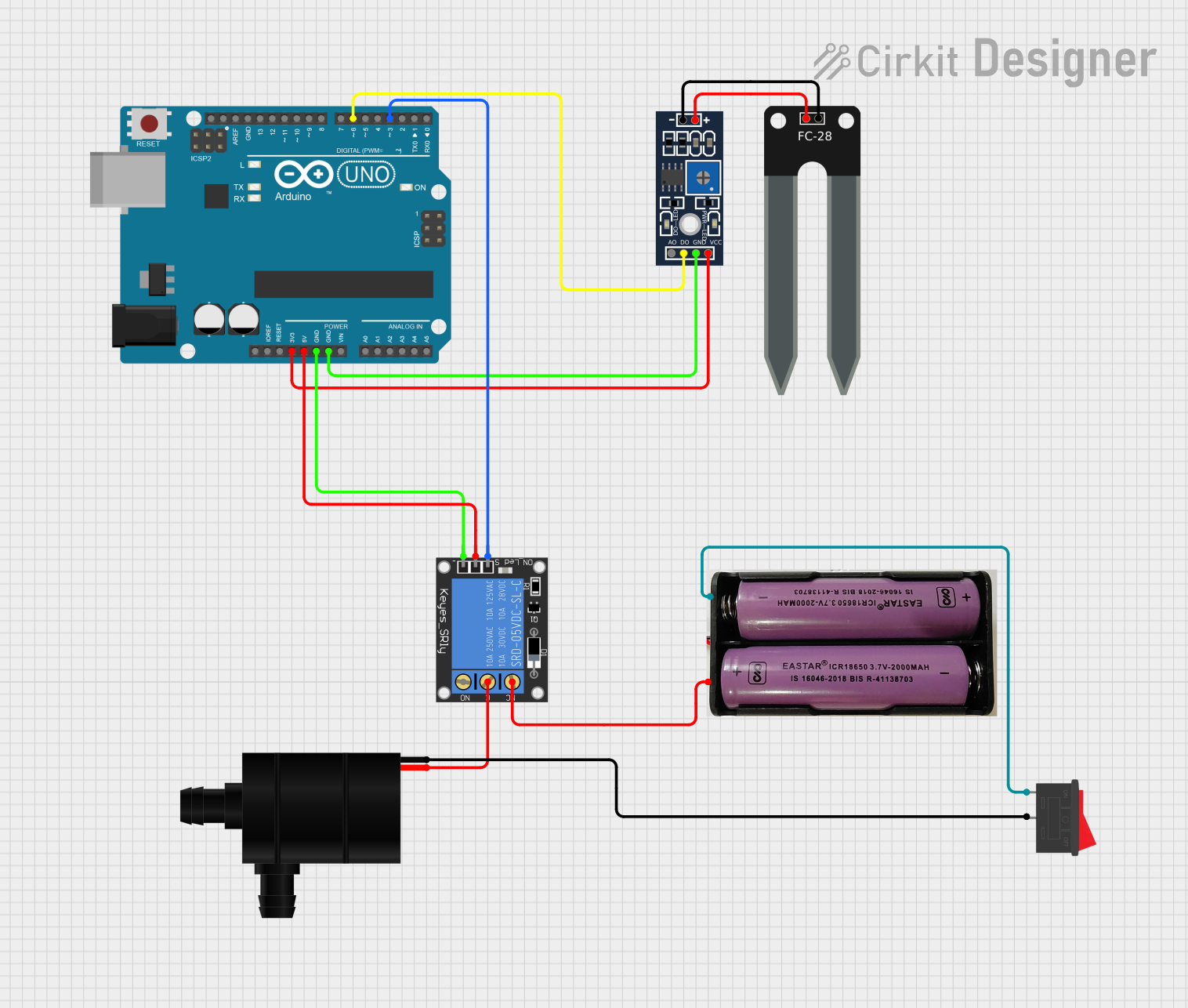
Circuit Documentation
Summary
This document provides a detailed overview of a circuit that includes an Arduino UNO microcontroller, various sensors, a relay, a water pump, a power source, and a rocker switch. The circuit is designed to control the water pump based on sensor inputs, with the relay acting as a switch for the pump.
Component List
Arduino UNO
- Description: A microcontroller board based on the ATmega328P.
- Pins: UNUSED, IOREF, Reset, 3.3V, 5V, GND, Vin, A0, A1, A2, A3, A4, A5, SCL, SDA, AREF, D13, D12, D11, D10, D9, D8, D7, D6, D5, D4, D3, D2, D1, D0
meřič2
- Description: A sensor with positive and negative terminals.
- Pins: POS, NEG
měřič
- Description: A sensor with multiple pins for power, ground, digital output, and analog output.
- Pins: VCC, GND, DO, AO, POS, NEG
1-Channel Relay (5V 10A)
- Description: A relay module that can control high voltage devices.
- Pins: NC, signal, C, power, NO, ground
Water Pump
- Description: A pump that operates on a DC voltage.
- Pins: VCC, GND
7.4v Power Source
- Description: A power source providing 7.4 volts.
- Pins: +, -
Rocker Switch
- Description: A switch to control the power flow.
- Pins: 1, 2
Wiring Details
Arduino UNO
- 3.3V connected to VCC of měřič
- 5V connected to power of 1-Channel Relay (5V 10A)
- GND connected to GND of 1-Channel Relay (5V 10A)
- GND connected to GND of měřič
- D6 connected to DO of měřič
- D3 connected to signal of 1-Channel Relay (5V 10A)
meřič2
- POS connected to POS of měřič
- NEG connected to NEG of měřič
měřič
- VCC connected to 3.3V of Arduino UNO
- GND connected to GND of Arduino UNO
- DO connected to D6 of Arduino UNO
- POS connected to POS of meřič2
- NEG connected to NEG of meřič2
1-Channel Relay (5V 10A)
- power connected to 5V of Arduino UNO
- ground connected to GND of Arduino UNO
- signal connected to D3 of Arduino UNO
- NC connected to + of 7.4v Power Source
- C connected to VCC of Water Pump
Water Pump
- VCC connected to C of 1-Channel Relay (5V 10A)
- GND connected to 2 of Rocker Switch
7.4v Power Source
- + connected to NC of 1-Channel Relay (5V 10A)
- - connected to 1 of Rocker Switch
Rocker Switch
- 1 connected to - of 7.4v Power Source
- 2 connected to GND of Water Pump
Documented Code
Arduino UNO Code (sketch.ino)
void setup() {
  // put your setup code here, to run once:

}

void loop() {
  // put your main code here, to run repeatedly:

}
This code is a basic template for the Arduino UNO. The setup function is used to initialize any settings, and the loop function runs continuously, allowing for real-time control and monitoring of the connected components.
Additional Documentation (documentation.txt)
This file is currently empty and can be used for further documentation or notes related to the project.