
Arduino UNO-Based Environmental Monitoring System with SD Card Storage
View and Edit Project In Cirkit Designer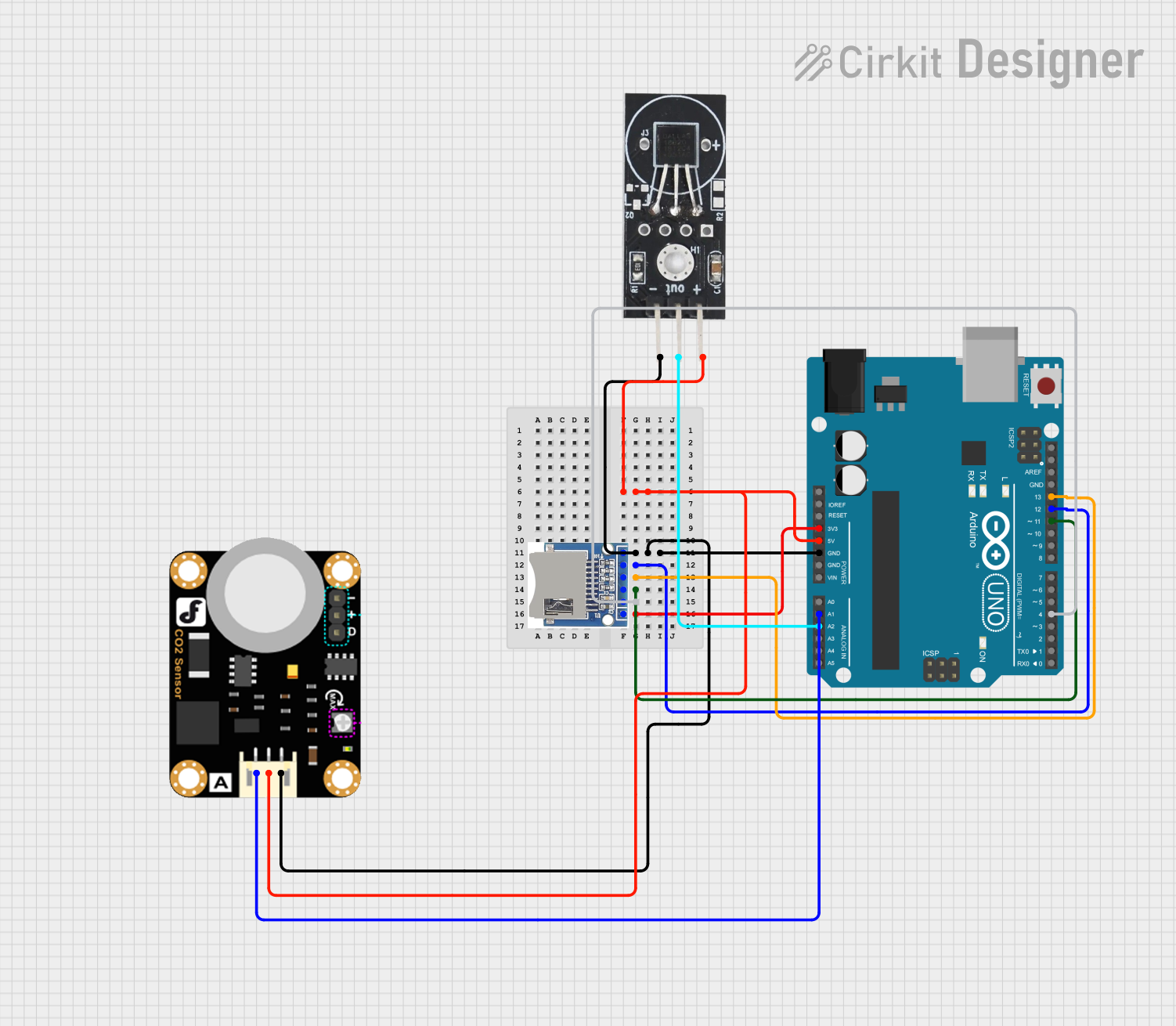
Circuit Documentation
Summary
This circuit involves an Arduino UNO microcontroller interfacing with an SD SDHC card module, a Carbon Dioxide Sensor, and a DS18B20 Temperature Sensor. The Arduino UNO serves as the central controller, reading data from the sensors and potentially storing it on the SD card.
Component List
Arduino UNO
- Description: A microcontroller board based on the ATmega328P.
- Pins: UNUSED, IOREF, Reset, 3.3V, 5V, GND, Vin, A0, A1, A2, A3, A4, A5, SCL, SDA, AREF, D13, D12, D11, D10, D9, D8, D7, D6, D5, D4, D3, D2, D1, D0
SD SDHC
- Description: A module for interfacing with SD and SDHC memory cards.
- Pins: 3V3, CS, MOSI, CLK, MISO, GND
Carbon Dioxide Sensor
- Description: A sensor for measuring the concentration of carbon dioxide in the air.
- Pins: A, VCC, GND
DS18B20 Temperature Sensor
- Description: A digital temperature sensor.
- Pins: GND, VCC, OUT
Wiring Details
Arduino UNO
- 5V connected to VCC of DS18B20 Temperature Sensor and Carbon Dioxide Sensor
- GND connected to GND of SD SDHC, DS18B20 Temperature Sensor, and Carbon Dioxide Sensor
- D12 connected to MISO of SD SDHC
- D13 connected to CLK of SD SDHC
- D11 connected to MOSI of SD SDHC
- D4 connected to CS of SD SDHC
- 3.3V connected to 3V3 of SD SDHC
- A1 connected to A of Carbon Dioxide Sensor
- A2 connected to OUT of DS18B20 Temperature Sensor
SD SDHC
- GND connected to GND of Arduino UNO
- MISO connected to D12 of Arduino UNO
- CLK connected to D13 of Arduino UNO
- MOSI connected to D11 of Arduino UNO
- CS connected to D4 of Arduino UNO
- 3V3 connected to 3.3V of Arduino UNO
Carbon Dioxide Sensor
- VCC connected to 5V of Arduino UNO
- GND connected to GND of Arduino UNO
- A connected to A1 of Arduino UNO
DS18B20 Temperature Sensor
- VCC connected to 5V of Arduino UNO
- GND connected to GND of Arduino UNO
- OUT connected to A2 of Arduino UNO
Code Documentation
Arduino UNO Code
void setup() {
  // put your setup code here, to run once:

}

void loop() {
  // put your main code here, to run repeatedly:

}
This code is a basic template for the Arduino UNO. The setup() function is where you initialize your sensors and SD card module, and the loop() function is where you will read sensor data and potentially write it to the SD card.
Additional Documentation
This section is reserved for any additional documentation or notes you may want to include about the circuit or its operation.