
ESP32-Based Environmental Monitoring System with Wi-Fi Connectivity
View and Edit Project In Cirkit Designer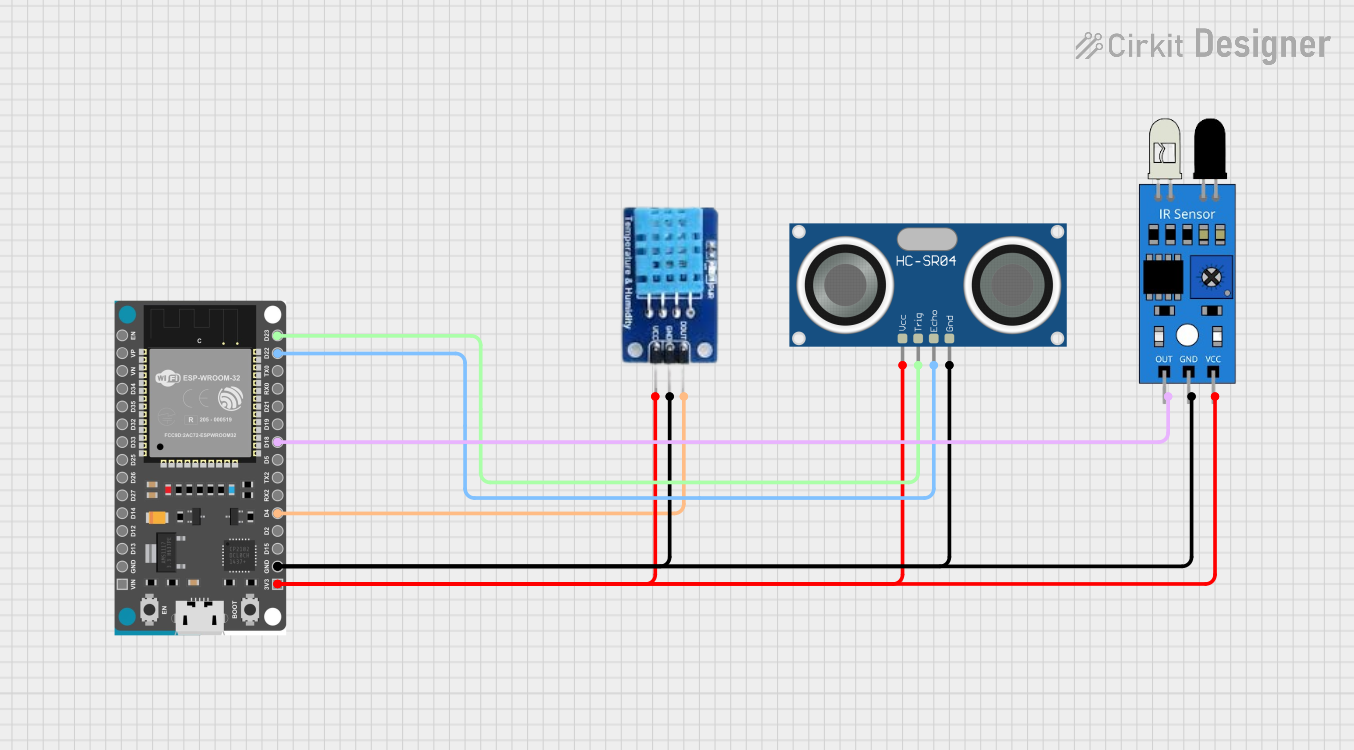
Circuit Documentation
Summary
The circuit in question is designed to interface an ESP32 Devkit V1 microcontroller with a set of sensors including an IR sensor, an HC-SR04 Ultrasonic Sensor, and a DHT11 temperature and humidity sensor. The ESP32 Devkit V1 is responsible for reading data from these sensors and transmitting the information to a server via Wi-Fi. The IR sensor is used to detect obstacles, the HC-SR04 sensor measures distance, and the DHT11 sensor provides ambient temperature and humidity readings.
Component List
IR Sensor
- Pins: out, gnd, vcc
- Description: An infrared sensor used for obstacle detection.
ESP32 Devkit V1
- Pins: 3V3, GND, D15, D2, D4, RX2, TX2, D5, D18, D19, D21, RX0, TX0, D22, D23, EN, VP, VN, D34, D35, D32, D33, D25, D26, D27, D14, D12, D13, VIN
- Description: A microcontroller development board with Wi-Fi capabilities.
HC-SR04 Ultrasonic Sensor
- Pins: VCC, TRIG, ECHO, GND
- Description: A sensor that measures distance using ultrasonic waves.
DHT11
- Pins: DATA, GND, VCC
- Description: A sensor that measures temperature and humidity.
Wiring Details
IR Sensor
- VCC: Connected to 3V3 of ESP32 Devkit V1
- GND: Connected to GND of ESP32 Devkit V1
- OUT: Connected to D18 of ESP32 Devkit V1
ESP32 Devkit V1
- 3V3: Provides power to IR Sensor, HC-SR04 Ultrasonic Sensor, and DHT11
- GND: Common ground for all sensors
- D4: Connected to DATA of DHT11
- D18: Connected to OUT of IR Sensor
- D22: Connected to ECHO of HC-SR04 Ultrasonic Sensor
- D23: Connected to TRIG of HC-SR04 Ultrasonic Sensor
HC-SR04 Ultrasonic Sensor
- VCC: Connected to 3V3 of ESP32 Devkit V1
- TRIG: Connected to D23 of ESP32 Devkit V1
- ECHO: Connected to D22 of ESP32 Devkit V1
- GND: Connected to GND of ESP32 Devkit V1
DHT11
- DATA: Connected to D4 of ESP32 Devkit V1
- GND: Connected to GND of ESP32 Devkit V1
- VCC: Connected to 3V3 of ESP32 Devkit V1
Documented Code
//include library DHT11
#include "DHT.h"

//include library for WiFi
#include "WiFi.h"
#include "HTTPClient.h"

//define pin for DHT11
#define DHTPIN 4    //pin GPIO4
#define DHTTYPE DHT11

#define TRIG_PIN 23 // ESP32 pin GPIO23 connected to Ultrasonic Sensor's TRIG pin
#define ECHO_PIN 22 // ESP32 pin GPIO22 connected to Ultrasonic Sensor's ECHO pin

#define SENSOR_PIN 18 // ESP32 pin GPIO18 connected to OUT pin of IR obstacle avoidance sensor

//Object for DHT11
DHT dht(DHTPIN, DHTTYPE);
int h, t;

//variable for Wifi and password
const char* ssid = "kucingsalai";
const char* password = "cubateka";

//IP address
const char* host = "192.168.229.156";

float duration_us, distance_cm;

void setup() {
  // Start serial communication
  Serial.begin(115200);
  delay(100);

  // DHT11 sensor initialization
  dht.begin();

  // IR sensor setup
  pinMode(SENSOR_PIN, INPUT);

  // Ultrasonic sensor setup
  pinMode(TRIG_PIN, OUTPUT);
  pinMode(ECHO_PIN, INPUT);

  // Wi-Fi connection
  WiFi.begin(ssid, password);
  Serial.println("Connecting to WiFi...");
  while (WiFi.status() != WL_CONNECTED) {
    Serial.print(".");
    delay(1000);
  }
  Serial.println("Connected to WiFi");
}

void loop() {
  // DHT11 sensor readings
  h = dht.readHumidity();
  t = dht.readTemperature();

  // Display DHT11 sensor data
  Serial.print("Temperature: ");
  Serial.println(t);
  Serial.print("Humidity: ");
  Serial.println(h);

  // IR sensor readings
  int ir_state = digitalRead(SENSOR_PIN);
  if (ir_state == LOW) {
    Serial.println("Obstacle detected!");
  } else {
    Serial.println("No obstacle present.");
  }

  // Ultrasonic sensor readings
  digitalWrite(TRIG_PIN, HIGH);
  delayMicroseconds(10);
  digitalWrite(TRIG_PIN, LOW);
  duration_us = pulseIn(ECHO_PIN, HIGH);
  distance_cm = 0.017 * duration_us;

  // Display ultrasonic sensor data
  Serial.print("Distance: ");
  Serial.print(distance_cm);
  Serial.println(" cm");

  // Transfer data to server (port 80)
  WiFiClient client;
  const int httpPort = 80;
  if (!client.connect(host, httpPort)) {
    Serial.println("Connection to server failed");
    return;
  }

  String link;
  HTTPClient http;
  link = "http://" + String(host) + "/webpage/kirimdata.php?temp=" + String(t) + "&hum=" + String(h) + "&dist=" + String(distance_cm) + "&ir=" + String(ir_state);

  http.begin(link);
  http.GET();

  String response = http.getString();
  Serial.println("Server response: " + response);
  http.end();

  // Wait for 10 seconds before next loop iteration
  delay(10000);
}
This code is responsible for initializing the sensors, reading their data, and sending the data to a server. It includes Wi-Fi setup for the ESP32 and defines the necessary pins for sensor communication. The loop function continuously reads sensor data, prints it to the serial monitor, and sends it to the server.