
Arduino UNO-Based Smart Parking System with IR Sensors and LCD Display
View and Edit Project In Cirkit Designer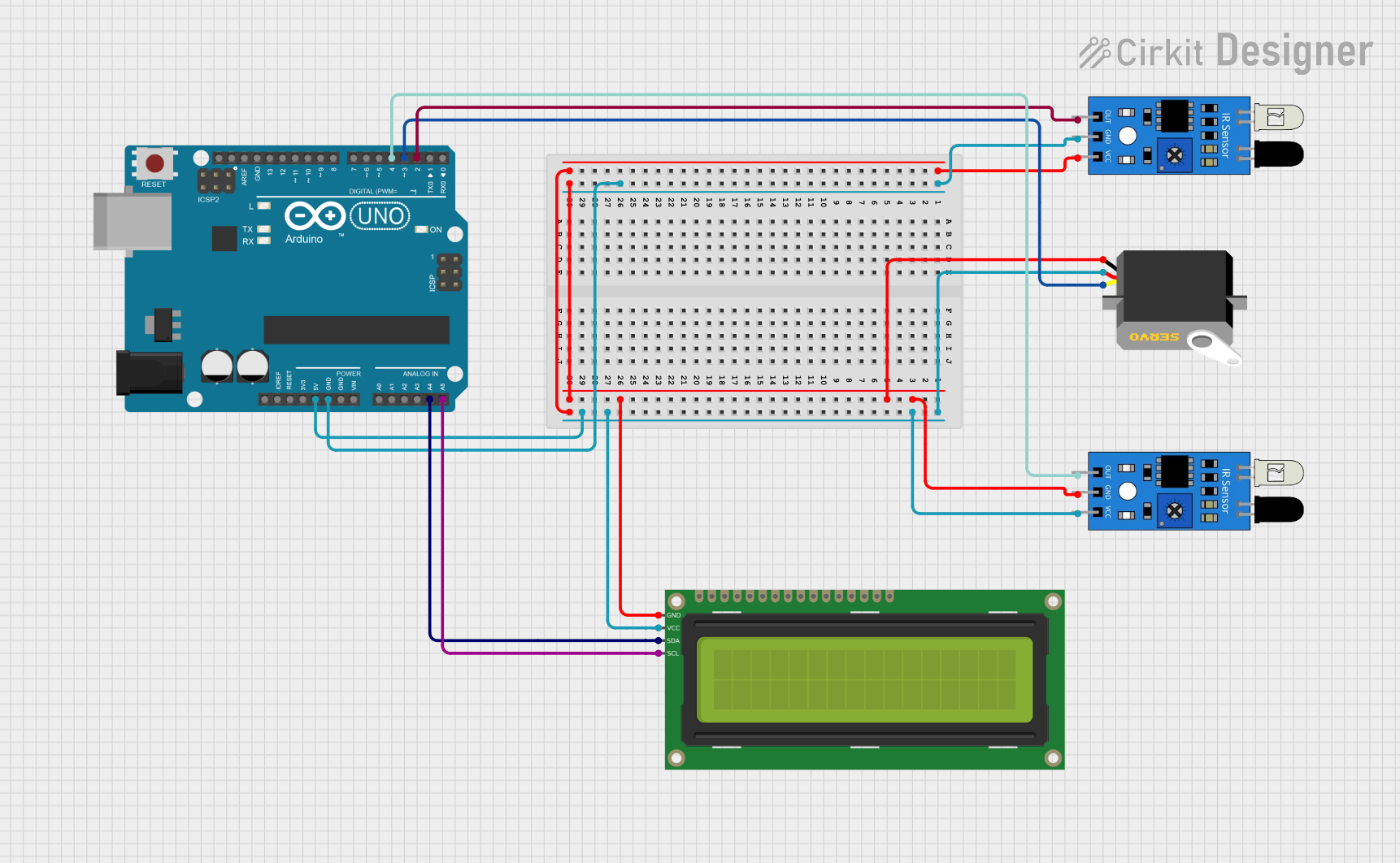
Circuit Documentation
Summary
This circuit is designed to manage a parking system using an Arduino UNO microcontroller. It utilizes two IR sensors to detect the presence of vehicles, a servo motor to control a barrier, and a 16x2 I2C LCD to display the status of the parking slots. The system counts the available parking slots and updates the display accordingly.
Component List
IR Sensor
- Description: Infrared sensor used to detect the presence of vehicles.
- Pins: out, gnd, vcc
Arduino UNO
- Description: Microcontroller board based on the ATmega328P.
- Pins: UNUSED, IOREF, Reset, 3.3V, 5V, GND, Vin, A0, A1, A2, A3, A4, A5, SCL, SDA, AREF, D13, D12, D11, D10, D9, D8, D7, D6, D5, D4, D3, D2, D1, D0
Servo
- Description: Servo motor used to control the barrier.
- Pins: gnd, vcc, pulse
16x2 I2C LCD
- Description: LCD display with I2C interface used to show the status of the parking slots.
- Pins: GND, VCC, SDA, SCL
Wiring Details
IR Sensor 1
- Pin out connected to Arduino UNO D2
- Pin gnd connected to Arduino UNO GND
- Pin vcc connected to Arduino UNO 5V
IR Sensor 2
- Pin out connected to Arduino UNO D4
- Pin gnd connected to Arduino UNO GND
- Pin vcc connected to Arduino UNO 5V
Arduino UNO
- Pin D2 connected to IR Sensor 1 out
- Pin D4 connected to IR Sensor 2 out
- Pin GND connected to IR Sensor 1 gnd, IR Sensor 2 gnd, Servo gnd, 16x2 I2C LCD GND
- Pin 5V connected to IR Sensor 1 vcc, IR Sensor 2 vcc, Servo vcc, 16x2 I2C LCD VCC
- Pin A4 connected to 16x2 I2C LCD SDA
- Pin A5 connected to 16x2 I2C LCD SCL
- Pin D3 connected to Servo pulse
Servo
- Pin gnd connected to Arduino UNO GND
- Pin vcc connected to Arduino UNO 5V
- Pin pulse connected to Arduino UNO D3
16x2 I2C LCD
- Pin GND connected to Arduino UNO GND
- Pin VCC connected to Arduino UNO 5V
- Pin SDA connected to Arduino UNO A4
- Pin SCL connected to Arduino UNO A5
Code Documentation
#include <Wire.h>
#include <LiquidCrystal_I2C.h>
LiquidCrystal_I2C lcd(0x3F,16,2);  //Change the HEX address
#include <Servo.h>

Servo myservo1;

int IR1 = 2;
int IR2 = 4;

int Slot = 4;           //Enter Total number of parking Slots

int flag1 = 0;
int flag2 = 0;

void setup() {
  lcd.begin();
  lcd.backlight();
  pinMode(IR1, INPUT);
  pinMode(IR2, INPUT);

  myservo1.attach(3);
  myservo1.write(100);

  lcd.setCursor (0,0);
  lcd.print("     ARDUINO    ");
  lcd.setCursor (0,1);
  lcd.print(" PARKING SYSTEM ");
  delay (2000);
  lcd.clear();
}

void loop(){

  if(digitalRead (IR1) == LOW && flag1==0){
    if(Slot>0){
      flag1=1;
      if(flag2==0){
        myservo1.write(0);
        Slot = Slot-1;
      }
    } else {
      lcd.setCursor (0,0);
      lcd.print("    SORRY :(    ");
      lcd.setCursor (0,1);
      lcd.print("  Parking Full  ");
      delay (3000);
      lcd.clear();
    }
  }

  if(digitalRead (IR2) == LOW && flag2==0){
    flag2=1;
    if(flag1==0){
      myservo1.write(0);
      Slot = Slot+1;
    }
  }

  if(flag1==1 && flag2==1){
    delay (1000);
    myservo1.write(100);
    flag1=0, flag2=0;
  }

  lcd.setCursor (0,0);
  lcd.print("    WELCOME!    ");
  lcd.setCursor (0,1);
  lcd.print("Slot Left: ");
  lcd.print(Slot);
}
This code initializes the LCD and servo motor, sets up the IR sensors as input, and manages the parking slots. The LCD displays a welcome message and the number of available slots. The servo motor controls the barrier based on the IR sensor readings.