
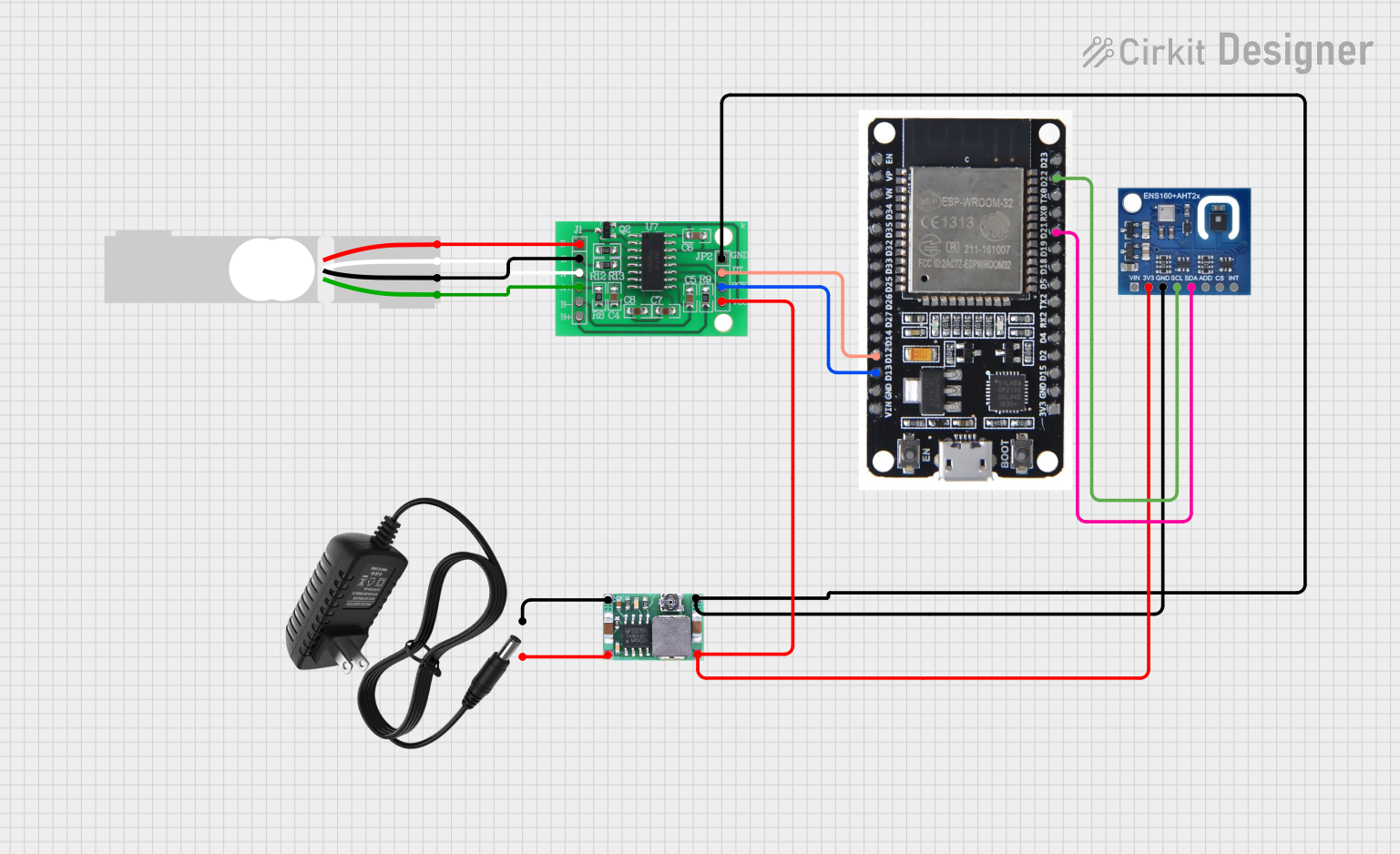
Circuit Documentation
Summary
The circuit in question is designed to measure weight using a Load Cell and to monitor environmental conditions with an ENS160+AHT21 sensor. The Load Cell's signals are interfaced through an HX711 Bridge Sensor Interface, which communicates with an ESP32 microcontroller. The ESP32 also communicates with the ENS160+AHT21 sensor via I2C protocol. A Mini-360 DC-DC Step Down Buck Converter is used to step down the voltage from a 12v power supply to a lower voltage suitable for powering the sensors and the ESP32.
Component List
Load Cell - Red/white/black/green
- Description: A transducer that converts force into an electrical signal.
- Pins: E+, A-, E-, A+
HX711 - Bridge Sensor Interface
- Description: A precision 24-bit analog-to-digital converter (ADC) designed for weigh scales and industrial control applications to interface directly with a bridge sensor.
- Pins: E+, E-, A-, A+, B-, B+, GND, DATA (OUT), SCK (CLOCK IN), 3.3/3.5V Supply
ESP32
- Description: A microcontroller with Wi-Fi and Bluetooth capabilities, suitable for a wide variety of applications.
- Pins: EN, VP, VN, D34, D35, D32, D33, D25, D26, D27, D14, D12, D13, GND, VIN, 3V3, D15, D2, D4, RX2, TX2, D5, D18, D19, D21, RX0, TX0, D22, D23, BOOT
ENS160+AHT21
- Description: A sensor module that combines gas sensing (ENS160) with temperature and humidity sensing (AHT21).
- Pins: VIN, 3V3, GND, SCL, SDA, ADD, CS, INT
Mini-360 DC-DC Step Down Buck Converter
- Description: A small, efficient, adjustable step-down converter that outputs a lower, regulated voltage from a higher input voltage.
- Pins: Input -, Input +, Output +, Output -
12v Power Supply
- Description: Provides a stable 12V DC output for powering the circuit.
- Pins: +, -
Wiring Details
Load Cell - Red/white/black/green
- E+ connected to HX711 E+
- A- connected to HX711 A-
- E- connected to HX711 E-
- A+ connected to HX711 A+
HX711 - Bridge Sensor Interface
- E+, E-, A-, A+ connected to Load Cell
- GND connected to Mini-360 DC-DC Step Down Buck Converter Output -
- DATA (OUT) connected to ESP32 D12
- SCK (CLOCK IN) connected to ESP32 D13
- 3.3/3.5V Supply connected to Mini-360 DC-DC Step Down Buck Converter Output +
ESP32
- D12 connected to HX711 DATA (OUT)
- D13 connected to HX711 SCK (CLOCK IN)
- D21 (I2C_SDA) connected to ENS160+AHT21 SDA
- D22 (I2C_SCL) connected to ENS160+AHT21 SCL
- GND connected to Mini-360 DC-DC Step Down Buck Converter Output -
ENS160+AHT21
- GND connected to Mini-360 DC-DC Step Down Buck Converter Output -
- 3V3 connected to Mini-360 DC-DC Step Down Buck Converter Output +
- SDA connected to ESP32 D21 (I2C_SDA)
- SCL connected to ESP32 D22 (I2C_SCL)
Mini-360 DC-DC Step Down Buck Converter
- Input - connected to 12v Power Supply -
- Input + connected to 12v Power Supply +
- Output + connected to HX711 3.3/3.5V Supply and ENS160+AHT21 3V3
- Output - connected to HX711 GND, ESP32 GND, and ENS160+AHT21 GND
12v Power Supply
-
- connected to Mini-360 DC-DC Step Down Buck Converter Input +
-
- connected to Mini-360 DC-DC Step Down Buck Converter Input -
Documented Code
ESP32 Microcontroller Code (sketch.ino)
#include <HX711.h>
#include <Wire.h>
#include <Adafruit_Sensor.h>
#include <Adafruit_AHTX0.h>

// HX711 pins
#define HX711_DOUT 12
#define HX711_SCK 13

// I2C pins for ENS160+AHT21
#define I2C_SDA 21
#define I2C_SCL 22

// Create instances
HX711 scale;
Adafruit_AHTX0 aht;

void setup() {
  // Initialize Serial Monitor
  Serial.begin(115200);

  // Initialize HX711
  scale.begin(HX711_DOUT, HX711_SCK);
  Serial.println("HX711 initialized.");

  // Initialize I2C for ENS160+AHT21
  Wire.begin(I2C_SDA, I2C_SCL);
  if (!aht.begin()) {
    Serial.println("Failed to find AHT sensor!");
    while (1) delay(10);
  }
  Serial.println("AHT sensor initialized.");
}

void loop() {
  // Read weight from HX711
  if (scale.is_ready()) {
    long reading = scale.read();
    Serial.print("HX711 reading: ");
    Serial.println(reading);
  } else {
    Serial.println("HX711 not found.");
  }

  // Read temperature and humidity from AHT21
  sensors_event_t humidity, temp;
  aht.getEvent(&humidity, &temp);
  Serial.print("Temperature: ");
  Serial.print(temp.temperature);
  Serial.println(" degrees C");
  Serial.print("Humidity: ");
  Serial.print(humidity.relative_humidity);
  Serial.println("% rH");

  // Delay between readings
  delay(2000);
}
This code initializes the HX711 and the ENS160+AHT21 sensors, reads data from them, and outputs the readings to the Serial Monitor. The HX711 is used to read the weight from the Load Cell, and the ENS160+AHT21 is used to read temperature and humidity. The code includes error handling for sensor initialization and uses I2C communication for the ENS160+AHT21 sensor.