
Circuit Documentation
Summary
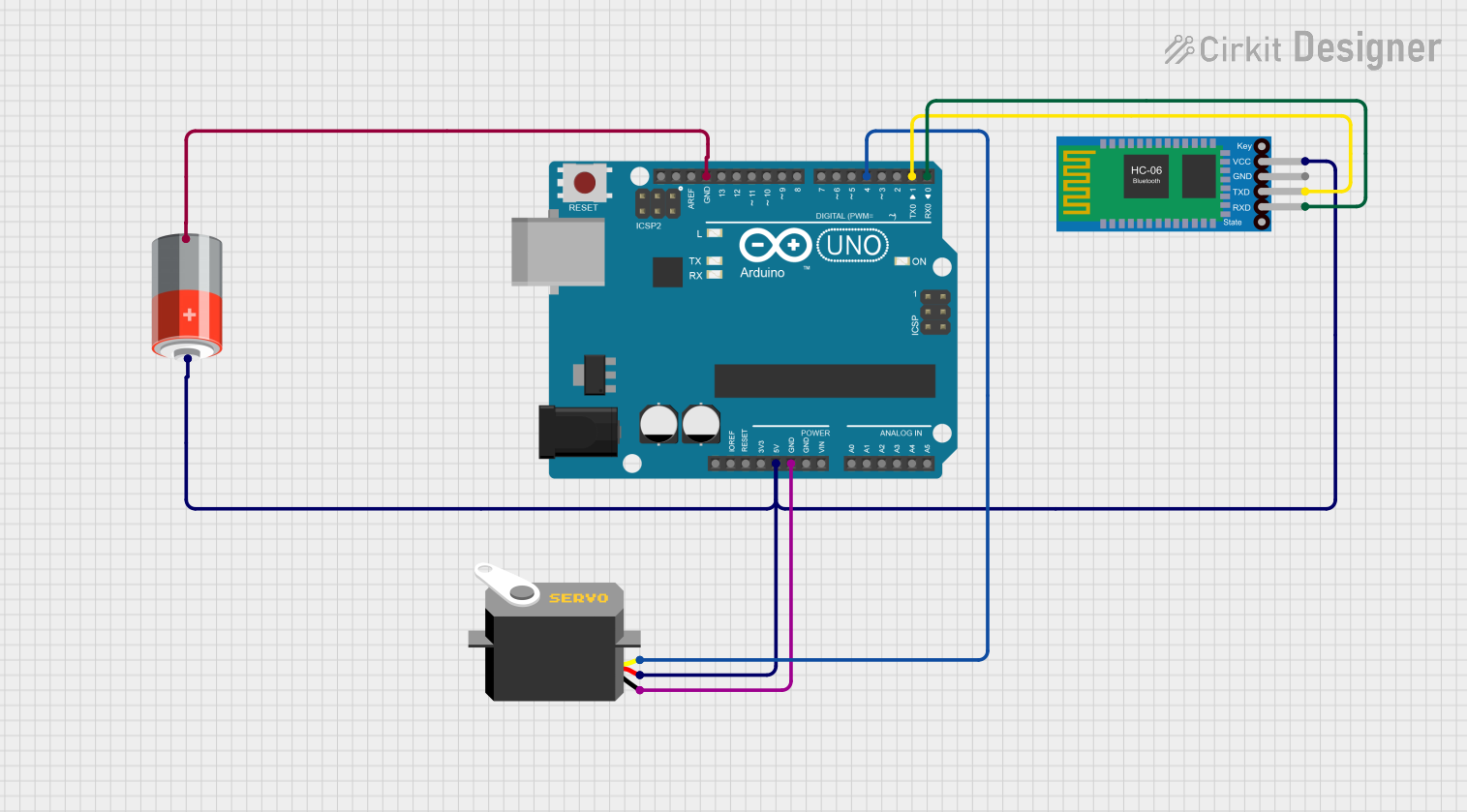
This document provides a detailed overview of a circuit that includes an Arduino UNO microcontroller, a Servo motor, a Bluetooth HC-06 module, and a 5V Battery. The circuit is designed to control the Servo motor via the Arduino UNO, which receives commands from a Bluetooth device through the HC-06 module. The entire system is powered by a 5V Battery.
Component List
Arduino UNO
- Description: A microcontroller board based on the ATmega328P.
- Pins: UNUSED, IOREF, Reset, 3.3V, 5V, GND, Vin, A0, A1, A2, A3, A4, A5, SCL, SDA, AREF, D13, D12, D11, D10, D9, D8, D7, D6, D5, D4, D3, D2, D1, D0
Servo
- Description: A standard servo motor.
- Pins: gnd, vcc, pulse
Bluetooth HC-06
- Description: A Bluetooth module used for wireless communication.
- Pins: VCC, GND, TXD, RXD
5V Battery
- Description: A battery providing 5V power supply.
- Pins: +, -
Wiring Details
Arduino UNO
- 5V: Connected to the VCC pin of the Bluetooth HC-06, the vcc pin of the Servo, and the + pin of the 5V Battery.
- GND: Connected to the gnd pin of the Servo and the - pin of the 5V Battery.
- D4: Connected to the pulse pin of the Servo.
- D1: Connected to the TXD pin of the Bluetooth HC-06.
- D0: Connected to the RXD pin of the Bluetooth HC-06.
Servo
- gnd: Connected to the GND pin of the Arduino UNO.
- vcc: Connected to the 5V pin of the Arduino UNO.
- pulse: Connected to the D4 pin of the Arduino UNO.
Bluetooth HC-06
- VCC: Connected to the 5V pin of the Arduino UNO.
- GND: Connected to the GND pin of the Arduino UNO.
- TXD: Connected to the D1 pin of the Arduino UNO.
- RXD: Connected to the D0 pin of the Arduino UNO.
5V Battery
- +: Connected to the 5V pin of the Arduino UNO.
- -: Connected to the GND pin of the Arduino UNO.
Code Documentation
Arduino UNO Code
void setup() {
  // put your setup code here, to run once:

}

void loop() {
  // put your main code here, to run repeatedly:

}
This code is a basic template for the Arduino UNO. The setup() function is where you initialize your variables and set up the environment. The loop() function runs continuously after the setup() function has completed. You can add your main code here to control the Servo motor based on commands received from the Bluetooth HC-06 module.