
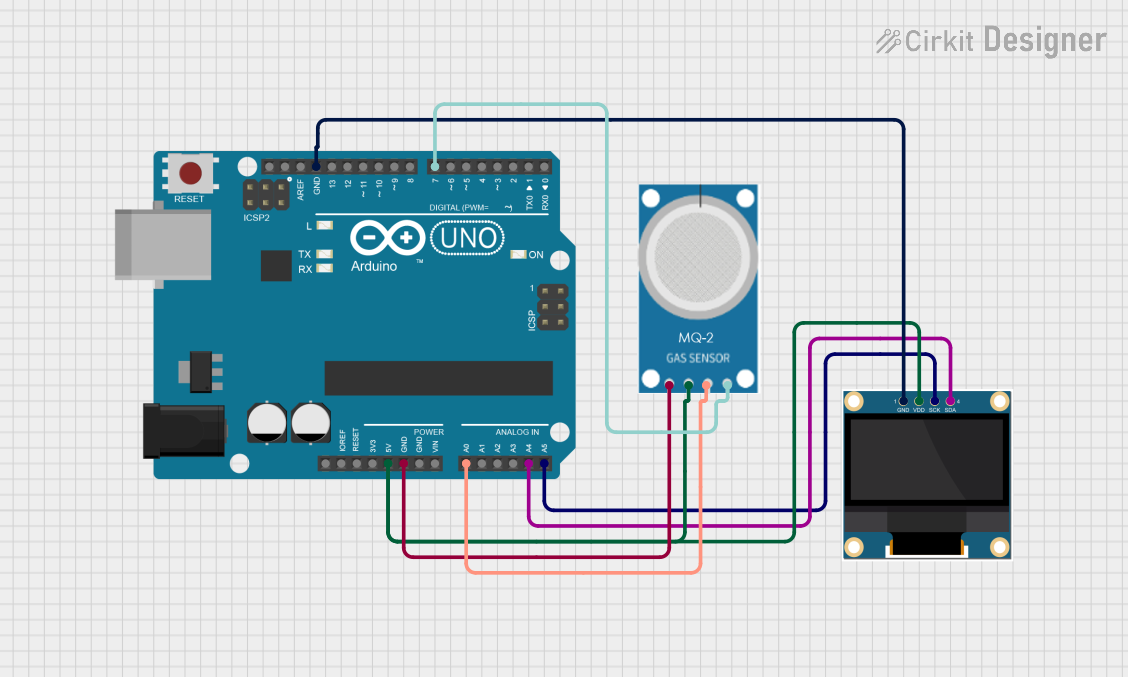
Circuit Documentation
Summary
This circuit is designed to measure gas concentration using an MQ-2 gas sensor and display the data on a 0.96" OLED screen. The circuit is controlled by an Arduino UNO microcontroller, which reads the analog signal from the MQ-2 sensor, processes the data, and then displays the gas concentration in parts per million (ppm) on the OLED screen.
Component List
Arduino UNO
- Description: A microcontroller board based on the ATmega328P.
- Pins: UNUSED, IOREF, Reset, 3.3V, 5V, GND, Vin, A0, A1, A2, A3, A4, A5, SCL, SDA, AREF, D13, D12, D11, D10, D9, D8, D7, D6, D5, D4, D3, D2, D1, D0
MQ-2 Gas Sensor
- Description: A gas sensor that can detect various gases including LPG, i-butane, propane, methane, alcohol, hydrogen, and smoke.
- Pins: GND, VCC, ANALOG, Digital
0.96" OLED Display
- Description: A small OLED display module with a resolution of 128x64 pixels.
- Pins: GND, VDD, SCK, SDA
Wiring Details
Arduino UNO
- 5V: Connected to VCC of MQ-2 and VDD of OLED.
- GND: Connected to GND of MQ-2 and GND of OLED.
- A0: Connected to ANALOG of MQ-2.
- A4: Connected to SDA of OLED.
- A5: Connected to SCK of OLED.
- D7: Connected to Digital of MQ-2.
MQ-2 Gas Sensor
- VCC: Connected to 5V of Arduino UNO.
- GND: Connected to GND of Arduino UNO.
- ANALOG: Connected to A0 of Arduino UNO.
- Digital: Connected to D7 of Arduino UNO.
0.96" OLED Display
- VDD: Connected to 5V of Arduino UNO.
- GND: Connected to GND of Arduino UNO.
- SCK: Connected to A5 of Arduino UNO.
- SDA: Connected to A4 of Arduino UNO.
Documented Code
Sketch Code (Arduino)
#include <Wire.h>
#include <Adafruit_GFX.h>
#include <Adafruit_SSD1306.h>

// OLED display setup
#define SCREEN_WIDTH 128
#define SCREEN_HEIGHT 64
Adafruit_SSD1306 display(SCREEN_WIDTH, SCREEN_HEIGHT, &Wire, -1);

const int gasSensorPin = A0; // Analog input pin for MQ-2

void setup() {
  Serial.begin(9600);

  // Initialize the OLED display
  if (!display.begin(SSD1306_I2C_ADDRESS, 0x3C)) {
    Serial.println(F("OLED initialization failed"));
    for (;;); // Loop forever if OLED is not found
  }

  display.clearDisplay();
  display.setTextSize(1);
  display.setTextColor(SSD1306_WHITE);
  display.display();
}

void loop() {
  int sensorValue = analogRead(gasSensorPin);  // Read analog value from MQ-2
  float voltage = sensorValue * (5.0 / 1023.0); // Convert to voltage
  float ppm = map(sensorValue, 0, 1023, 0, 1000); // Simple mapping for ppm

  // Display data on OLED
  display.clearDisplay();
  display.setCursor(0, 0);
  display.print("Gas sensor data: ");
  display.setCursor(0, 20);
  display.print(ppm);
  display.print(" ppm");

  display.display();

  delay(1000);  // Update every second
}
PPM Code (Arduino)
#include <Wire.h>
#include <U8g2lib.h>
#include <math.h>

// U8g2 Constructor for SSD1306, 128x64 OLED with I2C (SDA, SCL pins)
U8G2_SSD1306_128X64_NONAME_F_SW_I2C u8g2(U8G2_R0, SCL, SDA, /* reset=*/ U8X8_PIN_NONE);

const int sensorPin = A0;
const int digitalSensor = 7;
#define R0 20
#define Rl 10

void setup() {
  // Initialize the display
  u8g2.begin();
  Serial.begin(9600);
  pinMode(sensorPin, INPUT);
  pinMode(digitalSensor, INPUT);
}

void loop() {
  // Clear the display
  u8g2.clearBuffer();

  // Set font and position for text
  u8g2.setFont(u8g2_font_ncenB10_tr); // Choose a font from the list of available fonts
  u8g2.setCursor(0, 20); // Set cursor position (x, y)

  // Read sensor value
  float sensorValue = analogRead(sensorPin);

  // Calculate ppm
  float vOut = (sensorValue / 1023.0) * 5.0;
  float Rs = ((5.0 / vOut) - 1.0) * Rl;
  float ratio = Rs / R0;
  float m = (log10(2) - log10(1)) / (log10(1000) - log10(5000));
  float ppm = pow(10, ((log10(ratio) + m * 3 - log10(2)) / m));

  // Print ppm on OLED display
  u8g2.print("PPM: ");
  u8g2.setCursor(0, 40); // Set cursor position for ppm value
  u8g2.print(ppm);

  // Send buffer to the display
  u8g2.sendBuffer();

  // Print ppm on Serial Monitor for debugging
  Serial.print("PPM: ");
  Serial.println(ppm);

  // Delay to control display refresh rate
  delay(1000); // 1 second delay
}
This documentation provides a comprehensive overview of the circuit, including the components used, their wiring details, and the code required to operate the circuit.