
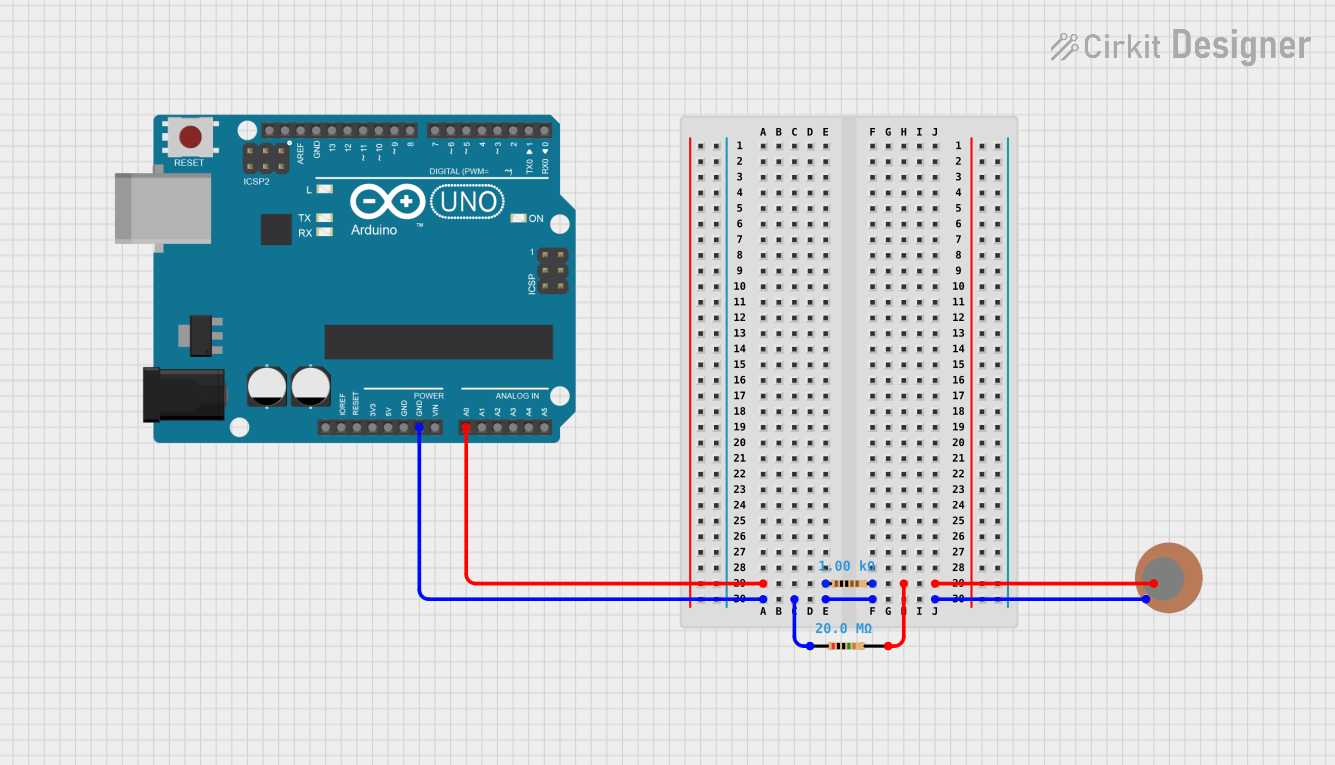
Circuit Documentation
Summary of the Circuit
This circuit is designed to read analog values from a piezo sensor and output the readings to a serial monitor. The piezo sensor is interfaced with an Arduino UNO microcontroller. The sensor's signal is conditioned through a 1kΩ resistor, and a 20MΩ resistor is used to provide a reference to ground. The Arduino UNO is programmed to read the analog voltage from the sensor, convert it to a digital value, and print this value to the serial monitor at a baud rate of 9600 bps. The circuit operates with a simple loop that includes a delay of 100 milliseconds between readings.
Component List
Arduino UNO
- Description: A microcontroller board based on the ATmega328P.
- Pins: UNUSED, IOREF, Reset, 3.3V, 5V, GND, Vin, A0-A5, SCL, SDA, AREF, D13-D0.
Piezo Sensor
- Description: A sensor that generates a voltage when pressure is applied to it.
- Pins: +, -.
Resistor (1kΩ)
- Description: A resistor with a resistance of 1kΩ.
- Pins: pin1, pin2.
Resistor (20MΩ)
- Description: A resistor with a resistance of 20MΩ.
- Pins: pin1, pin2.
Wiring Details
Arduino UNO
- A0: Connected to pin1 of the 1kΩ Resistor.
- GND: Connected to pin1 of the 20MΩ Resistor.
Piezo Sensor
- +: Connected to pin2 of the 1kΩ Resistor and pin2 of the 20MΩ Resistor.
- -: Connected to pin1 of the 20MΩ Resistor.
Resistor (1kΩ)
- pin1: Connected to A0 on the Arduino UNO.
- pin2: Connected to the + pin on the Piezo Sensor.
Resistor (20MΩ)
- pin1: Connected to GND on the Arduino UNO.
- pin2: Connected to the + pin on the Piezo Sensor.
Documented Code
/*
 * Piezo - Simple
 * This sketch reads the analog value from a piezo sensor connected to pin A0
 * through a 1kΩ resistor and prints the value to the serial monitor.
 */

void setup() {
  // Initialize serial communication at 9600 bits per second:
  Serial.begin(9600);
}

void loop() {
  // Read the input on analog pin A0:
  int sensorValue = analogRead(A0);
  // Print the sensor value to the serial monitor:
  Serial.println(sensorValue);
  // Wait for 100 milliseconds:
  delay(100);
}
Filename: sketch.ino
This code is written for the Arduino UNO microcontroller. It initializes serial communication in the setup() function and continuously reads the analog value from pin A0 in the loop() function. The read value is then printed to the serial monitor, and the loop includes a 100-millisecond delay before repeating.