
Circuit Documentation
Summary
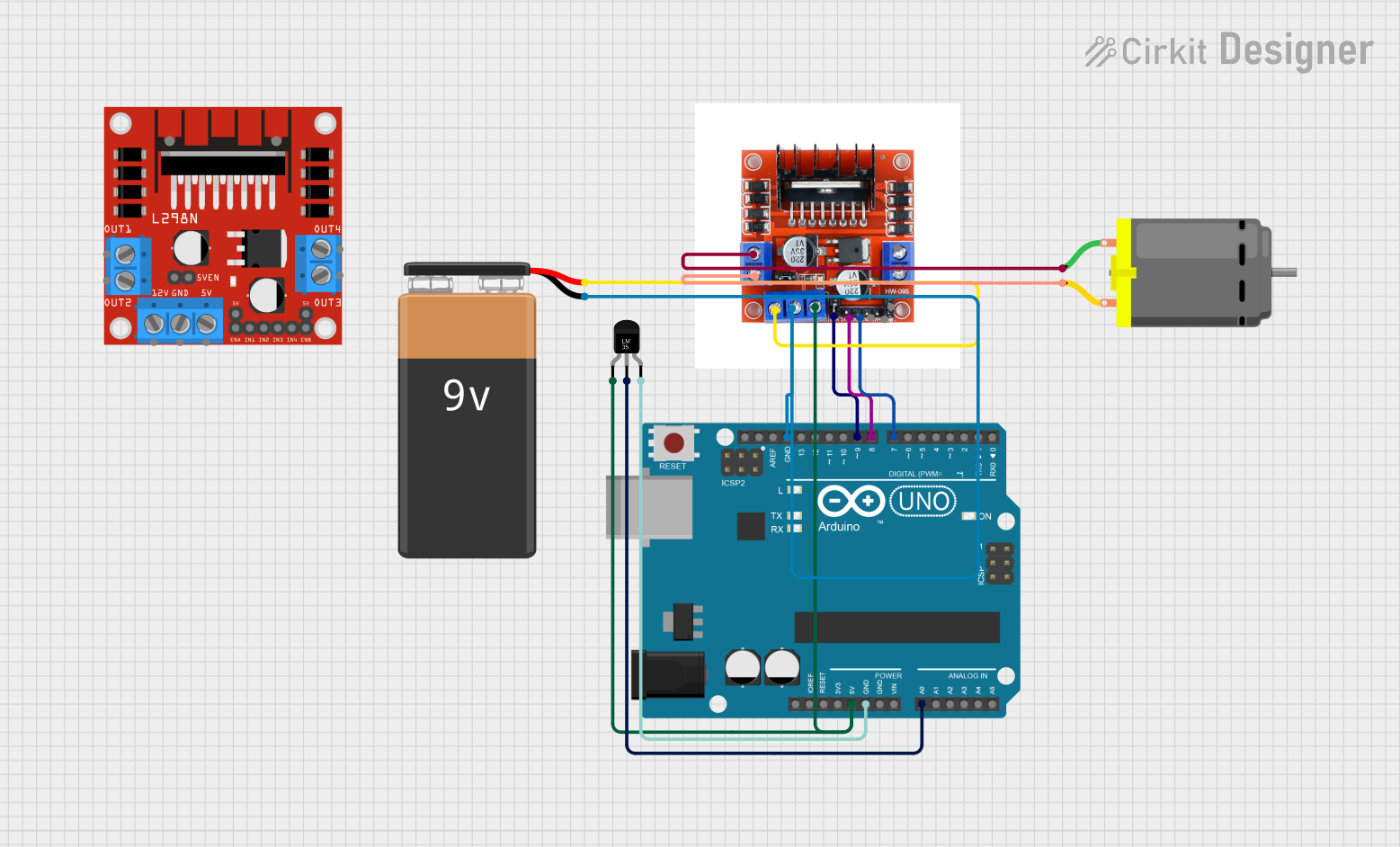
This circuit is designed to read temperature data from an LM35 temperature sensor and control a DC motor using an L298N motor driver module. The motor's operation is dependent on the temperature reading; it turns on when the temperature reaches or exceeds 27 degrees Celsius, and its speed increases with rising temperature. The Arduino UNO microcontroller serves as the central processing unit, reading the sensor data, calculating the temperature, and controlling the motor speed accordingly.
Component List
Arduino UNO
- Microcontroller board based on the ATmega328P
- It has 14 digital input/output pins, 6 analog inputs, a 16 MHz quartz crystal, a USB connection, a power jack, an ICSP header, and a reset button.
L298N 2A Dual Motor Driver Module with PWM Control
- A high-power motor driver module that can drive up to two DC motors.
- It has inputs for direct control and PWM for speed control.
DC Motor
- A simple electric motor that converts electrical energy into mechanical energy.
- It typically has two pins for power and ground.
Temperature Sensor (LM35)
- An analog temperature sensor that provides a voltage output proportional to the ambient temperature.
- It has three pins: power, ground, and analog voltage output.
9V Battery
- A standard 9V battery used to provide power to the circuit.
Wiring Details
Arduino UNO
5VandGNDare used to power the LM35 temperature sensor and the L298N motor driver module.A0is connected to theVoutof the LM35 temperature sensor to read the temperature data.- Digital pins
D9,D8, andD7are connected to theENA,IN1, andIN2pins of the L298N motor driver module to control the motor.
L298N 2A Dual Motor Driver Module with PWM Control
5VandGNDare connected to the5VandGNDof the Arduino UNO for logic power.12Vis connected to the+of the 9V battery to power the motors.ENA,IN1, andIN2are connected to the Arduino UNO for motor control.OUT1andOUT2are connected to the two pins of the DC motor to drive the motor.
DC Motor
pin 1andpin 2are connected toOUT1andOUT2of the L298N motor driver module.
Temperature Sensor (LM35)
+Vsis connected to the5Vof the Arduino UNO for power.GNDis connected to theGNDof the Arduino UNO.Voutis connected to theA0pin of the Arduino UNO to read the temperature data.
9V Battery
+is connected to the12Vof the L298N motor driver module to provide motor power.-is connected to theGNDof the Arduino UNO and the L298N motor driver module.
Documented Code
/*
 * This Arduino sketch reads the temperature from an LM35 sensor and controls
 * a DC motor via an L298N motor driver. The motor turns on if the temperature
 * reaches 27 degrees Celsius and its speed increases as the temperature rises.
 */

const int tempPin = A0; // Pin connected to LM35 Vout
const int motorEnablePin = 9; // Pin connected to L298N ENA
const int motorIn1Pin = 8; // Pin connected to L298N IN1
const int motorIn2Pin = 7; // Pin connected to L298N IN2

void setup() {
  pinMode(motorEnablePin, OUTPUT);
  pinMode(motorIn1Pin, OUTPUT);
  pinMode(motorIn2Pin, OUTPUT);
  Serial.begin(9600);
}

void loop() {
  int tempReading = analogRead(tempPin);
  float voltage = tempReading * (5.0 / 1023.0);
  float temperatureC = voltage * 100.0;
  Serial.print("Temperature: ");
  Serial.print(temperatureC);
  Serial.println(" C");

  if (temperatureC >= 27.0) {
    int motorSpeed = map(temperatureC, 27, 50, 0, 255);
    motorSpeed = constrain(motorSpeed, 0, 255);
    analogWrite(motorEnablePin, motorSpeed);
    digitalWrite(motorIn1Pin, HIGH);
    digitalWrite(motorIn2Pin, LOW);
  } else {
    analogWrite(motorEnablePin, 0);
    digitalWrite(motorIn1Pin, LOW);
    digitalWrite(motorIn2Pin, LOW);
  }

  delay(1000); // Wait for 1 second before next reading
}
This code is written for the Arduino UNO and is responsible for reading the temperature from the LM35 sensor, calculating the temperature in Celsius, and controlling the DC motor through the L298N motor driver based on the temperature reading. The motor speed is controlled using PWM on pin D9, and the motor direction is controlled by setting pins D8 and D7 to high or low.