
ESP8266-Based Dual Ultrasonic Water Level Monitor with OLED Display
View and Edit Project In Cirkit Designer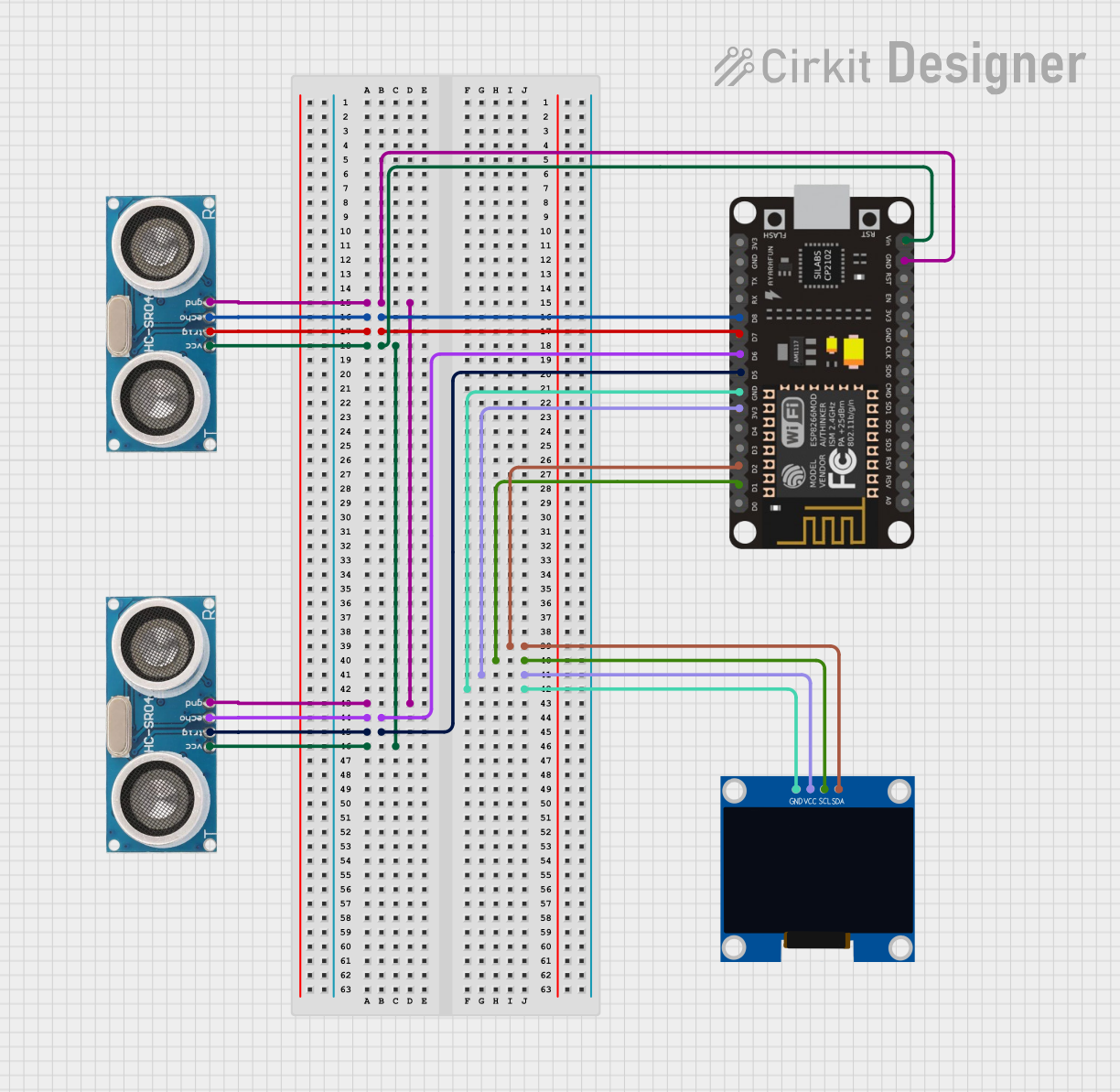
Circuit Documentation
Summary
This circuit is designed to measure and display the water levels in two tanks using ultrasonic sensors and an OLED display. The measurements are processed by an ESP8266 NodeMCU microcontroller, which also drives the OLED display to show the water levels and alerts.
Component List
Ultrasonic Sensor
- Description: Measures distance using ultrasonic waves.
- Pins: +VCC, Trigger, Echo, GND
128x64 OLED Display (I2C IIC SPI Serial)
- Description: Displays information using I2C communication.
- Pins: GND, SDA, SCL, VCC
ESP8266 NodeMCU
- Description: Microcontroller with Wi-Fi capabilities, used to process sensor data and control the display.
- Pins: D0, D1, D2, D3, D4, 3V3, GND, D5, D6, D7, D8, RX, TX, A0, RSV, SD3, SD2, SD1, CMD, SD0, CLK, EN, RST, VIN
Wiring Details
Ultrasonic Sensor 1
- +VCC connected to VIN of ESP8266 NodeMCU
- Trigger connected to D7 of ESP8266 NodeMCU
- Echo connected to D8 of ESP8266 NodeMCU
- GND connected to GND of ESP8266 NodeMCU
Ultrasonic Sensor 2
- +VCC connected to VIN of ESP8266 NodeMCU
- Trigger connected to D5 of ESP8266 NodeMCU
- Echo connected to D6 of ESP8266 NodeMCU
- GND connected to GND of ESP8266 NodeMCU
128x64 OLED Display (I2C IIC SPI Serial)
- GND connected to GND of ESP8266 NodeMCU
- SDA connected to D2 of ESP8266 NodeMCU
- SCL connected to D1 of ESP8266 NodeMCU
- VCC connected to 3V3 of ESP8266 NodeMCU
Code Documentation
#include <Wire.h>
#include <Adafruit_GFX.h>
#include <Adafruit_SSD1306.h>

// OLED display configuration
#define SCREEN_WIDTH 128
#define SCREEN_HEIGHT 64
#define OLED_ADDR 0x3C   // Update if your OLED's I2C address is different

Adafruit_SSD1306 display(SCREEN_WIDTH, SCREEN_HEIGHT, &Wire, -1);

// Ultrasonic sensor pins for Tank 1 and Tank 2
#define TRIG_PIN1 D5
#define ECHO_PIN1 D6
#define TRIG_PIN2 D7
#define ECHO_PIN2 D8

// Tank height in cm
#define TANK_SIZE1 12  // Height of Tank 1 in cm
#define TANK_SIZE2 11  // Height of Tank 2 in cm

// Sensor offsets in cm
#define OFFSET_TANK1 1  // Sensor for Tank 1 is 1 cm above the tank
#define OFFSET_TANK2 2  // Sensor for Tank 2 is 3 cm above the tank

void setup() {
  // Initialize serial communication for debugging
  Serial.begin(115200);

  // Initialize the OLED display
  if (!display.begin(SSD1306_SWITCHCAPVCC, OLED_ADDR)) {
    Serial.println(F("OLED initialization failed"));
    while (1);
  }

  // Initialize ultrasonic sensor pins
  pinMode(TRIG_PIN1, OUTPUT);
  pinMode(ECHO_PIN1, INPUT);
  pinMode(TRIG_PIN2, OUTPUT);
  pinMode(ECHO_PIN2, INPUT);

  // Clear the display
  display.clearDisplay();
}

void loop() {
  // Get water levels for both tanks
  float waterLevel1 = getWaterLevel(TRIG_PIN1, ECHO_PIN1, TANK_SIZE1, OFFSET_TANK1);
  float waterLevel2 = getWaterLevel(TRIG_PIN2, ECHO_PIN2, TANK_SIZE2, OFFSET_TANK2);

  // Display readings and alerts on the single OLED
  displayWaterLevels(waterLevel1, waterLevel2);

  // Print readings to Serial Monitor
  Serial.print("Tank 1 Water Level: ");
  Serial.print(waterLevel1);
  Serial.println(" cm");

  Serial.print("Tank 2 Water Level: ");
  Serial.print(waterLevel2);
  Serial.println(" cm");

  // Optional delay before taking the next reading
  delay(1000);
}

float getWaterLevel(int trigPin, int echoPin, int tankSize, int offset) {
  long duration, distance;

  // Trigger ultrasonic pulse
  digitalWrite(trigPin, LOW);
  delayMicroseconds(2);
  digitalWrite(trigPin, HIGH);
  delayMicroseconds(10);
  digitalWrite(trigPin, LOW);

  // Measure distance based on pulse duration
  duration = pulseIn(echoPin, HIGH);
  distance = duration * 0.034 / 2;  // Calculate distance in cm

  // Adjust distance for sensor offset
  distance -= offset;  // Subtract the sensor offset

  // Calculate water level in tank
  float actualWaterLevel = tankSize - distance;  // Subtract distance from tank size

  // Ensure the water level is within valid range (0 to tank size)
  if (actualWaterLevel < 0) {
    actualWaterLevel = 0;  // Prevent negative water level
  } else if (actualWaterLevel > tankSize) {
    actualWaterLevel = tankSize;  // Prevent water level exceeding tank size
  }

  return actualWaterLevel;
}

void displayWaterLevels(float waterLevel1, float waterLevel2) {
  display.clearDisplay();

  // Display the title with slightly larger font and centered positioning
  display.setTextSize(1); // Use regular size but position it for emphasis
  display.setTextColor(SSD1306_WHITE);
  display.setCursor(32, 0); // Adjust cursor to center the title
  display.print("WATER LEVEL");

  // Display Tank 1 water level
  display.setTextSize(1); // Keep text size standard for tank data
  display.setCursor(0, 15); // Position Tank 1 readings below the title
  display.print("Tank 1: ");
  display.print(waterLevel1);
  display.println(" cm");

  // Display alert for Tank 1 based on water level
  if (waterLevel1 >= 10 && waterLevel1 <= 12) {
    display.setCursor(0, 25);
    display.print("Tank 1 is Full!");
  } else if (waterLevel1 > 7) {
    display.setCursor(0, 25);
    display.print("Tank 1 Level: High");
  } else if (waterLevel1 > 4) {
    display.setCursor(0, 25);
    display.print("Tank 1 Level: Medium");
  } else if (waterLevel1 > 2) {
    display.setCursor(0, 25);
    display.print("Tank 1 Level: Low");
  } else {
    display.setCursor(0, 25);
    display.print("Tank 1 is Empty!");
  }

  // Display Tank 2 water level
  display.setCursor(0, 40);
  display.print("Tank 2: ");
  display.print(waterLevel2);
  display.println(" cm");

  // Display alert for Tank 2 based on water level
  if (waterLevel2 >= 8 && waterLevel2 <= 11) {
    display.setCursor(0, 50);
    display.print("Tank 2 is Full!");
  } else if (waterLevel2 > 7) {
    display.setCursor(0, 50);
    display.print("Tank 2 Level: High");
  } else if (waterLevel2 > 4) {
    display.setCursor(0, 50);
    display.print("Tank 2 Level: Medium");
  } else if (waterLevel2 > 2) {
    display.setCursor(0, 50);
    display.print("Tank 2 Level: Low");
  } else {
    display.setCursor(0, 50);
    display.print("Tank 2 is Empty!");
  }

  // Show the updated content on the OLED
  display.display();
}
This code initializes the OLED display and ultrasonic sensors, measures the water levels in two tanks, and displays the readings and alerts on the OLED display. The water levels are also printed to the Serial Monitor for debugging purposes.